35
7. BASIC OPERATION
This section explains basic operation of the Remote Controller.
Mount the charged battery (BDC46C). When the remaining battery power becomes low, the ●
POWER Flashes.
Types of power source: "10.1 Power Supply System"
• Remove the battery when the instrument is not being used.
• Before removing the battery, turn off the power to the instrument. If the battery is removed while
the power is switched on, a warm boot occurs.
• When installing/removing the battery, make sure that moisture or dust particles do not come in
contact with the inside of the instrument.
• Do not use if the terminals are dirty. If dirty, wipe clean with a soft dry cloth.
• To clean other parts of the unit, lightly moisten a soft cloth with water or a mild detergent solution.
Wring out excess water until the cloth is slightly damp, then carefully wipe the surface of the unit.
Do not use any organic solvents or alkaline cleaning solutions.
• Remove from the surveying instrument or charger before putting the battery into storage.
• Store the battery in a dry room where the temperature is within the following ranges
1 week or less : -20 to 50°C
1 week to 1 month : -20 to 45°C
1 month to 6 months : -20 to 40°C
6 months to 1 year : -20 to 35°C
• For long-term storage, the battery should be charged at least once every six months.
• This battery generates power using a chemical reaction and as a result has a limited lifetime. Even
when in storage and not used for long periods, battery capacity deteriorates with the passage of
time. This may result in the operating time of the battery shortening despite having been charged
correctly. In this event, a new battery is required.
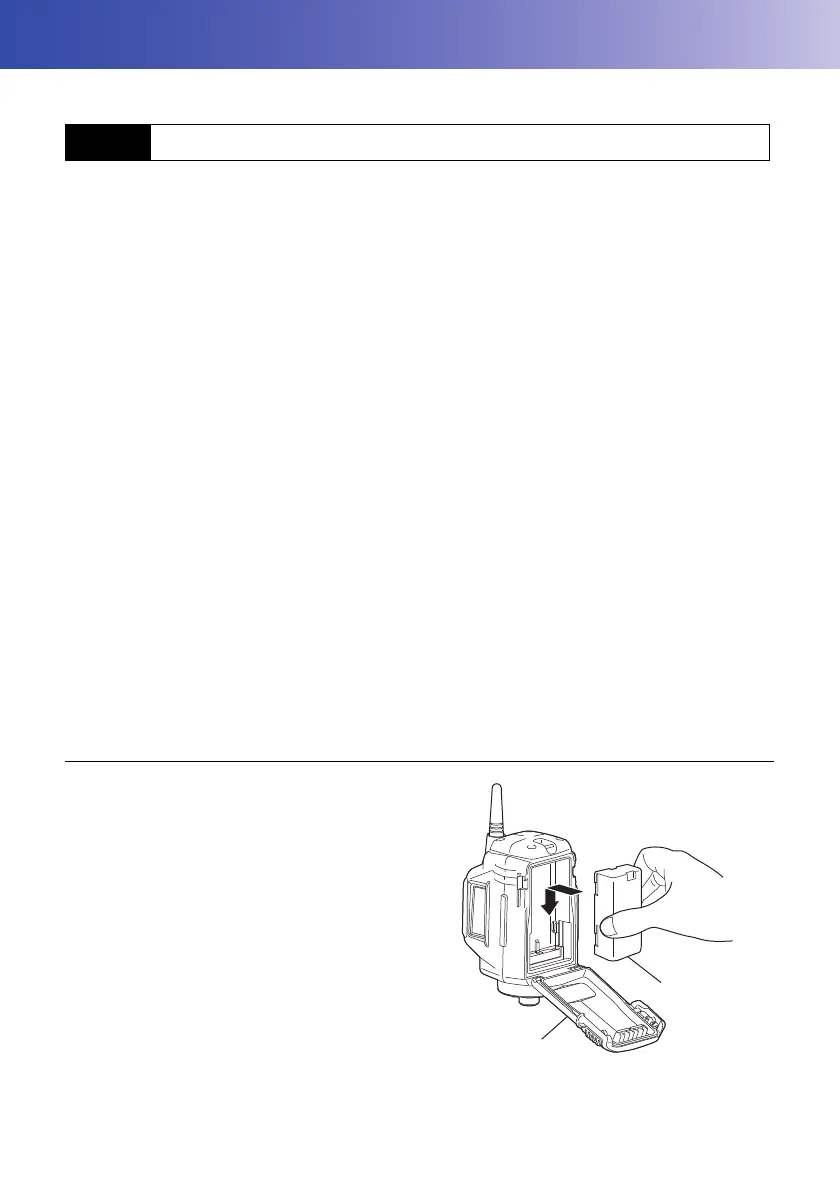
PROCEDURE Mounting the battery
1. Slide down the catches on the battery cover to
open.
2. Insert the battery in the direction of the arrow
printed on the side and press down.
3. Close the battery cover. A click is heard when
the cover is secure.
7.1 Using the Battery



 To Next Page