26
6. SETTINGS FOR THE TOTAL STATION
6.2.1 Settings for Bluetooth Communication
When communicating between the total station and Remote Controller using Bluetooth wireless
technology, the modem for the total station will be set as the "Master" device and the total station will
be set as the "Slave" device.
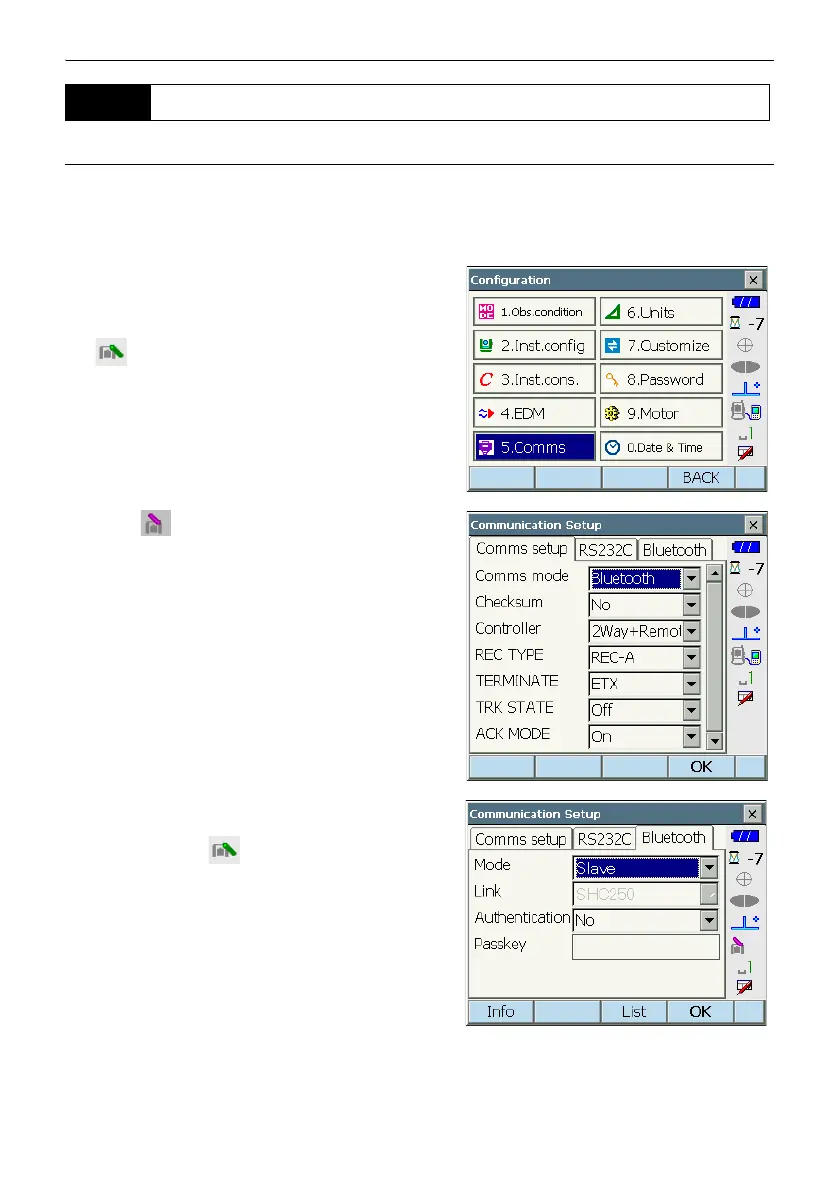
1. Select "Comms" in SETTINGS mode. Set
"Comms mode" in the Comms setup tab to
"Bluetooth".
Check that the status panel icon has changed to
.
• Changing communication settings during
Bluetooth communication will cancel the
connection.
• The status bar icon cannot be tapped in
<Communication Setup>.
2. Select "Slave" as the total station mode and press
[OK]. Selection can also be made by pressing
and holding the icon in the status panel until
a menu appears.
• When communicating between a data collector
and the Remote Controller using Bluetooth
wireless technology, set modem for the data
collector as the "Slave" device. Set the data
collector as the "Master" device.
"7.4 Communication Status Bluetooth
connections"
6.2 Settings for PS/DS/MS



 To Next Page