Installation of chain and chain brackets
1. Chain Brackets
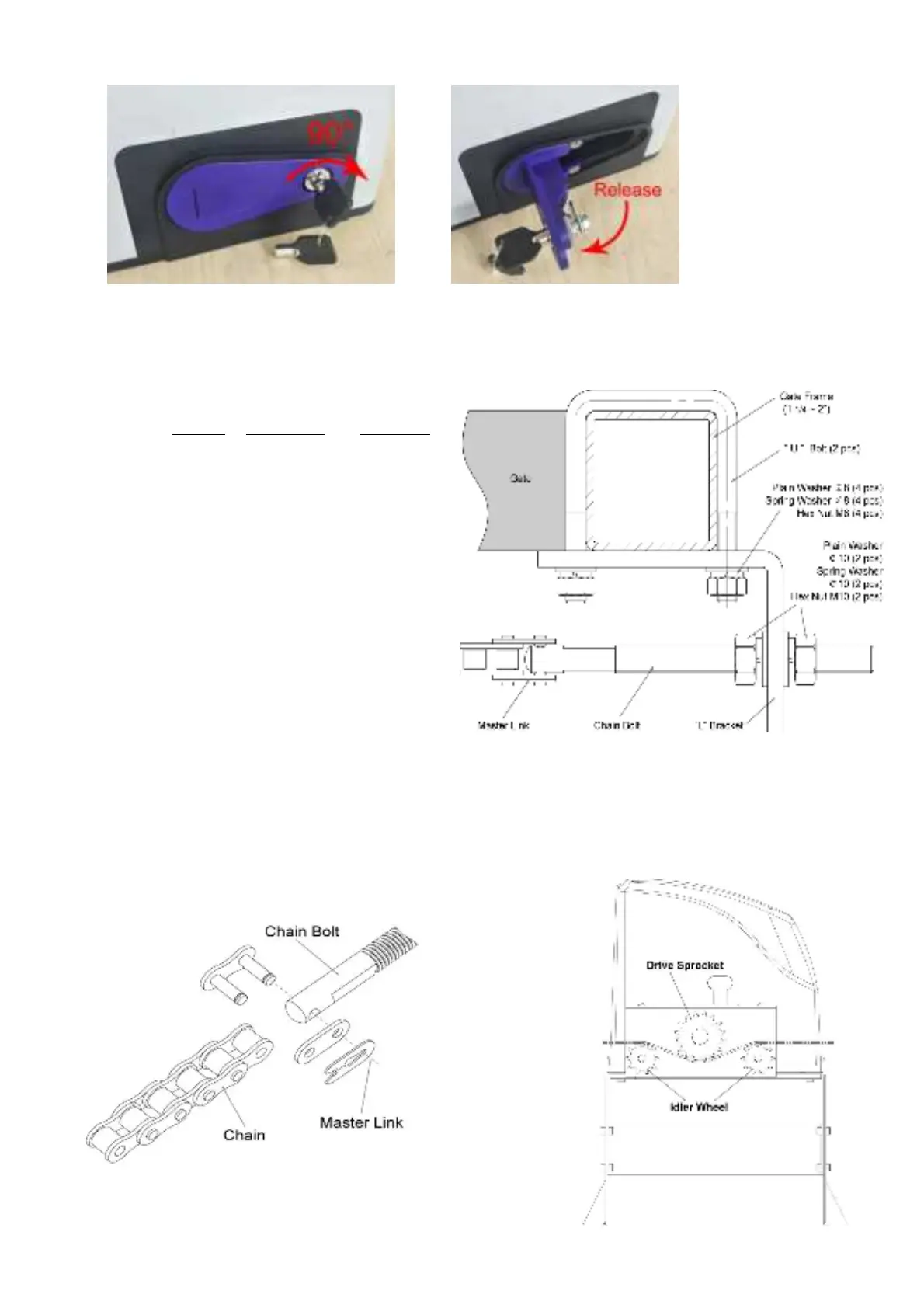
1). Please refer to below chain brackets figure,
which shows “U” bolt, “L” bracket and chain bolt.
Use the “U” bolts (square or round) to attach the
chain brackets to gate frame.
2). If Both the square bolts and round bolts are not
fit for the gate frame, use the appropriate bolts to
attach the chain brackets to gate frame.
2. How to install the chain
1). Place the chain around the top of the idler
wheels and under the drive sprocket in chain box.
2). Connect a chain bolt to one end of chain from
chain box by using master link. Then insert the
chain bolt to the L bracket and fix them each other
by washers and nuts temporarily. (Nuts will be
further adjusted for a proper chain tension later)
3). Connect second chain bolt with another end of chain from chain box, then attach bolt to the L bracket on
opposite end of gate using the washers and nuts.
4). Make sure that the chain is line up exactly with the position where the chain on the chain idler wheel.
5). Remove the unwanted length of chain. Set appropriated chain tension by adjusting two chain bolts of the
both end.


 To Next Page