8 Instructions for Use TORMAX 2101 T-1672 e
3 Product Description
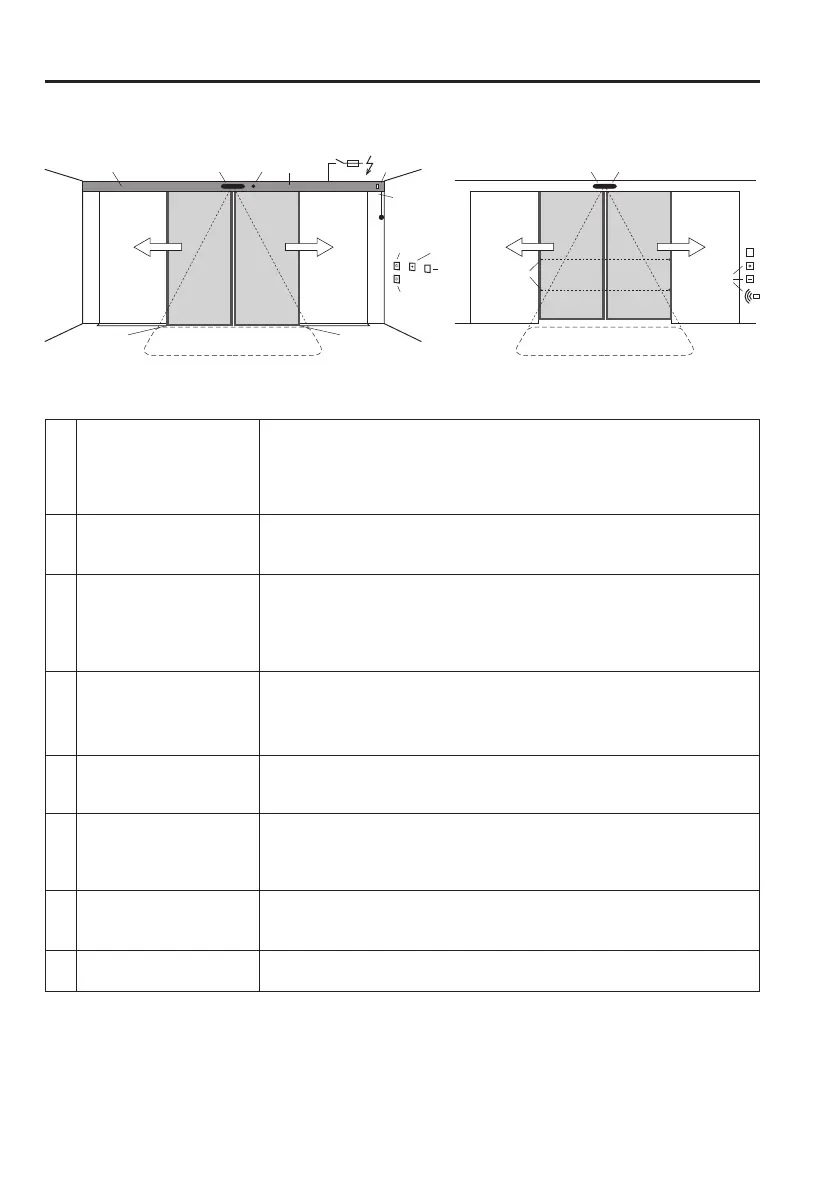
3.1 System Overview
1 Drive
Cladding
Motor unit
MC42 control system with monitoring system, power limitation and perma-
nent diagnosis
Guide system with noise-absorbent guide rail
2 Drive accessories u
£ Lock with
a) £ internal manual activation £ in the cladding £ on the wall
b) £ external manual activation
3 Door leaves
a) Moving leaves with main closing edge (HK) and secondary closing
edge (NK)
b) Moving leaves with floor guide
c) £ Side part u
d) £ Protection leaves u as protection for the secondary closing edge
4 Operating controls u
a) £ User interface with 6 positions and fault indication.
b) £ Operating mode switch with 3 positions.
c) £ Lock for the user interface
d) £ Remote control of operating modes
5 Internal activators
a) With automatic activation b) With manual activation
£ Radar with/without direction recognition £ Push button
£ IR motion detector £ Contact-free button
6 External activators
a) With automatic activation b) With manual activation
£ Radar with/without direction recognition £ Key switch
£ IR motion detector £ Card reader
£ Remote control
7 Safety sensors
a) £ Presence sensor: main closing edge protection
b) £ Presence sensor, external: main closing edge protection
c) £ Safety beams
8 Emergency systems
a) £ Power switch / fuse
b) £ Emergency on/off switch
£ Depending on the system’s equipment
T1672_1e
inside outside
3c 3a 3a
HKNK NK
5a, 7a
3d
3c
3d
3b 3b
1
4a,b
4c
5b
8b
7c
7b 6a
6b
2a 4d 4b
7d
2a
8a
2b



 To Next Page