Instructions for Use Win Drive 2201 T-1165 e 11
5 Procedure in the Event of a Fault
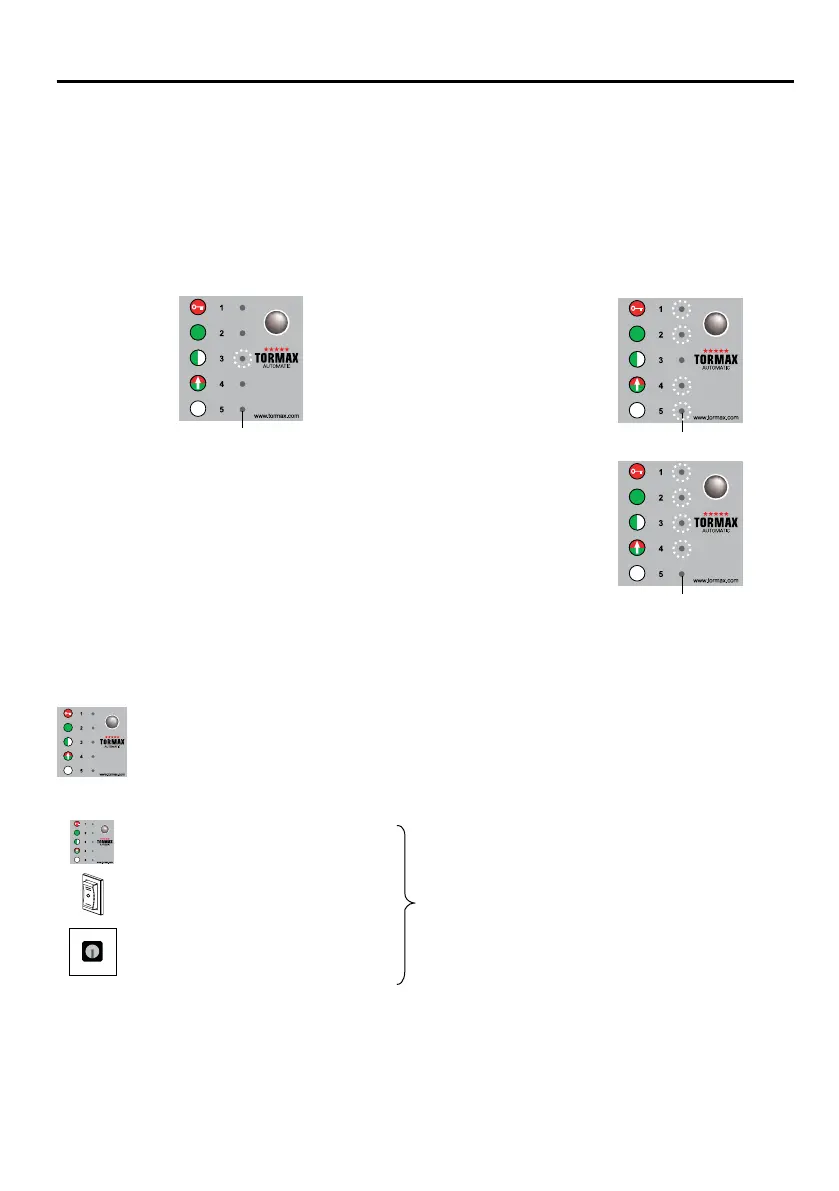
Faultsareevidentthroughunusualbehaviourbythedoorand/orareindicatedbytheashinglight-emitting
diodes(LEDs).ThedisplaytakestheformofeitherasingleashingLEDorby”Manualoperation“being
indicated if the system was automatically shut down by the control unit or an emergency opening was
triggered. In this case the fault number is indicated by the single LED that is not illuminated.
5.1 Fault indication
See the table in Section 7.1 for a summary of fault signals and possible means of rectification.
Example: Displayoffaultnumber3
5.2 Restarting the Door System After a Fault (Software Reset)
Reset after a fault with the TORMAX user interface
Occasional faults can be rectified by re-starting the system.
• Pressselectorbutton5andholddownfor5seconds–thesoftwareisreset.
Resetting after fault number 5
• Pressselectorkeybriey
• Changeoperatingmode
• Turnthekeyswitchonandthen
off again quickly
Reset of the Fault by Disconnecting the Power Supply
• Ifthesystemdoesnothaveabatteryunit,disconnectfromthepowersupplyforabout10seconds.
If this does not reset the fault or if it re-occurs after a short time, you must arrange for the fault to be rec-
tified by a skilled person from your TORMAX dealer. In this case note the fault number and inform the
dealer. See the last page or the service tag on the system for the dealer’s address.
T1165_12
LED
T1165_14
LED
LED3ashes
All except LED 3 are
ashing – The door
system is in MANUAL
OPERATION because
of fault number 3
T1165_17
LED
All except LED 5 are
ashing – The door
system is in MANUAL
OPERATION because
of fault number 5
Example: Displayoffaultnumber5
or
www.tormax.com
1
1
0
The software is reset
manual operation is reset;
the door opens and closes slowly.



 To Next Page