Instructions for Use Win Drive 2201 T-1165 e 9
4 Operation
The automatic sliding door may only be operated by a skilled person, the operator or a person instructed
by the operator.
4.1 Commissioning
Before switching on the mains power supply:
• Unlocktheoptionalmechanicaldoorlocke.g.oorlock.
• Checkthatthemovementareaofthedoorleavesisfreefromobjectse.g.umbrellastandsorvehicles.
• Checkthattheoorguide(particularlyif itiscontinuous)iscleanandnotblockedbyanything(e.g.
gravel or snow).
• SwitchonthemainspowersupplyandselectoperatingmodeAUTO,forexample.
• Waituntilthedoorisclosed.
The first movement after switching the power on for the first time is slow. The control system is
checking the door leaf’s travel distance and defining the end position.
The door is now ready for operation.
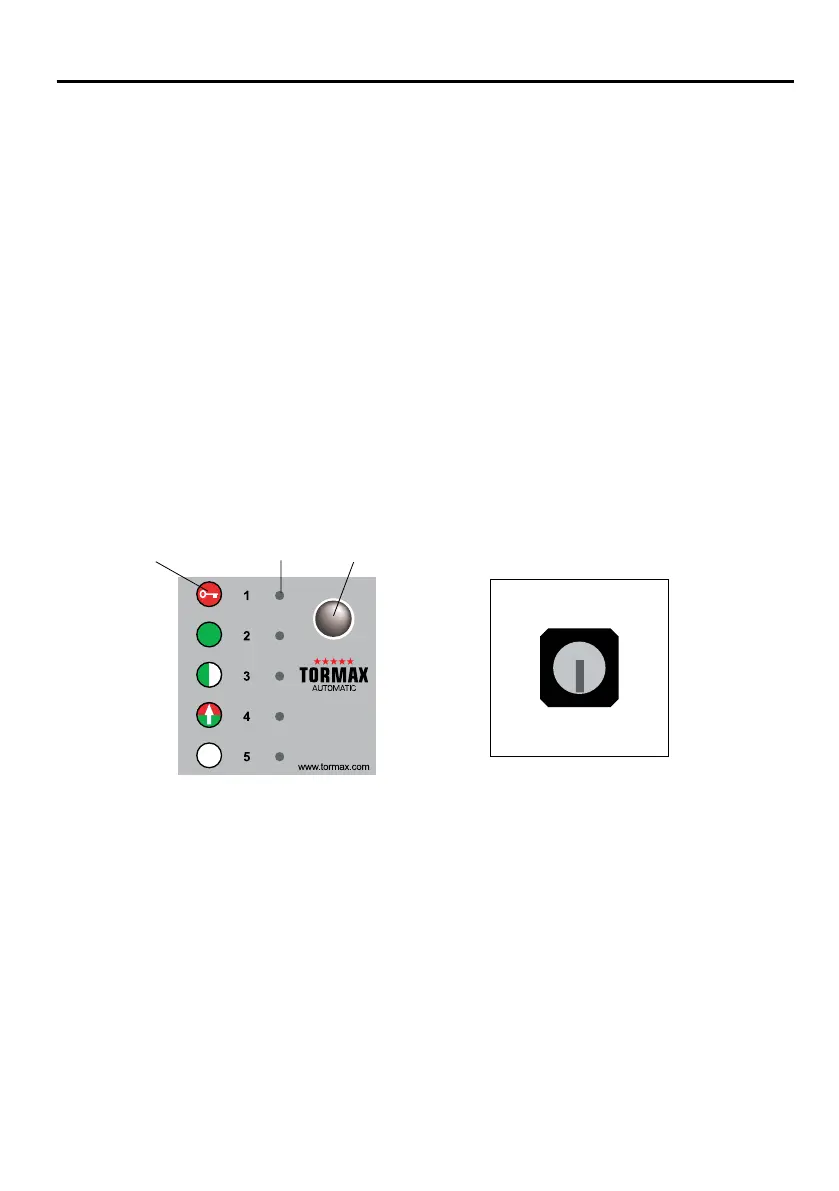
4.2 Operation with the TORMAX User Interface u
TORMAX User Interface Lock u for User Interface
Selection of Operating Modes
• Releaselocku for user interface.
• Pressselectorkeybriey.Thecorrespondingoperatingmodesymbolisilluminated.
Switching to manual operation
• Presstheselectorkeyandholddownfor5seconds.
ManualoperationisindicatedbyallveLEDsashing.
• Presstheselectorkeybrieytoswitchoutof manualmode.
Fault indication
e.g.LED4ashes.SeeSection5forhowtoproceedintheeventoffaultsandhowtoresetthesystem.
See chapter 7 for the definition of the fault.
Symbol for operating mode
T1165/8e
LED
Selection key
OFF
AUTO
AUTORED
OPEN
EXIT
www.tormax.com
1
1
0



 To Next Page