Archer C50 AC1200 Wireless Dual Band Router
- 16 -
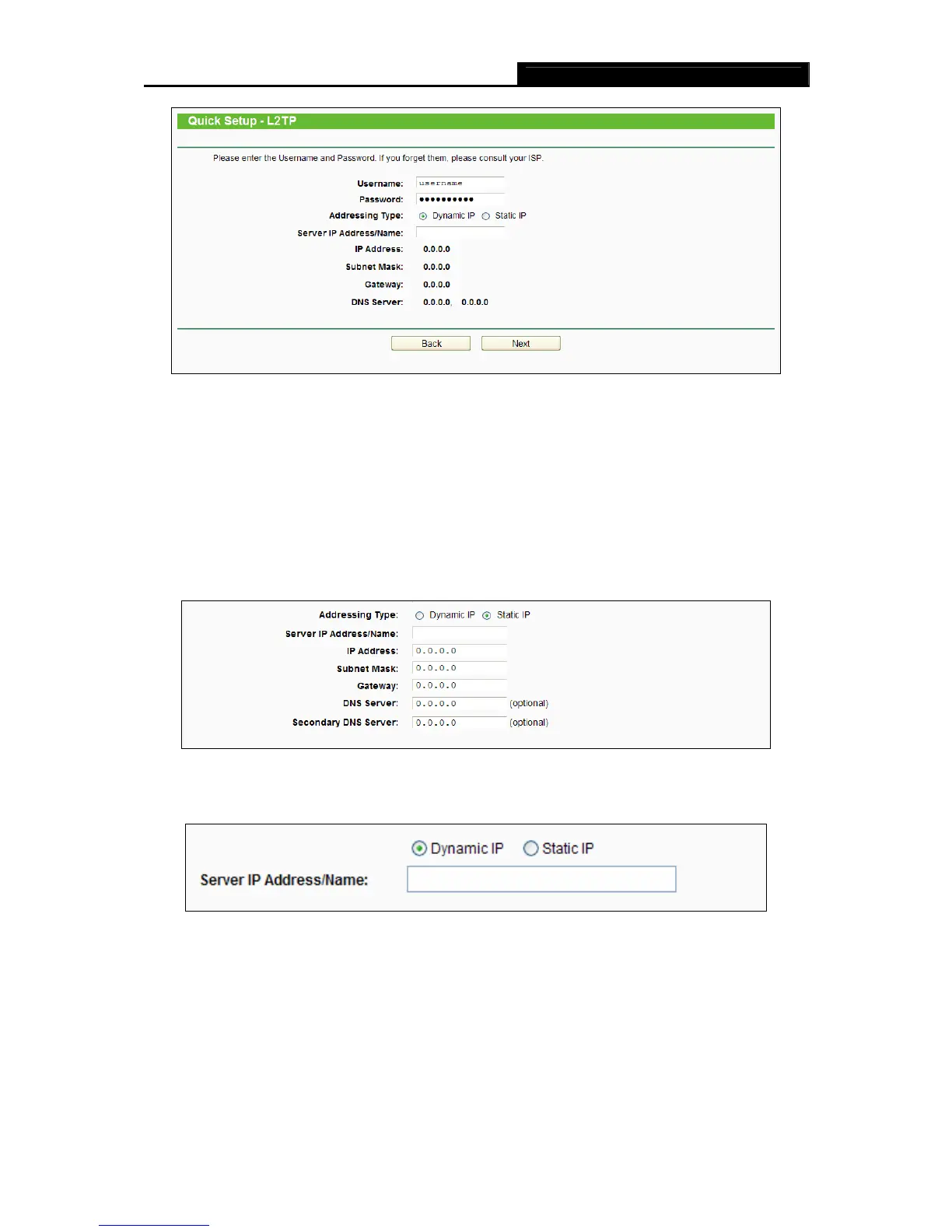
Figure 3-10 Quick Setup – L2TP/Russia L2TP
Username/Password - Enter the Username and Password provided by your ISP.
These fields are case-sensitive. If you have difficulty with this process, please contact
your ISP.
Select Static IP if the IP Address/ Subnet Mask/ Gateway and DNS server address have
been provided by your ISP. Then please enter server IP address or domain name provided by
your ISP, and also enter the corresponding parameters.
Select Dynamic IP if none of the above parameters are provided. Then you just need to enter
server IP address or domain name provided by your ISP.
5) If your connection type is PPTP/Russia PPTP, select PPTP/Russia PPTP in Figure 3-6
and the n
ext screen will appear as shown in Figure 3-11. Configure the following
p
arameters and then click Next to continue.














 To Next Page