Archer C50 AC1200 Wireless Dual Band Router
- 59 -
Be sure to click the Save button to save your settings on this page.
4.7.4 Wireless MAC Filtering
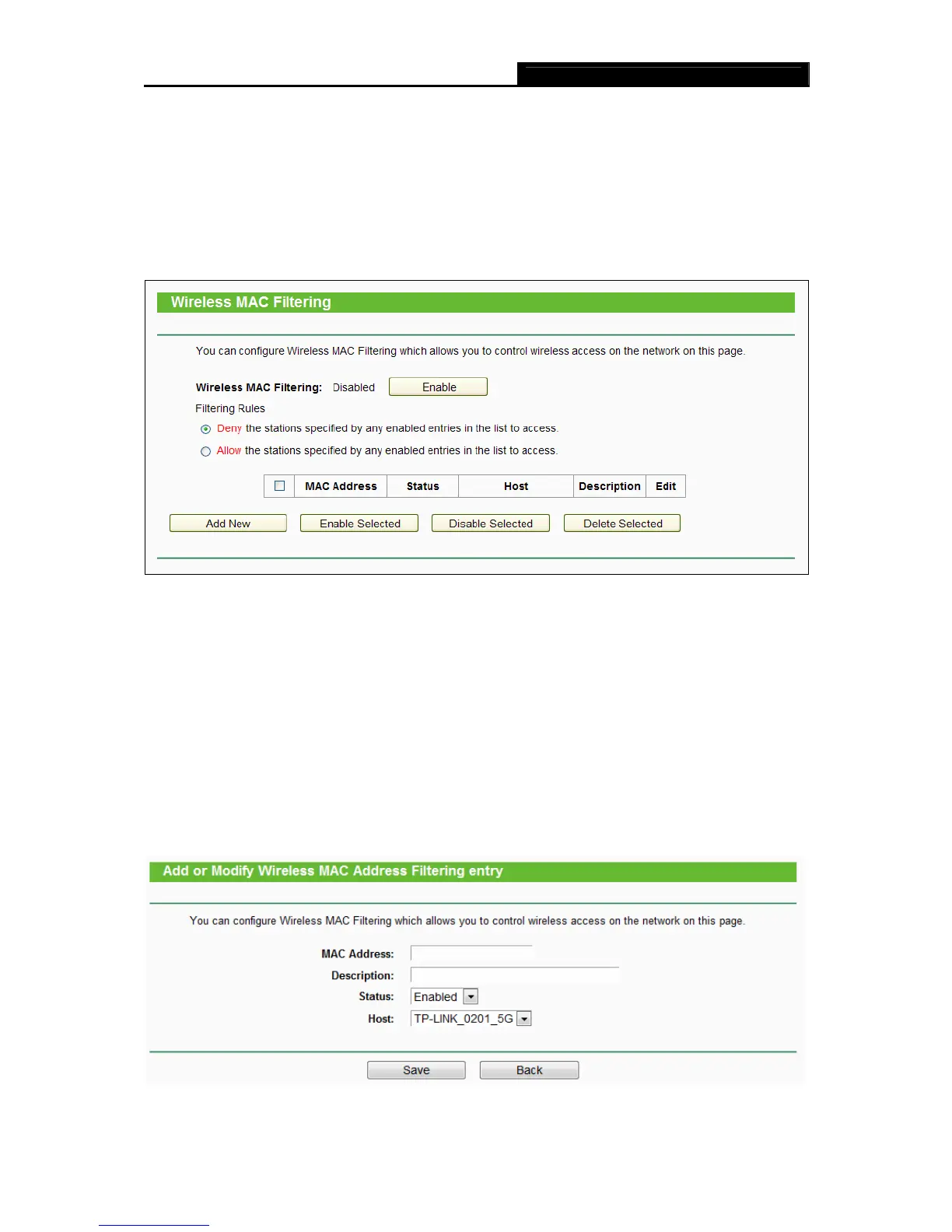
Choose menu “Wireless → MAC Filtering”, you can control the wireless access by configuring
the Wireless MAC Filtering function, shown in
Figure 4-24.
Figure 4-39 Wireless MAC Filtering
To filter wireless users by MAC Address, click Enable. The default setting is Disabled.
MAC Address - The wireless station's MAC address that you want to filter.
Status - The status of this entry, either Enabled or Disabled.
Host- The host network for the filetring rules.
Description - A simple description of the wireless station.
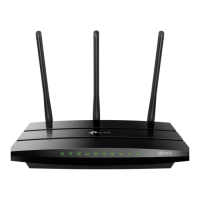
To Add a Wireless MAC Address filtering entry, click the Add New button. The "Add or Modify
Wireless MAC Address Filtering entry" page will appear, shown in Figure 4-25:
Figure 4-40 Add or Modify Wireless MAC Address Filtering entry














 To Next Page