Archer C50 AC1200 Wireless Dual Band Router
- 30 -
Set DNS server manually - If your ISP does not automatically assign DNS addresses to the
router during login, please click “Set DNS server manually” check box and enter the IP
address of your ISP’s primary DNS server. If a secondary DNS server address is available,
enter it as well.
Click the Save button to save your settings.
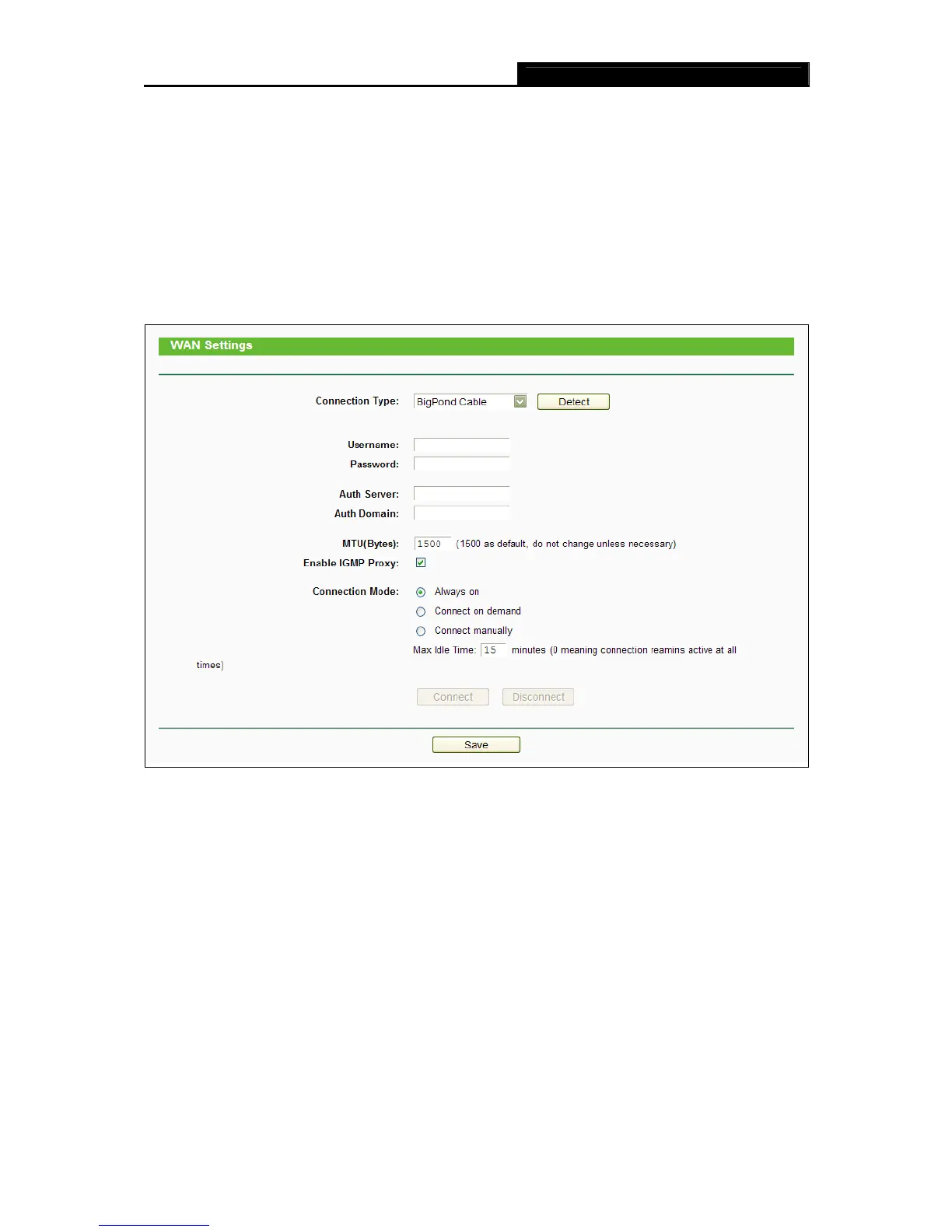
4. If your ISP provides BigPond Cable (or Heart Beat Signal) connection, please select
BigPond Cable. And you should enter the following parameters (Figure 4-7):
Figure 4-7 WAN - BigPond Cable
Username/Password - Enter the User Name and Password provided by your ISP. These
fields are case-sensitive.
Auth Server - Enter the authenticating server IP address or host name.
Auth Domain - Type in the domain suffix server name based on your location.
e.g.
NSW / ACT - nsw.bigpond.net.au
VIC / TAS / WA / SA / NT - vic.bigpond.net.au
QLD - qld.bigpond.net.au














 To Next Page