Archer C50 AC1200 Wireless Dual Band Router
- 70 -
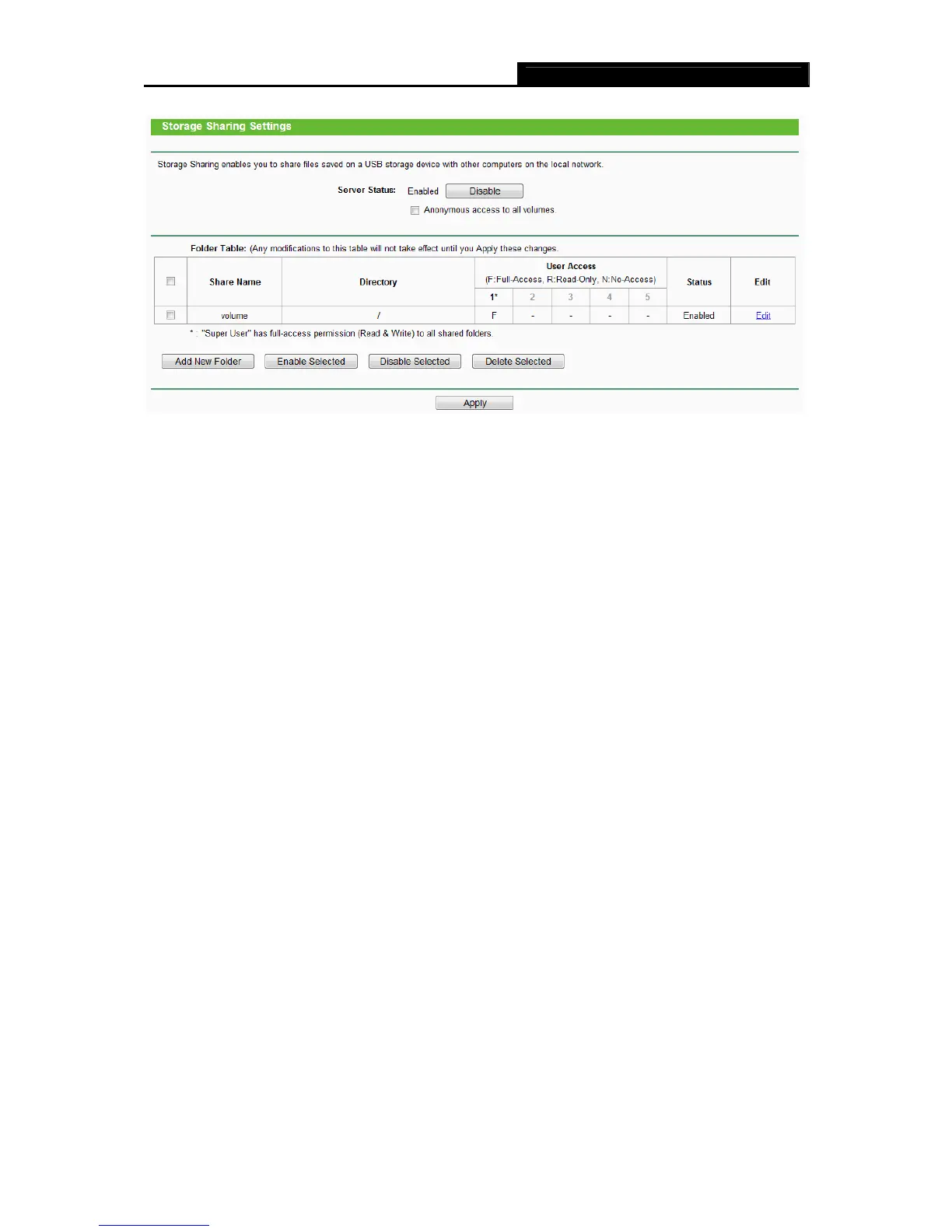
Figure 4-52 Storage Sharing
Server Status - Indicates the Storage Sharing server's current status. You can click the
Enable button to start the Storage Sharing service and click the Disable button to stop it.
Anonymous access to all volumes – Check this box to allow users to access to all
volumes without username or password
Shared Name - The volume name of the USB drive the users have access to.
Directory - The directory of the shared folder.
User Access – Indicates user access of the shared folder. F stands for fully access, R
stands for read-only and N stands for no-access.
Status - Indicates the shared or non-shared status of the volume.
Edit – Click Edit to edit the entry.
To add a new folder, follow the instructions below.
1. Click Add New Folder in Figure 4-52.














 To Next Page