39
Chapter 7
QoS
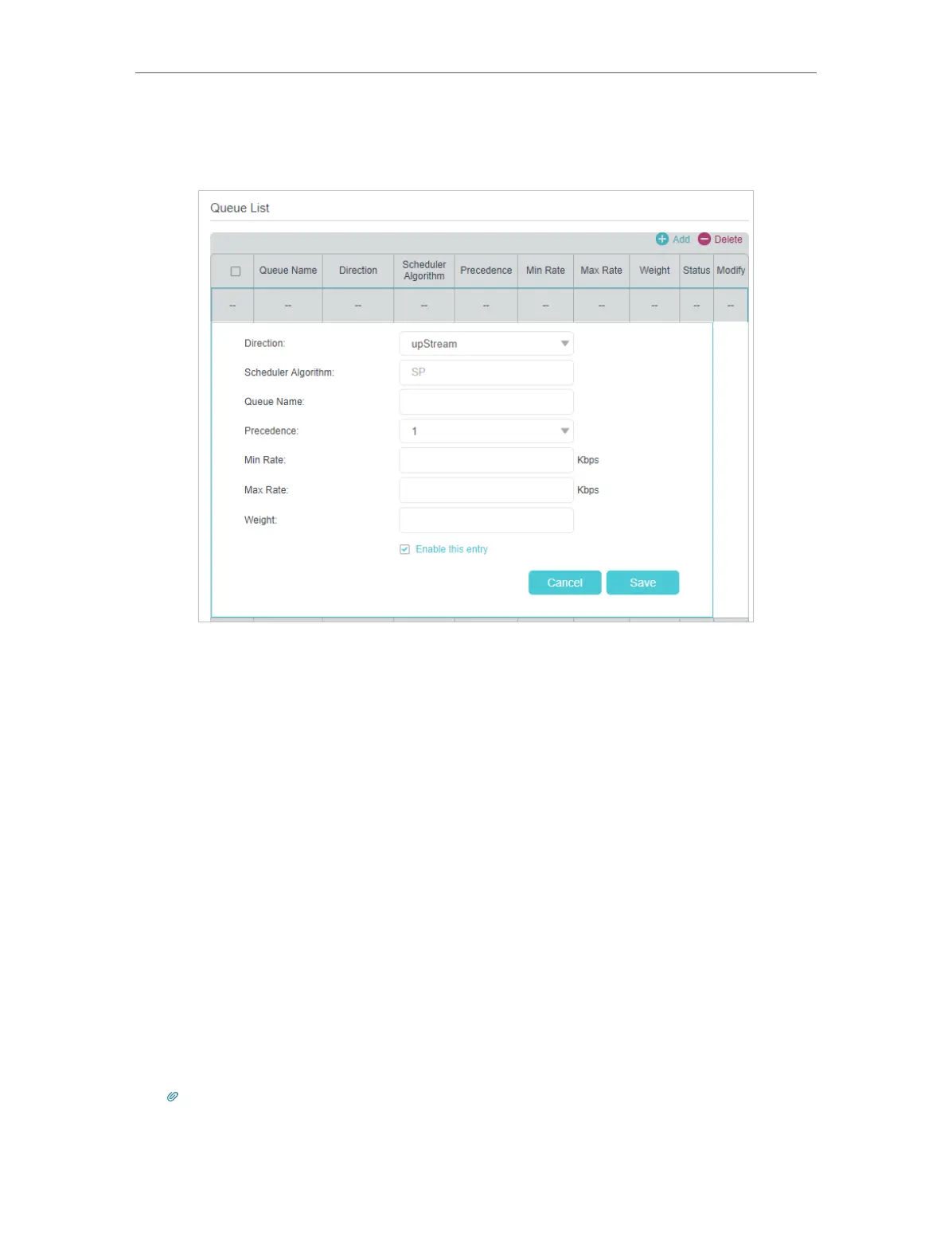
¾ To add a new queue:
1 ) Locate the Queue List section and click Add.
2 ) Specify the settings according to the explanation below.
• Direction: Select the data flow direction.
• Scheduler Algorithm: Displays the algorithm applied, the default setting is SP
(strict priority).
• Queue Name: Type a name for the queue as the identification. Every queue
must have a unique name.
• Precedence: Select the priority of the queue. The packets get through network
more quickly with higher precedence. The precedence value ranges from 1 to
8, value 1 means the highest priority. This settings is valid when the algorithm
is SP.
• Min Rate: Set the minimum bandwidth guaranteed according to the precedence.
• Max Rate: Set the maximum bandwidth guaranteed according to the precedence.
• Weight: Set the queue’s quota bandwidth of the left bandwidth after the Min
Rate of each queue is allocated.
3 ) Click Save to make the settings effective, and then the queue will be added to
the Queue List table.
Tips:
The total bandwidth allocated to the queue will be between the Min Rate and Max Rate if your ISP provides enough
bandwidths for the allocation.



 To Next Page