5
Chapter 1
Get to Know About Your Outdoor Router
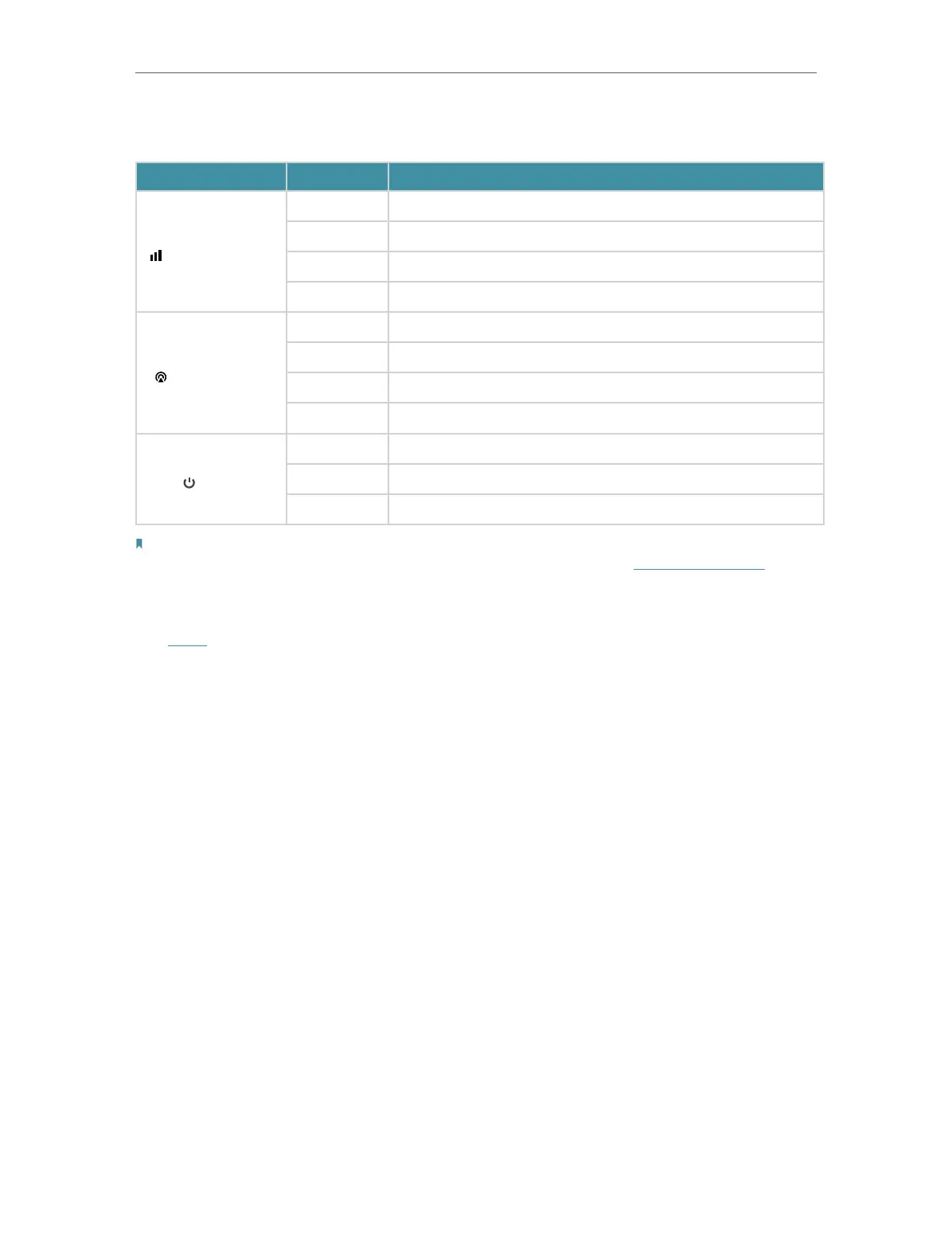
Some Common LEDs Explanation
LED Status Indication
(Signal Strength)
Solid white The signal strength is above 75%.
Solid green The signal strength is between 50% and 75%.
Solid orange The signal strength is below 50%.
Off No mobile network signal.
(Network Type)
Solid white The device is on a 5G network.
Solid green The device is on a 4G network.
Solid orange The device is on a 3G network.
Off The device is not registered on the network.
(Power)
On The device is powered on and working properly.
Flashing The device is initializing, RESET or upgrading.
Off The device is powered off.
Notes:
1. If the Signal Strength LED is off, please check your Internet connection first. Refer to Connect the Hardware for more
information about how to make Internet connection correctly. If you have already made a right connection, please
contact your ISP to make sure your Internet service is available now.
2. If the Internet LED is off, please check your Signal Strength LED first. If your Signal Strength LED is also off, please refer
to Note 1. If your Signal Strength LED is ON, please check your Internet configuration. You may need to check this part
of information with your ISP and make sure everything have been input correctly.
3. If the Network Type LED is off, please check your Internet LED first. If the Internet LED is also off, please check your
internet connection. If you have already made a right connection, please contact your ISP to make sure your 5G/4G
network service is available.











 To Next Page