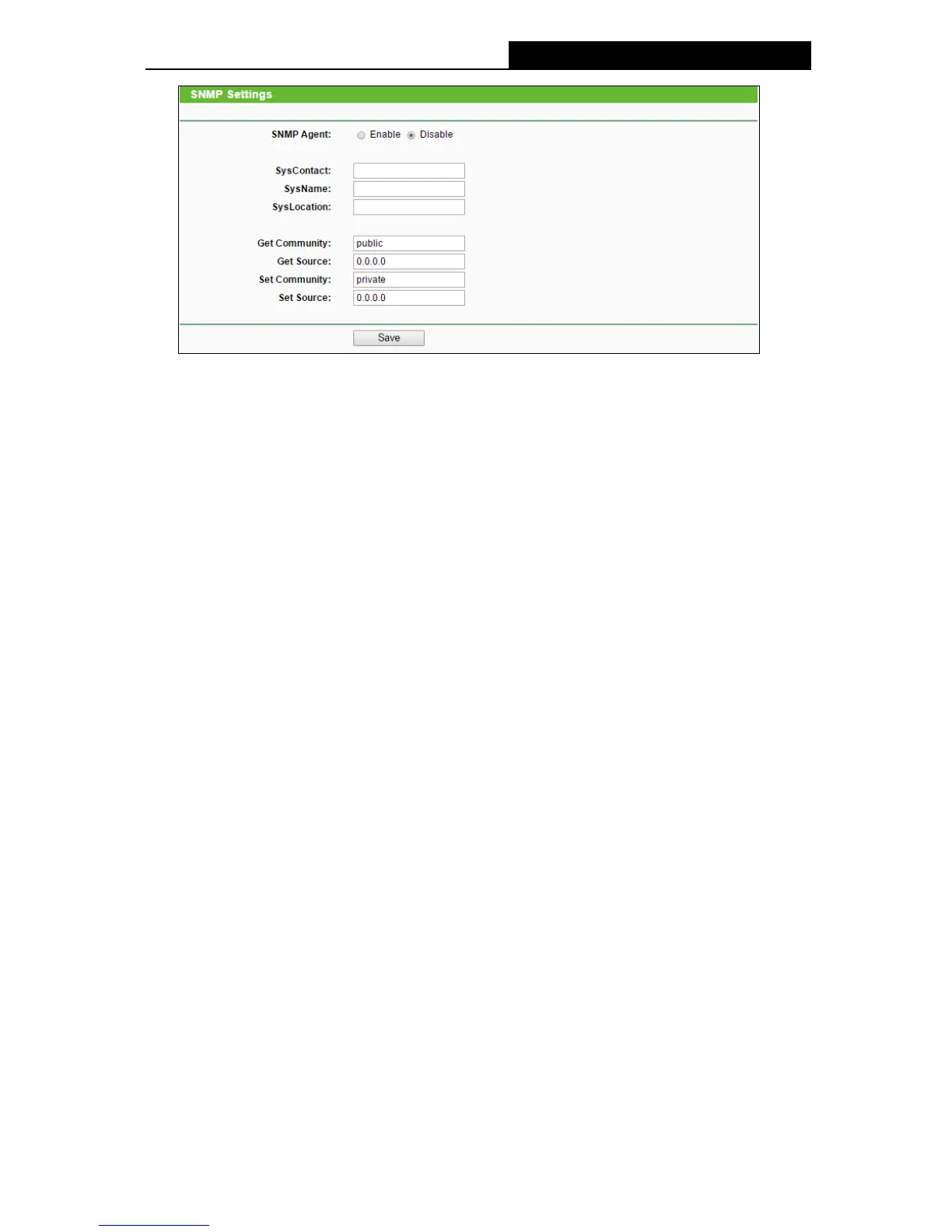
Figure 4-76 SNMP Settings
SNMP Agent - Choose Enable to open this function if you want to have remote control
through SNMPv1/v2 agent with MIB-II. Choose Disable to close this function.
SysContact - The textual identification of the contact person for this managed node.
SysName - An administratively-assigned name for this managed node.
SysLocation - The physical location of this node.
Note:
Specifying one of these values via the Device's Web-Based Utility makes the corresponding
object read-only. If there isn't such a config setting, then the write request will succeed
(assuming suitable access control settings), but the new value would be forgotten the next
time the agent was restarted.
Get Community - Enter the community name that allows Read-Only access to this
device's SNMP information. The community name can be considered a group password.
The default setting is public.
Get Source - Get source defines the IP address or subnet for management systems that
can read information from this 'get' community device.
Set Community - Enter the community name that allows Read/Write access to this
device's SNMP information. The community name can be considered a group password.
The default setting is private.
Set Source - Set source defines the IP address or subnet for management systems that
can control this 'set' community device.
Note:
A restricted source can be a specific IP address (e.g. 10.10.10.1), or a subnet - represented
as IP/BITS (e.g. 10.10.10.0/24). If an IP Address of 0.0.0.0 is specified, the agent will accept
all requests under the corresponding community name.
Click the Save button to save your settings.
-75-




 To Next Page