108
Chapter 6
&RQƮJXUHWKH5RXWHULQ5HSHDWHU0RGH
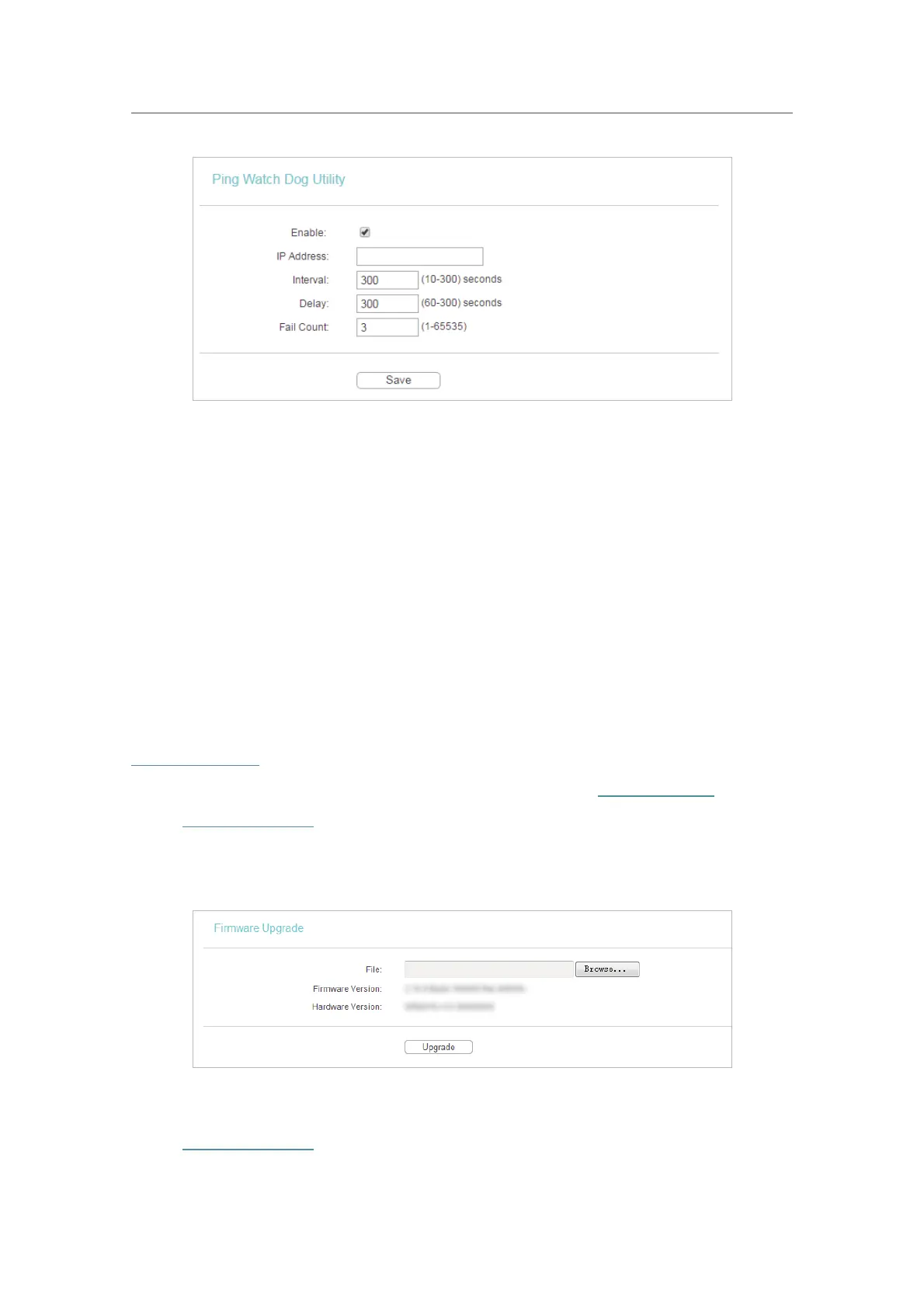
• Enable - Turn on/off Ping Watch Dog.
•
IP Address - The IP address of the target host where the Ping Watch Dog Utility is
sending ping packets.
•
Interval - Time interval between two ping packets which are sent out continuously.
•
Delay - Time delay before first ping packet is sent out when the router is restarted.
•
Fail Count - Upper limit of the ping packets the router can drop continuously. If this
value is overrun, the router will restart automatically.
6. 6. 3. Firmware Upgrade
TP-Link is dedicated to improving and richening the product features, giving users
a better network experience. We will release the latest firmware at TP-Link official
website. You can download the latest firmware file from the
Support page of our website
www.tp-link.com and upgrade the firmware to the latest version.
1. Download the latest firmware file for the router from our website
www.tp-link.com.
2. Visit
http://tplinkwifi.net, and log in with the username and password you set for the router.
3. Go to
System Tools > Firmware Upgrade.
4. Click
Browse to locate the downloaded firmware file, and click Upgrade.
6. 6. 4. Factory Defaults
1. Visit http://tplinkwifi.net, and log in with the username and password you set for the router.












 To Next Page