53
Chapter 4
&RQƮJXUHWKH5RXWHULQ6WDQGDUG:LUHOHVV5RXWHU
• Ingress Bandwidth - This field displays the max and min download bandwidth through
the WAN port. The default is 0.
•
Enable - This field displays the status of the rule.
•
Modify - Click Modify/Delete to edit/delete the rule.
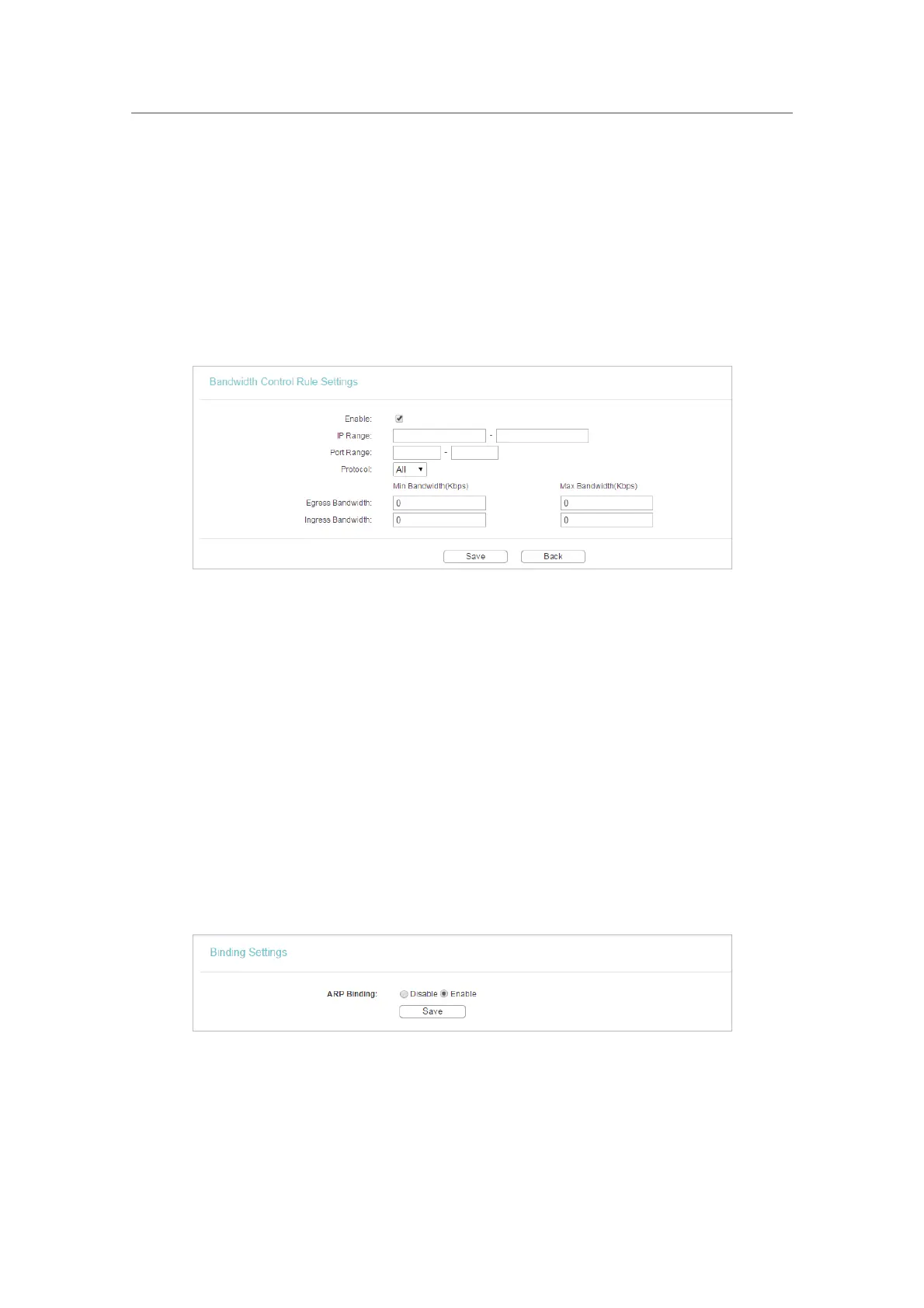
¾ To add a Bandwidth control rule:
1. Click
Add New.
2. Enter the information as the figure shown below.
3. Click Save.
4. 14. IP&MAC Binding
IP & MAC Binding, namely, ARP (Address Resolution Protocol) Binding, is used to bind
a network device’s IP address to its MAC address. This will prevent ARP spoofing and
other ARP attacks by denying network access to a device with a matching IP address in
the ARP list, but with an unrecognized MAC address.
4. 14. 1. Binding Settings
1. Visit http://tplinkwifi.net, and log in with the username and password you set for the router.
2. Go to
IP & MAC Binding > Binding Settings.
3. Select
Enable for ARP Binding.
4. Click Save.
¾ To add IP & MAC Binding entries:
1. Click
Add New.
2. Tick the
Bind.












 To Next Page