79
Chapter 5
&RQƮJXUHWKH5RXWHULQ$FFHVV3RLQW0RGH
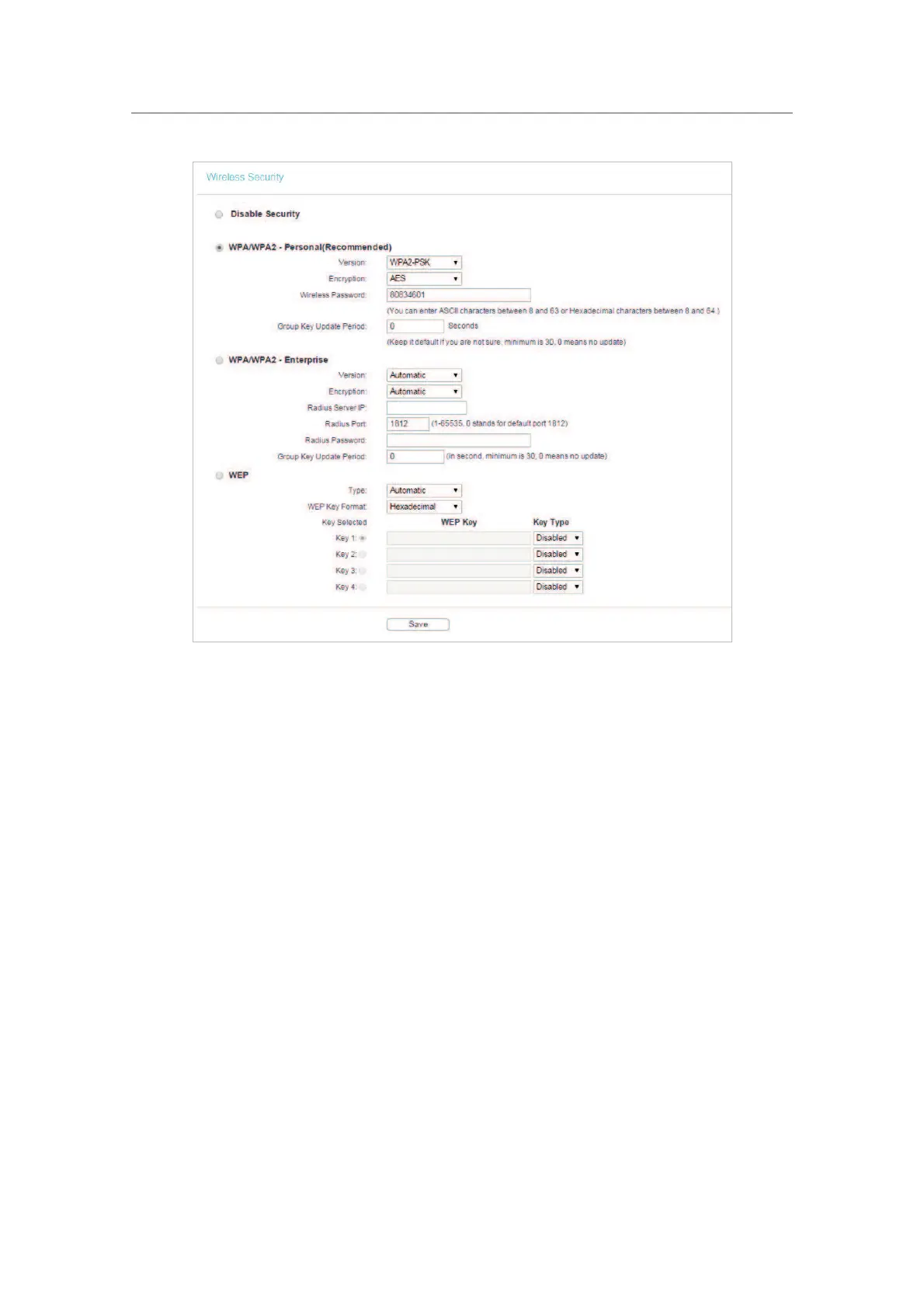
• Disable Security - The wireless security function can be enabled or disabled. If
disabled, wireless clients can connect to the router without a password. It’s strongly
recommended to choose one of the following modes to enable security.
•
WPA-PSK/WPA2-Personal - It’s the WPA/WPA2 authentication type based on pre-
shared passphrase.
•
Version - Select Automatic, WPA-PSK or WPA2-PSK.
•
Encryption - Select Automatic, TKIP or AES.
•
Wireless Password - Enter ASCII or Hexadecimal characters. For Hexadecimal,
the length should be between 8 and 64 characters; for ASCII, the length should
be between 8 and 63 characters.
•
Group Key Update Period - Specify the group key update interval in seconds.
The value can be 0 or at least 30. Enter 0 to disable the update.
•
WPA /WPA2-Enterprise - It’s based on Radius Server.
•
Version - Select Automatic, WPA or WPA2.
•
Encryption - Select Automatic, TKIP or AES.
•
Radius Server IP - Enter the IP address of the Radius server.
•
Radius Port - Enter the port that Radius server used.
•
Radius Password - Enter the password for the Radius server.












 To Next Page