2Chapter 1 . Get to Know about Touch P5
1. 2. Main Features
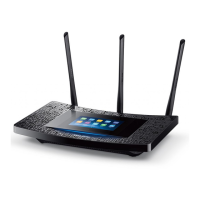
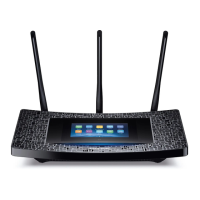
• Extra-large 4.3 inch capacitive colorful touchscreen surfaced with unbreakable toughened glass
• Complies with IEEE 802.11a/b/g/n/ac, IEEE 802.3/3u, IEEE 802.3ab
• 1*10/100/1000Mbps shielded Internet Port, 4*10/100/1000Mbps shielded Ethernet Ports, supports Auto-negotiation and
Auto MDI/MDIX
• Simultaneous Dual Band, with maximum speed up to 600Mbps over 2.4GHz and 1300Mbps over 5GHz
• User-friendly UI, convenient for users to configure the router and check network status
• With wall mounting design, users can place the router flexibly
• With one USB 3.0 Port and one USB 2.0 Port, support USB Storage Sharing, Print Server, FTP Server, and Media Server. Share
a printer locally and files & media with networked devices or remotely via FTP server
• 3 dual band external antennas and high power amplifiers provide maximum omni-directional wireless coverage and
reliability
• Beamforming Technology brings a more targeted and highly efficient Wi-Fi connection
• Supports wireless router, access point and repeater modes
• Guest Network access provides secure Wi-Fi access for guests sharing your home or office network
• Parental Controls allows parents or administrators to establish restricted access policies for children or staff
• Supports PPPoE, Dynamic IP, Static IP, PPTP, L2TP, BigPond Cable Internet access
• Supports UPnP, Dynamic DNS, Static Routing, Flow Statistics, VPN Pass-through
• Supports Virtual Server, Special Application and DMZ host
• Supports WEP, WPA/WPA2, WPA-PSK/WPA2-PSK encryptions
• Supports IPv6
• Built-in NAT and DHCP server supports static IP address distributing
• Supports touchscreen utility and web-based utility
• Supports firmware upgrade


 To Next Page