40
General Information
Control Locations and
Functions
Ignition Switch Key
Two keys come with the ATV. Keep the
spare key in a safe place. An identifying
number is stamped on each key. Use this
number when ordering a replacement
key.
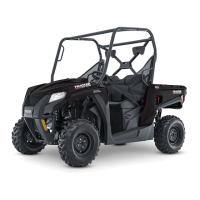
Ignition Switch
The ignition switch has three positions.
KM185
OFF position — All electrical circuits
are off. The engine will not start. The key
can be removed in this position.
ON position — The ignition circuit is
complete and the engine can run. The key
cannot be removed in this position.
LIGHTS
position — The ignition circuit
is complete and the taillight is on. The key
cannot be removed in this position.
NOTE: To illuminate the headlight,
the engine must be running and the
headlight switch must be in the HI or
LO position.
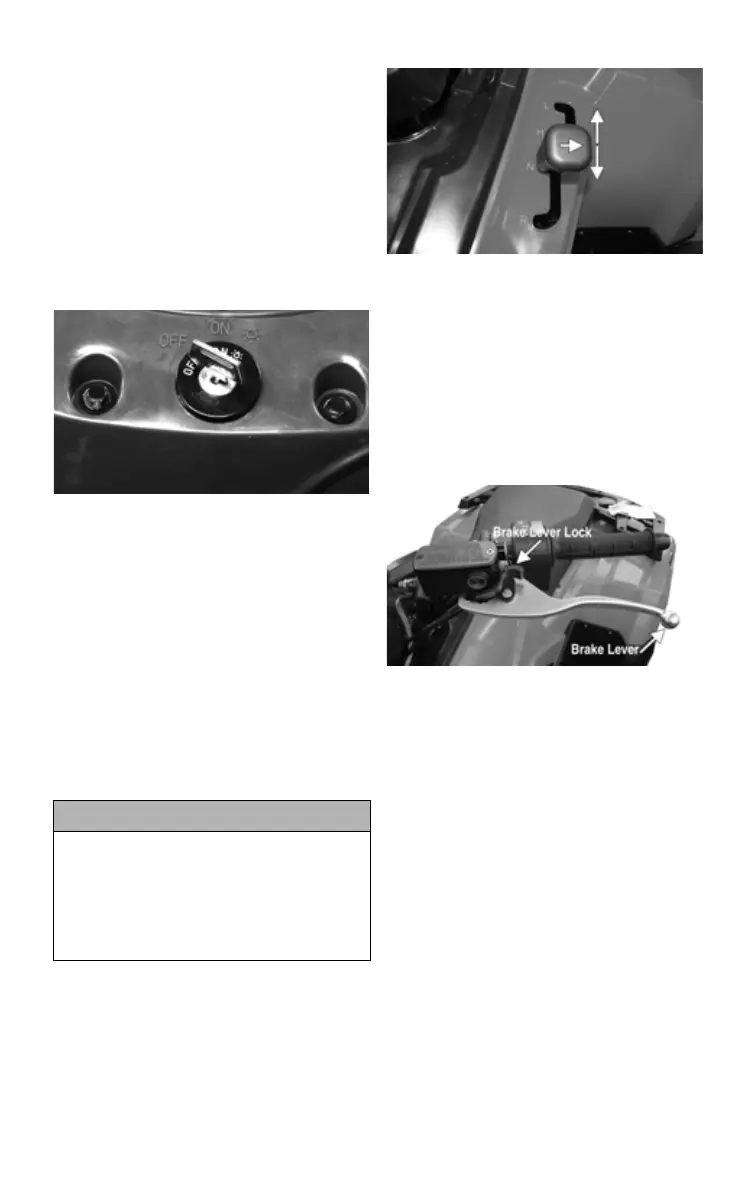
Shift Lever
This model has a dual-range automatic
transmission with reverse.
KM999A
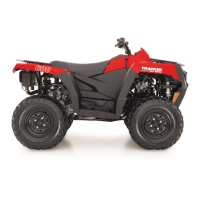
Hand Brake Lever/Brake
Lever Lock
The hand brake is considered to be the
normal operating (main) brake.
The hand brake should be applied when-
ever braking is needed.
Apply the brake by compressing the lever
toward the handlebar.
XA047A
To engage and release the brake lever
lock, use the following procedure:
1. Squeeze the hand brake two or three
times and release it.
2. Push and hold the brake lever lock.
3. While pushing forward on the brake
lever lock, squeeze the brake lever.
NOTE: It will click as it engages
and the brake lever will not return to
its released position.
4. Attempt to push the ATV. Check to
make sure the brake lever lock
engages properly and that the brake
(when engaged) locks the wheels.
NOTE: The brake lever lock must
lock the wheels. If it doesn’t, take the
ATV to an authorized dealer for ser-
vice.
CAUTION
Leaving the ignition switch in the ON
or LIGHTS position for a long period
of time when the engine is not run-
ning may cause the battery to dis-
charge. Always leave the ignition
switch in the OFF position when
engine is not running.


 To Next Page