Need help?
Do you have a question about the Traktor Kontrol S8 and is the answer not in the manual?
Step-by-step guide to loading and playing your first track.
Learn basic mixing techniques by blending a second track.
Understanding and setting mix levels for optimal sound quality.
How to adjust track tempo using global and deck-specific methods.
Guide to using Remix Decks, loading sets, and triggering samples.
Learn to assign decks to FX Units and set up Single and Group FX.
Detailed description of S8's Deck controls and functions.
Overview of the mixer's layout, function, and signal flow.
Guide to using the S8 as a standalone DJ mixer without computer connection.
Common issues and solutions for TRAKTOR KONTROL S8 setup and usage.
Resources for assistance, including Knowledge Base and Technical Support.
 General
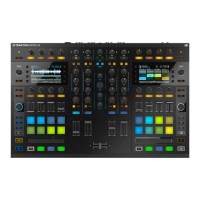
| Type | DJ Controller |
|---|---|
| Channels | 4 |
| MIDI Control | Yes |
| Displays | 2 x High-Resolution Color Displays |
| Audio Interface Sample Rate | 48 kHz |
| Inputs | 2 x XLR/TRS combo |
| Outputs | 2 x XLR, 2 x RCA |
| Weight | 11.0 lbs |
| EQ | 3-band EQ |
| Filter | Yes |
| Faders | 4 x channel faders, 1 x crossfader |
| Pads | 16 x Performance Pads |
| MIDI I/O | No |
| Software | Traktor Pro |
| Power Supply | Included |
| USB | 1 x USB 2.0 |

 To Next Page