Home
Traktor
Music Mixer
Kontrol S8
Page 68
Traktor Kontrol S8 - Page 68
264 pages
Manual
Save Page as PDF
To Next Page
To Next Page
To Previous Page
To Previous Page
Loading...
1.
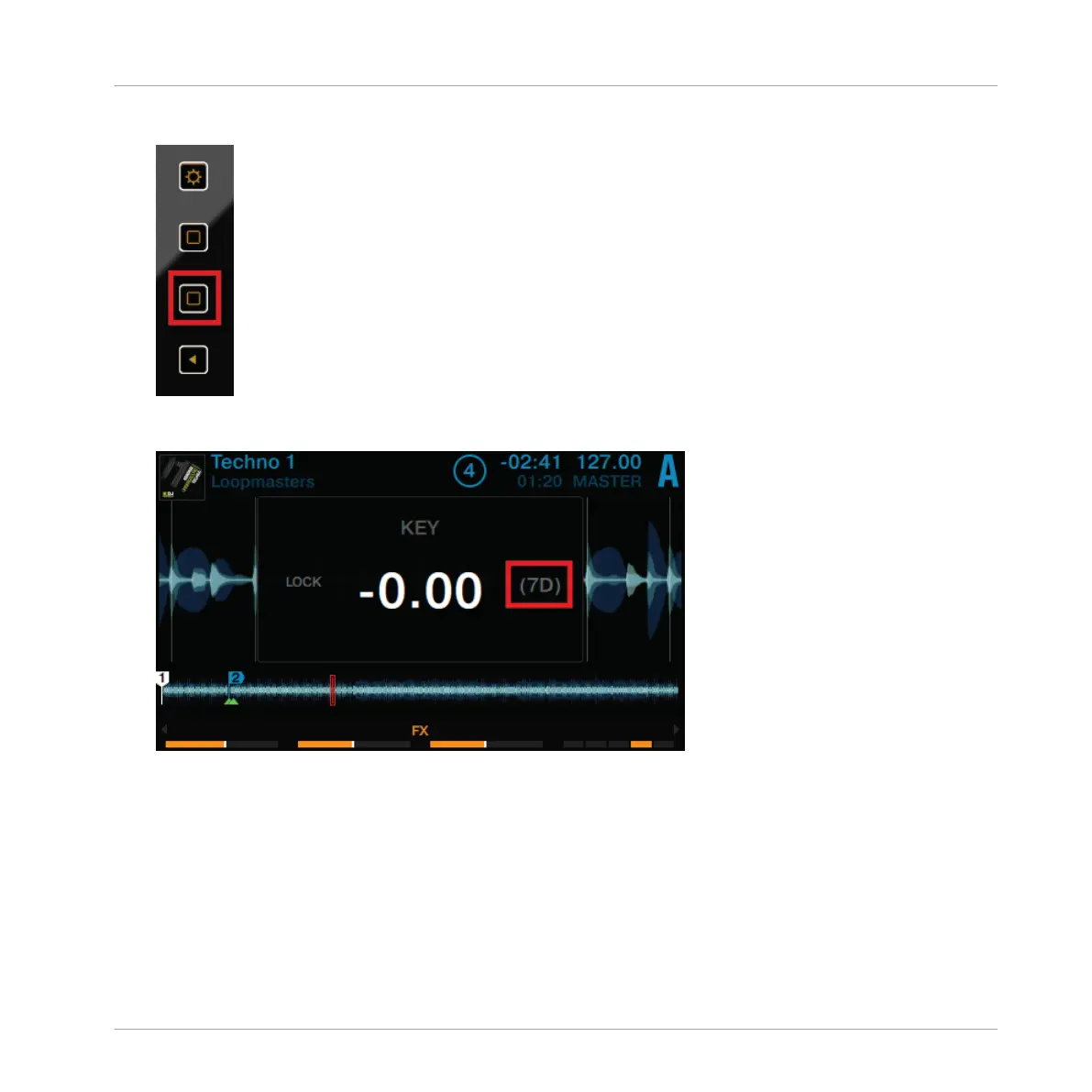
On a Deck, press the Display Button 2.
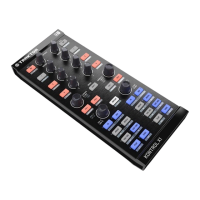
The
KEY
pop-up
opens
on
the
display.
For
tracks
which
have
been
analyzed
by
TRAKTOR,
their key is displayed here.
Using Your S8—Getting Started
Using Keylock
TRAKTOR KONTROL S8 - Manual - 68
67
69
Table of Contents
Main Page
Default Chapter
4
Table of Contents
4
1 Welcome to the World of TRAKTOR KONTROL S8
12
Where to Start
12
Manual Conventions
14
2 Using Your S8-Getting Started
18
Overview of TRAKTOR KONTROL S8
19
Enabling Decks
20
Browsing with Your S8
23
Browse Using Regular Interactions
23
Browse Using Touch Interactions
25
Switching Deck Focus
26
Switching Deck View and Zooming
29
Playing Your First Track
32
Loading a Track
34
Playing the Track
36
If You Don't Hear the Track
39
Mixing in a Second Track
42
Loading a Second Track
43
Playing the Second Track
45
Using Headphones to Prepare the MIX
47
Synchronizing the Second Track
48
Interlude: in Case the Left Track Has Finished
50
Mixing in the Track by Using the Channel EQ and Filter
50
Adjusting Levels
55
The Theory
55
In Practice
55
Using Cue Points
58
Setting and Deleting Cue Points (Hotcues)
59
Aligning Tracks Using Hotcues
61
Adjusting Tempo
62
Global Tempo Adjustments
62
Deck-Specific Tempo Adjustments
64
Using Keylock
67
3 Using Your S8-Getting Advanced
72
Using Touch Strip
72
Using the Touch Strip to Seek
72
Using the Touch Strip to Nudge/Pitchbend
77
Using the Touch Strip to Scratch
79
Playing with Loops in HOTCUE Mode
82
Engaging and Disengaging a Loop
83
Moving a Loop
86
Storing a Loop
87
Playing with Loops in LOOP Mode
88
Looping by Pre-Defined Sizes
89
Beatjumping
90
Using FREEZE Mode
91
Engaging Freeze Mode on a Track
93
Adjusting the Freeze Slice Size
94
Slicer Mode
96
Using FLUX Mode
100
Remixing with Remix Decks
101
Loading a Remix Set
102
Triggering Samples
104
Triggering Samples Using Different Quantize Sizes
109
Adjusting Levels and Using Filters of Remix Slots
111
Using the Touch Strip on a Remix Deck
111
Capturing Samples from Track Decks (Using Remix Mode)
112
Adding FX
119
Assigning Decks to the FX Units
119
Setting up an FX Unit to Group FX Mode
120
Exchanging Effects in the Group FX
123
Setting up an FX Unit in Single FX Mode
125
Storing a Snapshot
130
Routing FX
131
Using Four FX Units
131
Using Performance Modes on Remix Decks
132
Selecting and Applying a Performance Mode
133
Using Performance Mode Pitch
134
Using Performance Mode Filter
135
Using Performance Mode FX SEND
136
Using Performance Mode FX
138
Changing SINGLE FX in Performance Mode
139
Changing GROUP FX in Performance Mode
142
Working with Beatgrids
145
Checking a Beatgrid
145
Correcting a Beatgrid Manually
147
Additional Help Actions
150
4 Hardware Reference
153
Overview of the Controller
153
Top View
154
Rear Panel
155
Front Panel
155
LED States
155
Identical Decks
156
FX Units
159
Mixer
159
Rear Panel
161
Front Panel
163
The Deck
163
DECK Button
163
FLUX Button
164
Mode Select Buttons
165
HOTCUE Button
166
LOOP Button
166
FREEZE Button
168
REMIX Button
170
Loop Encoder
171
EDIT Button
172
CAPTURE Button
172
Display Area
173
S8'S Deck View
174
View Button
177
Display Buttons
178
Settings Button
180
Performance Mode Button
181
BROWSE Encoder
182
BACK Button
183
Performance Controls
183
Slot Volume Faders
186
Pads
186
Touch Strip
189
4.2.11.1 Touch Strip Leds
189
4.2.11.2 Touch Strip Functions
190
4.2.11.3 Customization Options
193
Transport Controls
195
The FX Unit
197
FX Unit Overview
198
FX SELECT Button
200
FX Unit Assignment
201
Using Four FX Units
201
The Mixer
205
Mixer Channel
207
GAIN Knob
209
TRAKTOR Button
210
FX Assign Buttons
210
EQ Knobs
211
Channel Fader
212
Channel Meter
213
FILTER Button and FILTER Knob
213
CUE Button
214
Mixer Main Section
215
Crossfader
216
CUE VOL Knob
217
CUE MIX Knob
217
TEMPO Encoder
218
BOOTH Knob
219
GLOBAL Section
220
MIC 1 and 2 Buttons
221
MAIN Knob
222
The Rear Panel
222
Main out
223
Booth out
224
External Inputs
224
MIC Input Section
225
Kensington Lock Slot
226
MIDI Connectors
226
USB Connector
226
POWER Section
227
The Front Panel
228
Crossfader Assign Switches
228
PHONES Section
229
Crossfader Curve Knob
229
5 Common Setups
231
Connecting Turntables
231
Connecting CD Players
234
Integrating External Audio Sources in Your TRAKTOR Workflow
235
Integrating External Sources as TIMECODE Controls
235
Final Preparations with Turntables
235
Final Preparations with CD Players
237
Successful Calibration
238
Using Your S8 as a Stand-Alone DJ Mixer
240
Connecting Microphones
241
Checking Microphone Assignments
242
Assigning a Microphone to Another Channel
242
Switching between Live Input and Direct Thru
243
Activating a MIC Input
244
6 S8 Preferences
245
Restore Default
246
Touch Controls
246
Touchstrip
246
Calibrate
247
Leds
247
Loop Mode Sizes
248
7 The S8 Audio Interface and Control Panel
249
Settings on Mac os X
249
Settings on Windows: the Control Panel
249
Opening the Control Panel
250
Audio Settings Panel
250
Diagnostics Panel
252
Using the S8 Audio Interface with Other Music Applications
255
Setting up S8 as Your Default Audio Interface
255
Windows
255
Mac os X
255
8 Troubleshooting - Getting Help
257
Troubleshooting
257
TRAKTOR Won't Start
257
TRAKTOR Crashes
257
TRAKTOR Has Performance Issues
258
Updates
259
Getting Help
259
Knowledge Base
259
Technical Support
259
Registration Support
260
Technical Specification
261
Other manuals for Traktor Kontrol S8
Manual
265 pages
Related product manuals
Traktor Kontrol X1
23 pages


 To Next Page