 To Next PageTo Next Page
 Need help?
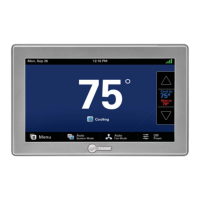
Do you have a question about the Trane Pivot BAYSTAT814 Series and is the answer not in the manual?
 General
| Brand | Trane |
|---|---|
| Model | Pivot BAYSTAT814 Series |
| Category | Thermostat |
| Language | English |
Defines the types of safety advisories (Warning, Caution, Notice) used throughout the manual.
Lists additional sensors and components that can be used with the thermostat.
Guidelines for selecting an optimal location for thermostat installation.
Information on connecting the thermostat to the internet via Wi-Fi or Ethernet.
Instructions and precautions for physically mounting the thermostat sub-base.
Detailed steps for wiring the thermostat to the HVAC system.
Provides various wiring diagrams for different HVAC system configurations.
Describes the thermostat's power-up sequence and initial calibration options.
Outlines the steps and options available in the Installation Wizard.
Explains how to navigate and configure parameters within the Installer Setup screens.
Details various settings for equipment, sensors, and operational parameters.
Covers settings for accessories like humidifiers, ventilation, and UV lights.
Settings related to dehumidification, fan operation, and aggressive recovery.
Settings for blower delays and airflow percentages for different stages.
Settings for temperature-based lockouts for auxiliary heat, compressor, and defrost.
Configuration of reminders for system maintenance tasks.
How to enter a contractor code for identification and portal association.
Information on automatic and manual software update procedures.
Guidance on setting up the mobile app for remote thermostat control.
Procedure for transferring the thermostat account from installer to building owner.
Explains the Proportional-Integral control scheme used for comfort and efficiency.
Details how load values represent system capacity requirements for heating and cooling.
How duty-cycling is used for indoor temperature control based on load value.
Mechanism to prevent excessive temperature overshoot by enforcing off-cycles.
Thresholds and logic for engaging different stages of heating or cooling.
Describes the available system modes like Heating, Cooling, Auto, Off, and Emergency Heating.
Details the behavior of each system mode, including Auto mode logic.
Explains the two fan modes: Auto and On, and their behavior.
How to adjust control constants to modify unit responsiveness.
Methods and settings for dehumidification, including over-cooling and smart fan.
Details how dehumidification is enabled via AUX contacts and its control options.
How the thermostat manages dual fuel systems with and without outdoor sensors.
Various lockout methods based on outdoor temperature to protect equipment.
How the thermostat controls humidification through AUX contacts.
Strategies to achieve comfort setpoints at the occupied time and save energy at shutdown.
How the thermostat participates in utility demand response programs for energy savings.
How stage inhibits are managed during recovery from setpoint adjustments.
How the thermostat controls ventilation systems to meet air quality standards.
How to configure an occupancy signal for controlling ventilation based on schedule.
How warm air discharge affects blower airflow in heating modes.
Operation of hot water coils as a sole or auxiliary heat source.
Procedures for testing various components like blower, heating, and cooling stages.
How to save diagnostic logs to a USB drive for troubleshooting.
Viewing cycle counts and runtime data for different operating modes and stages.
Accessing real-time system operational data like status, load value, and fan status.
Procedure for restoring the thermostat to its original factory settings.
Managing the PIN access code that restricts access to menu and service screens.
Contact information for technical support regarding thermostat setup and operation.
Information regarding FCC compliance for radio frequency emissions.
Information regarding Industry Canada compliance for radio frequency emissions.