Chapter 3 Operating the Programmer
TransCore Proprietary
3–25
#45<cr> Request Programming Mode
This command requests the current AP4119 programming mode, based on the permissions tag.
Response:
#AAR = AAR S-918 compatible
#GEN = Generic, non-AAR programming format
Programming a Tag
Note: The tag may be placed into the tag holder before issuing the command, or with the tag
holder door open, enter the command and place the tag into the tag holder within 10 seconds. If
an AT5549 End-of-Train Tag is being programmed, place the tag into the programmer adapter (P/N
20-4119-001), with the tag’s reflective side up, before sliding the tag into the tag holder. If the tag is
not placed in the tag holder and the door is not closed within 10 seconds, the programmer will abort
this command.
To program a tag
1. Send the programmer the appropriate command along with the user data to be program on to the tag.
Use command #200 if using the TransCore 6-bit format for your data, command #201 for the 4-bit hex
data format, command #220 if you are writing a page of SeGo data to the tag, and command #221 if
you are writing a byte of SeGo data to the tag.
2. When the programmer begins its 10-second timer (indicated by an audible beep once every second),
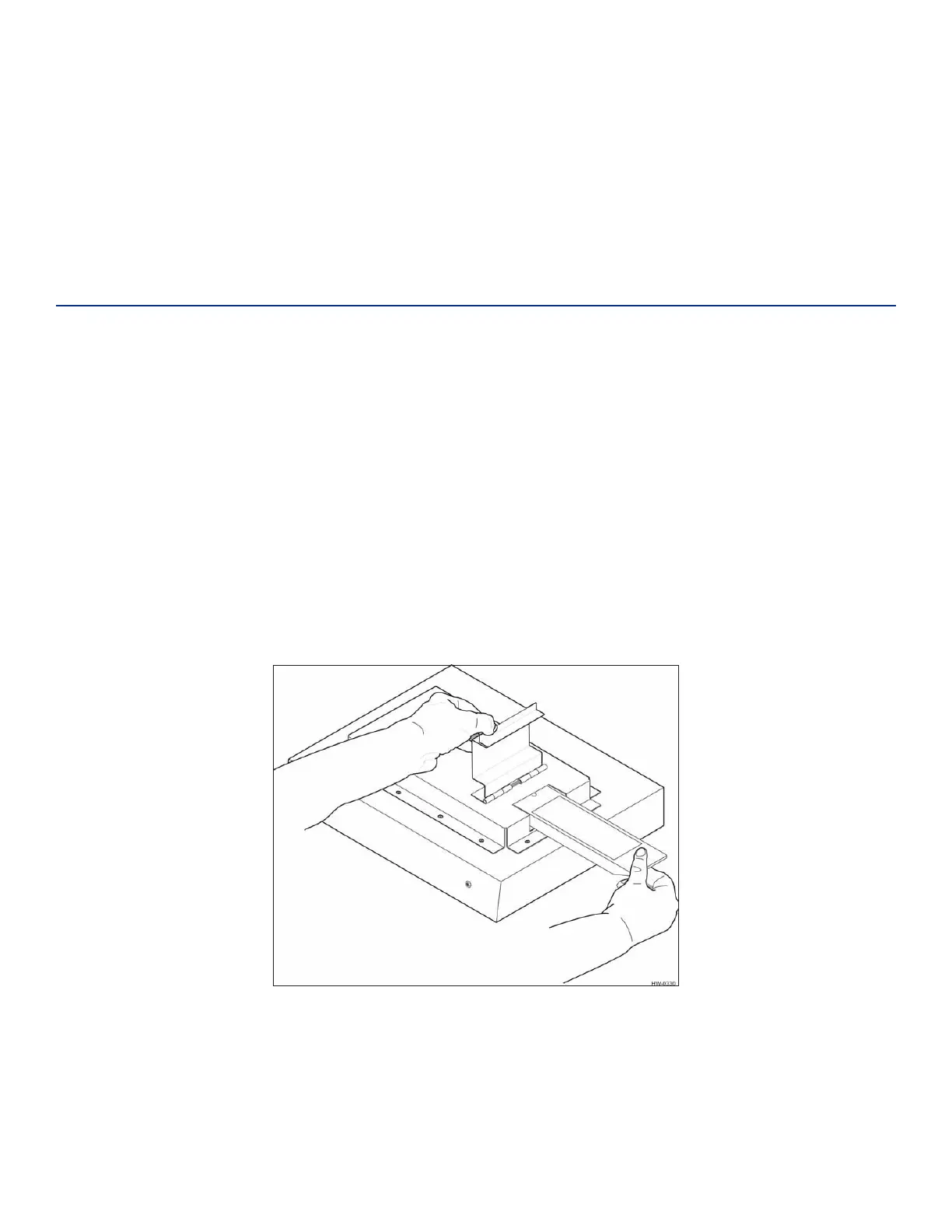
slide the tag into the tag holder and close the door (Figure 11), or place the AT5549 End-of-Train Tag
reflective side up into programmer adapter, slide into the tag holder, and close the door (Figure 12).
Figure 11 Tag Being Slid into Tag Holder


 To Next Page