Chapter 4 Troubleshooting
TransCore Proprietary
4–31
Chapter 4 Troubleshooting
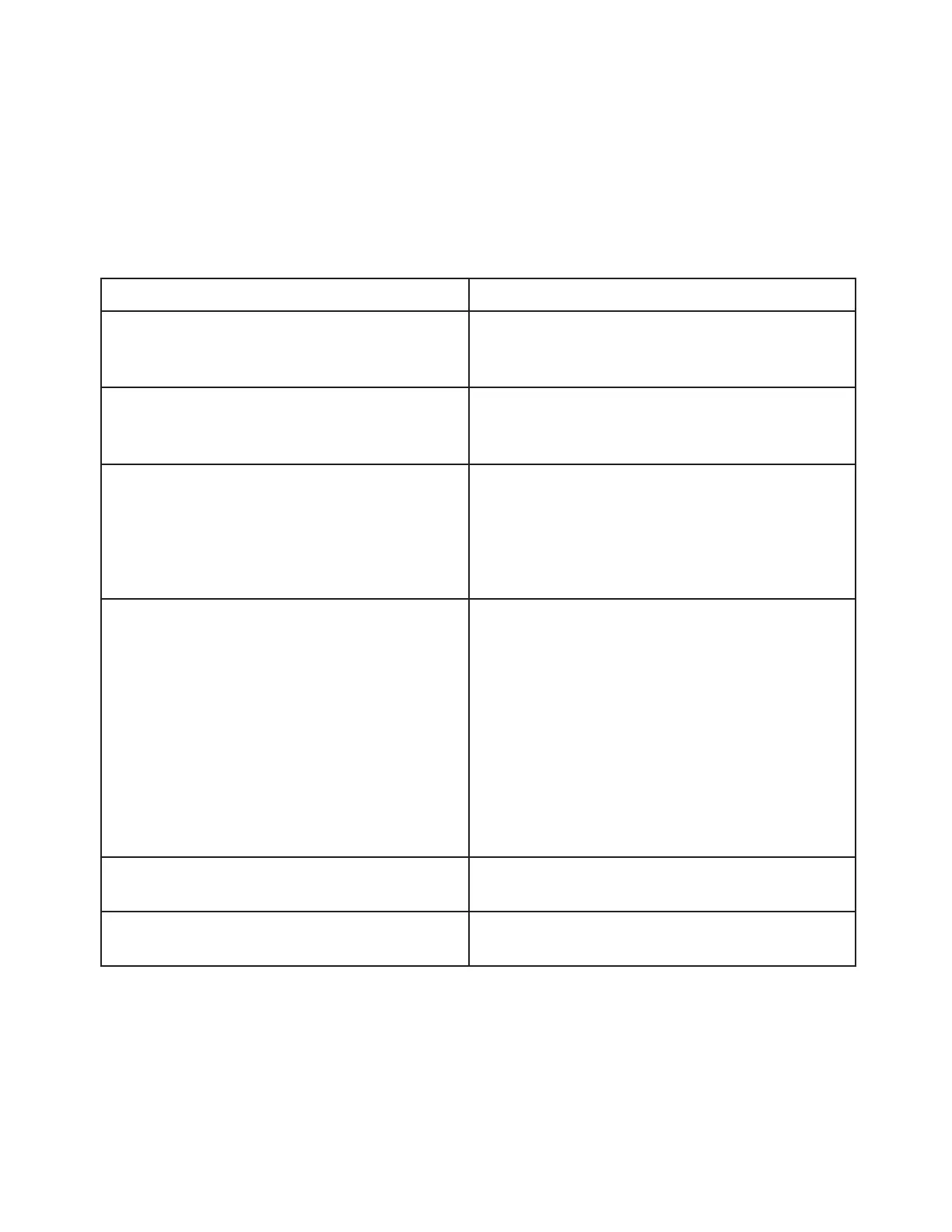
Table 7 lists some problems that may be encountered when using the AP4119 Rail Tag Programmer, along
with suggestions for troubleshooting each problem.
If a problem persists, call TransCore Technical Support.
Table 7 Troubleshooting Problems and Solutions
Problem
Suggested Solutions
READY LED does not illuminate at power-on.
Check power transformer.
Replace the internal 3-amp, 250-volt Fast-Blo
fuse.
System powers on but does not sign on.
Verify RS–232 or USB connection at the
programmer and at the host.
Verify that host baud rate is set to 9600.
Programmer beeper is not heard during tag
programming/verify sequence, or system
continually beeps until time-out.
Enter command #120 to enable the tone
generator.
Verify that the door is fully closed.
Verify that the optical switch that is activated
by the tag door is clean and is clear of any dirt
buildup.
Tag programmer reads tags but programming
sequence fails repeatedly.
Enter command #40 to retrieve the response
code then use the programmer response codes
listed in Appendix D to identify the problem.
Improve electrostatic discharge protection in
programming area.
Tag programmer permissions have expired. Enter
command #44 to retrieve the tag programmer
permissions expiration date. Also, review
the expiration date etched into the PT5780
Permissions Tag and/or review the permissions
certificate for the tag programmer.
Requested verify data does not match
programmed data.
Check for security code violations.
Check programmed data for accuracy.
System resets intermittently.
Check for damage to DC power connection.
Check for a loose AC power connection.


 To Next Page