Appendix G
TransCore Proprietary
G–39
Appendix G Commands
This appendix lists the serial command set for the AP4119.
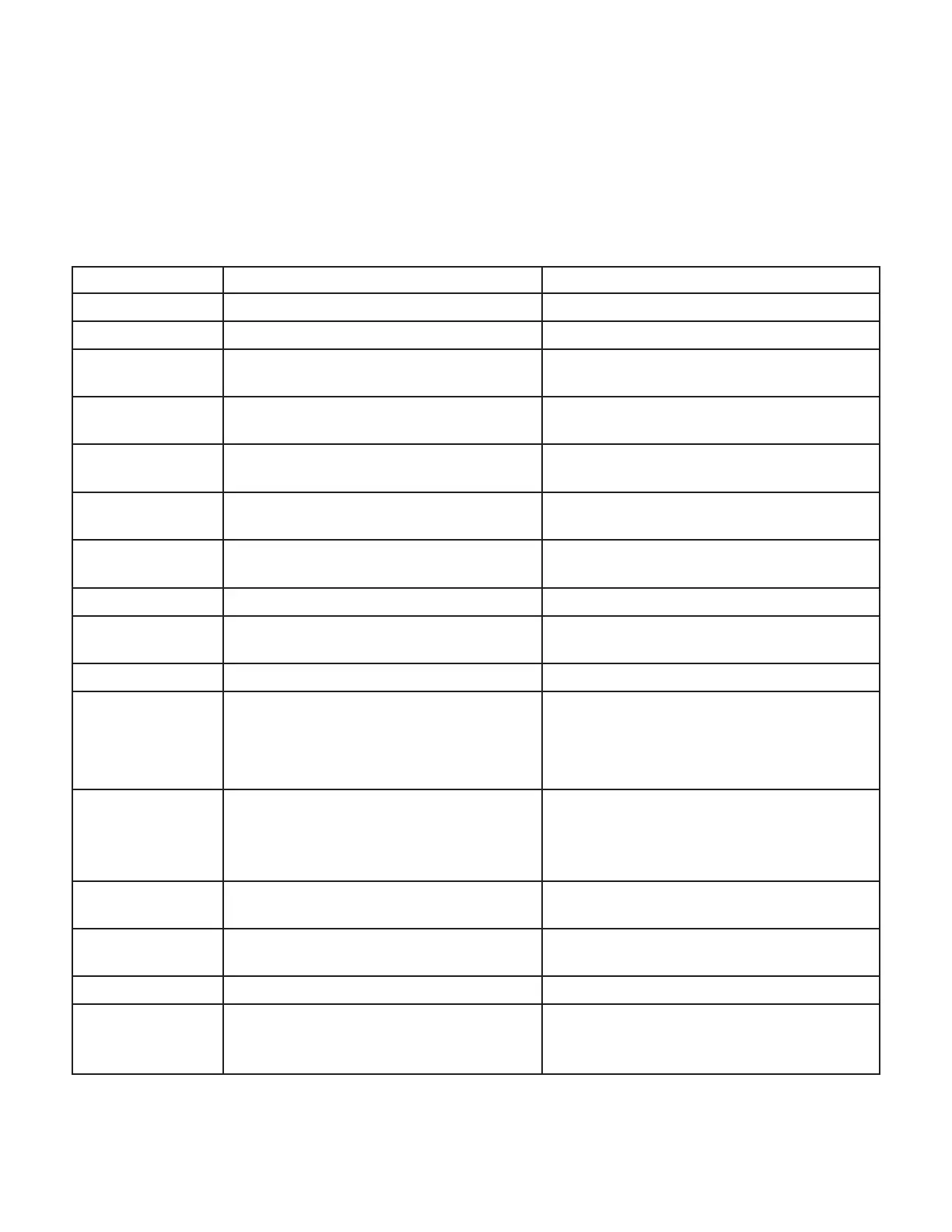
Table 16 Serial Command Set
Number Command Name Response
#120<cr> Enable Tone Generator #Done<cr>
#121<cr> Disable Tone Generator #Done<cr>
#200xxx...<cr>
Program Tag Using TransCore 6-Bit
ASCII Format
#xxxxxxxxxxxxxxxxxxxx<cr> #Done<cr> or
#Error<cr>
#201xxx...<cr>
Program Tag Using 4-Bit ASCII Hex
Format
#xxxxxxxxxxxxxxxxxxxxxxxxxxxxxx<cr>
#Done<cr> or #Error<cr>
#210<cr>
Read/Verify Tag Data Using TransCore
6-Bit ASCII Format
#xxxxxxxxxxxxxxxxxxxx<cr> #Done<cr> or
#Error<cr>
#211<cr>
Read/Verify Tag Data Using 4-Bit ASCII
Hex Format
#xxxxxxxxxxxxxxxxxxxxxxxxxxxxxx<cr>
#Done<cr> or #Error<cr>
#220yyxxxx…<cr> Write a Page of Data Using Hex Format
#xxxxxxxxxxxxxxxx<cr> #Done<cr> or
#Error<cr>
#221yyxx<cr> Write a Byte of Data Using Hex Format #xx<cr> #Done<cr> or #Error<cr>
#230yy<cr> Read a Page of Data Using Hex Format
#xxxxxxxxxxxxxxxx<cr> #Done<cr> or
#Error<cr>
#231yy<cr> Read a Byte of Data Using Hex Format #xx<cr> #Done<cr> or #Error<cr>
#30<cr> System Reset
#Model AP4119 Ver X.XX
#Copyright 2022 TransCore
where X.XX is the current software version
or #Error<cr>
#40<cr> Display System Status
#xx<cr> where XX is the two-digit
response code. The code 00 indicates
that the programmer performed the last
operation without error.
#42<cr> Display Tag Door Switch Status
#00<cr>door open
#01<cr>door closed
#43<cr> Request Control Number
#xxxxxxxx where xxxxxxxx is hex data
(control number)
#44<cr> Request Expiration Date #MM/DD/YYYY or #None
#45<cr> Request Programming Mode
#AAR = AAR S-918 compatible
#GEN = Generic, non-AAR programming
format


 To Next Page