Operation 31
© Travis Industries 4140808 100-01298
Remote Set-Up
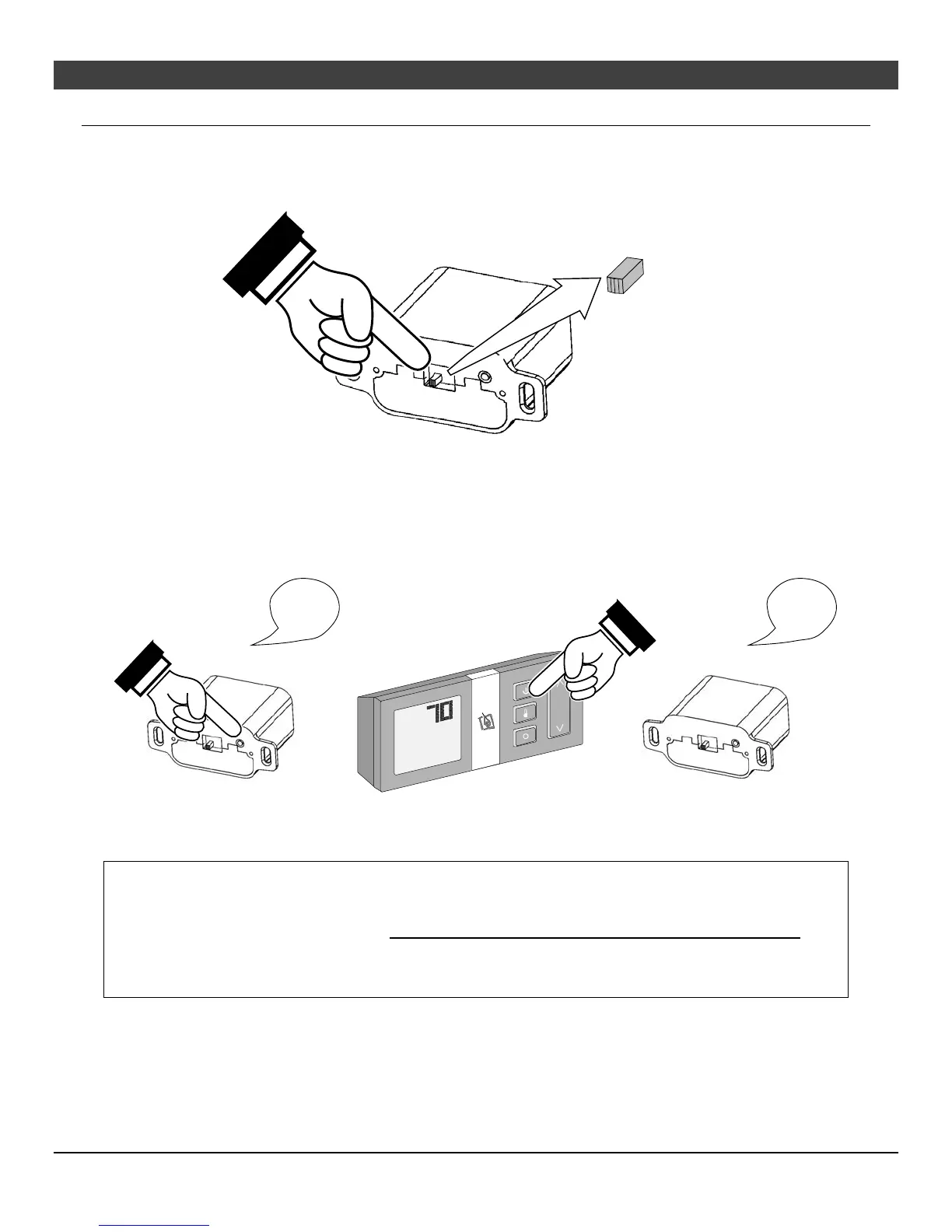
Verify the Switch is on “REMOTE”
The battery holder has a switch built into it (see Figure 1). This switch must remain in the REMOTE
position for the remote to operate.
Figure 1
Synchronize the Transmitter to the IFC
The transmitter will need to be synchronized to the IFC (Integrated Fireplace Control) before the remote
will work correctly. Synchronizing is done in the following two steps below (see Figure 2):
8. Press the PRG (Program) button on the battery box (IFC will beep 3 times).
9. Press the “ON” button on the transmitter (IFC will beep 3 times).
Figure 2
NOTE: If power is cut off to the IFC for an extended period of time, you may need to re-synchronize the
remote.
Clearing the System Memory
This appliance uses an Integrated Fireplace Control (IFC) to store the unique code for the remote control.
If you wish to clear the system memory, MAKE SURE GAS IS TURNED OFF TO THE APPLIANCE then
press the PRG (Program) button for 10 seconds. The pilot will start to spark repeatedly, signifying all
system memory has been cleared. The system will return to its original configuration: a remote will need
to be synchronized; and, the system will operate under continuous pilot mode.
ON REMOTE OFF
°F
"Beep"
"Beep"
"Beep"
"Beep"
"Beep"
"Beep"





 To Next Page