T9
-9-
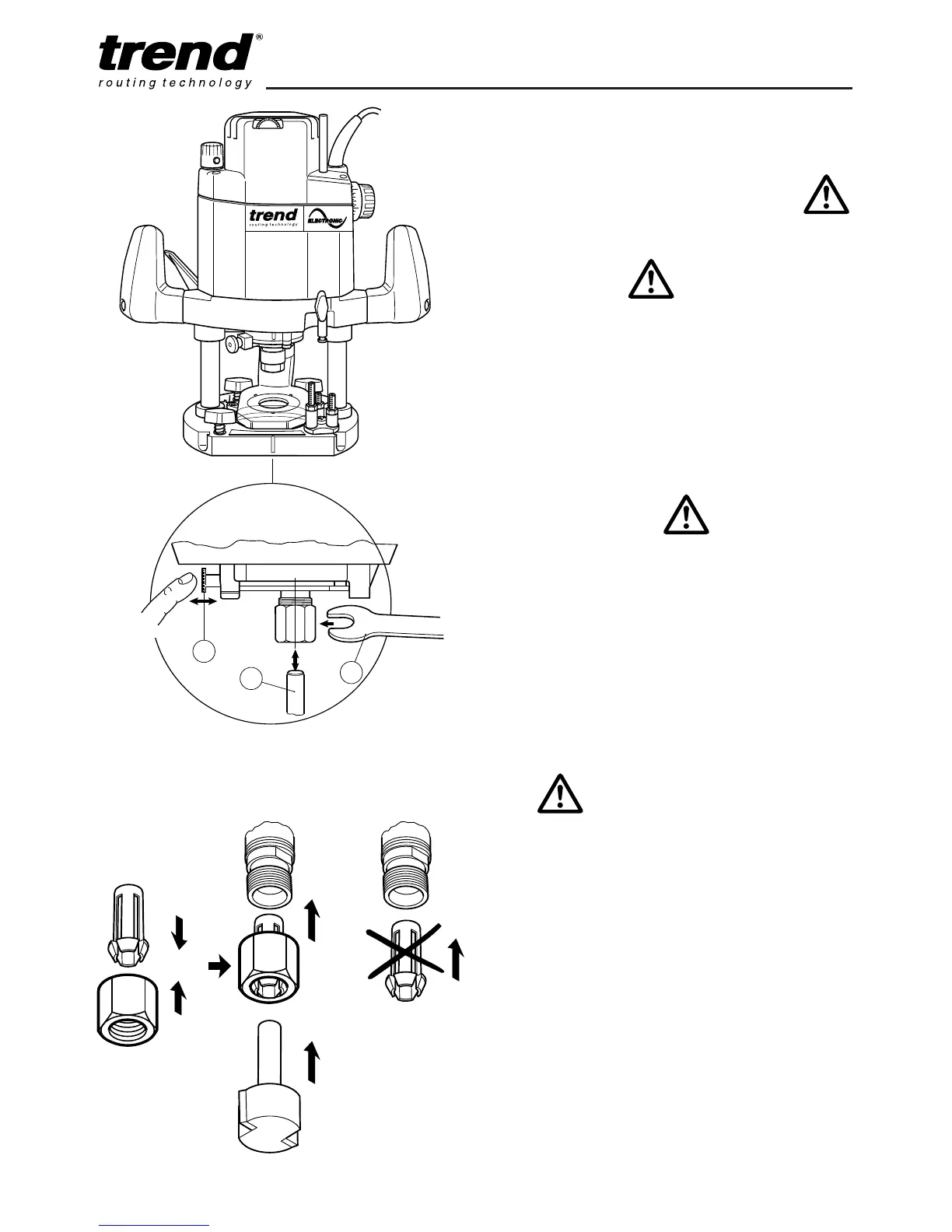
How to Fit and Remove a Router
Cutter
Fitting Cutters
n Insert at least
3
/4 of the shank length of the
cutter (1) into the collet.
n Press the spindle lock (2) forward until the
router spindle is locked (you may need to turn
the spindle slightly to engage it).
n Tighten the collet nut with the spanner (3). Do
not use excessive force.
Removing Cutters
n Undo the 22mm A/F collet nut with the
spanner.
n Keep turning the spanner until the collet nut
tightens and then loosens again. This is the
fail-safe mechanism releasing the collet.
n The cutter should now slide out.
n Each time you finish using a cutter, remove it
and store it in a safe place.
Correct Sequence for Fitting Collet,
Nut and Cutter
n Do not tighten the collet
without a cutter fitted.
n Always use cutters with
shanks which match the
diameter of the collet.
n Do not use cutters larger
than 45mm unless the router
is fitted in a router table.



 To Next Page