T9
-7-
Fitting and Removing the
Dust Extractor Spout
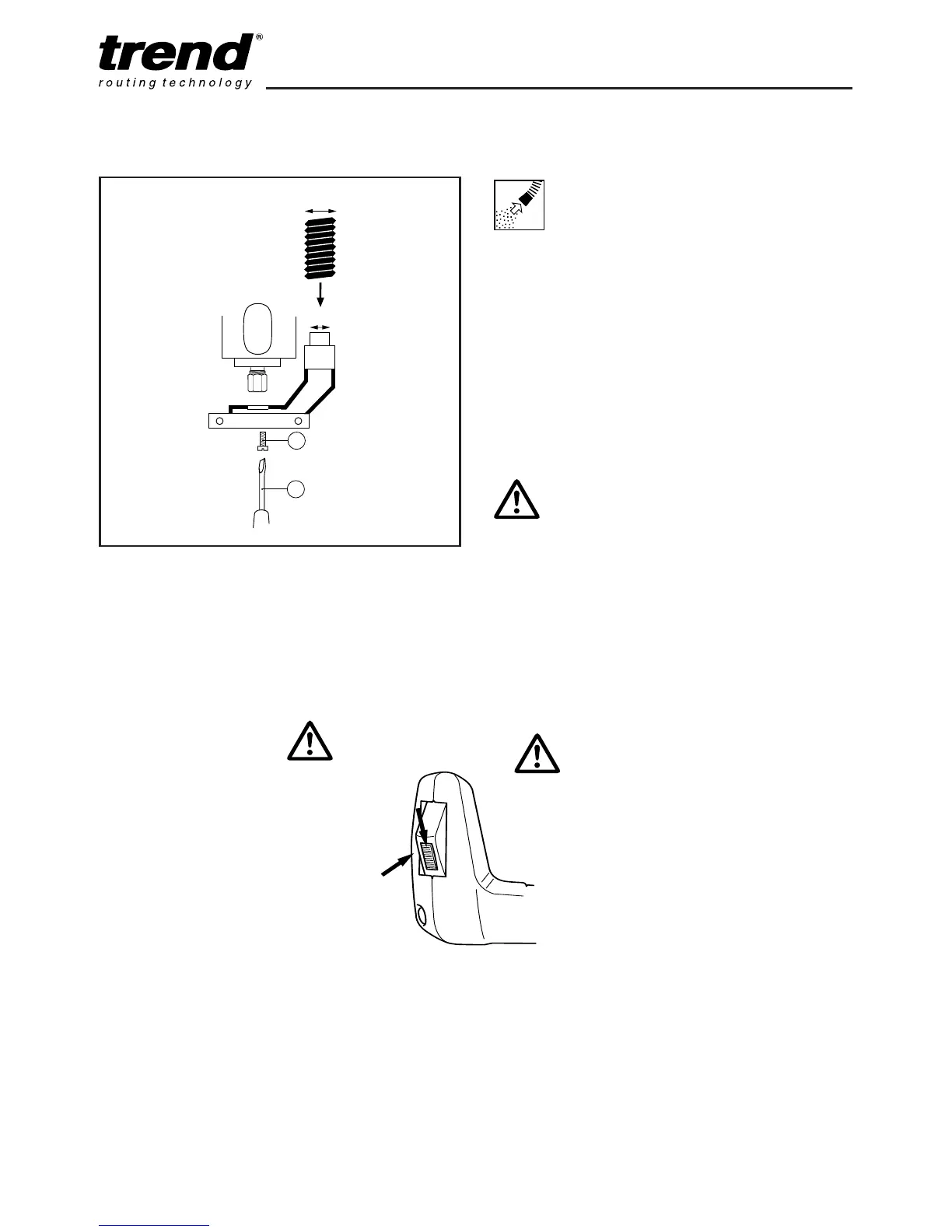
n Insert the extractor spout in the routing base.
The extractor spout is suitable for dust
extractors with a hose diameter of 35mm.
A separate adaptor is supplied for use with
hose Ø 26mm.
n Gently fit the two machine screws (1) into the
captivated nuts in the spout from the
underside of the router. Using a screwdriver
(2), tighten the screws.
Dismantle in reverse order.
Whenever possible use the
dust extraction spout with a
suitable extractor when
routing.
F
itting Dust
Extractor
S
pout
ASSEMBLY & ADJUSTMENT
Switching On & Off
n The router is provided with
a safety device to prevent
the tool being switched on
accidentally. Before
squeezing the switch
trigger (B), it is necessary
to move the slide
downwards (A). To switch
off release trigger.



 To Next Page