Adjusting the Depth of Cut
n Place the machine on the workpiece.
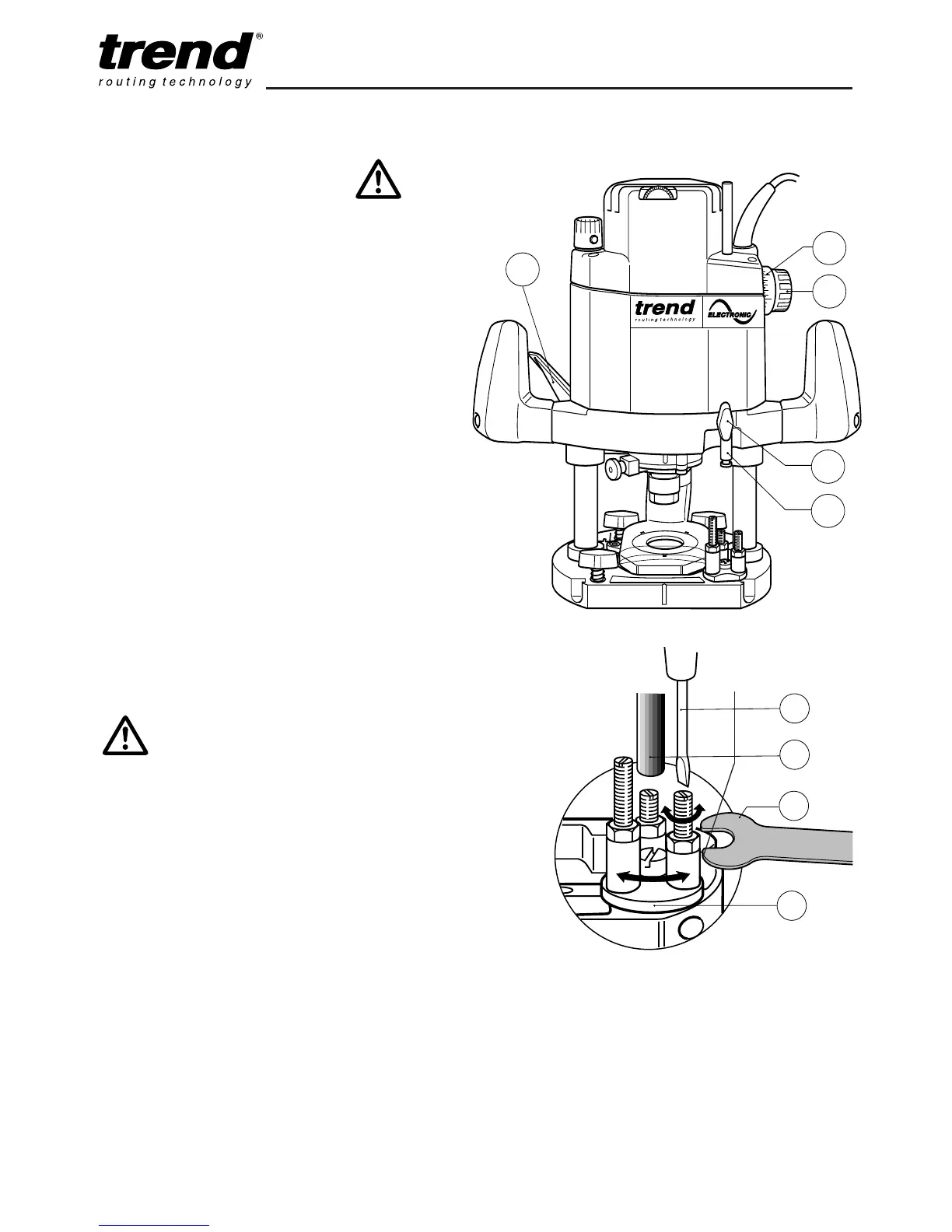
n Pre-set the 3-way turret stop (1) as required.
n Undo the thumb knob (2) for securing the
depth stop (3).
n Lift up the plunge locking lever (4) for fixing
the depth.
n Lower the machine slowly until the cutter
touches the workpiece and secure it with the
locking lever.
n
Set the graduated ring (5) to ‘0’ and by turning
the knob (6) raise the depth stop (3) by the
amount of required depth of cut (using the
graduation ring (5)).
n
One revolution of the knob (6) equals 25mm.
(Each single graduation equals a depth
adjustment of 0.5mm). Then re-tighten the
thumb knob (2).
The rotating turret stop screws can be used
for pre-setting up to three depths of cut.
Their
height can be adjusted using a screwdriver
(6) and an 8mm A/F spanner (7).
T9
-8-
n Never make adjustments
when the router is running
or plugged in.
n Deep cuts should always be
routed in several passes.



 To Next Page