T9
-16-
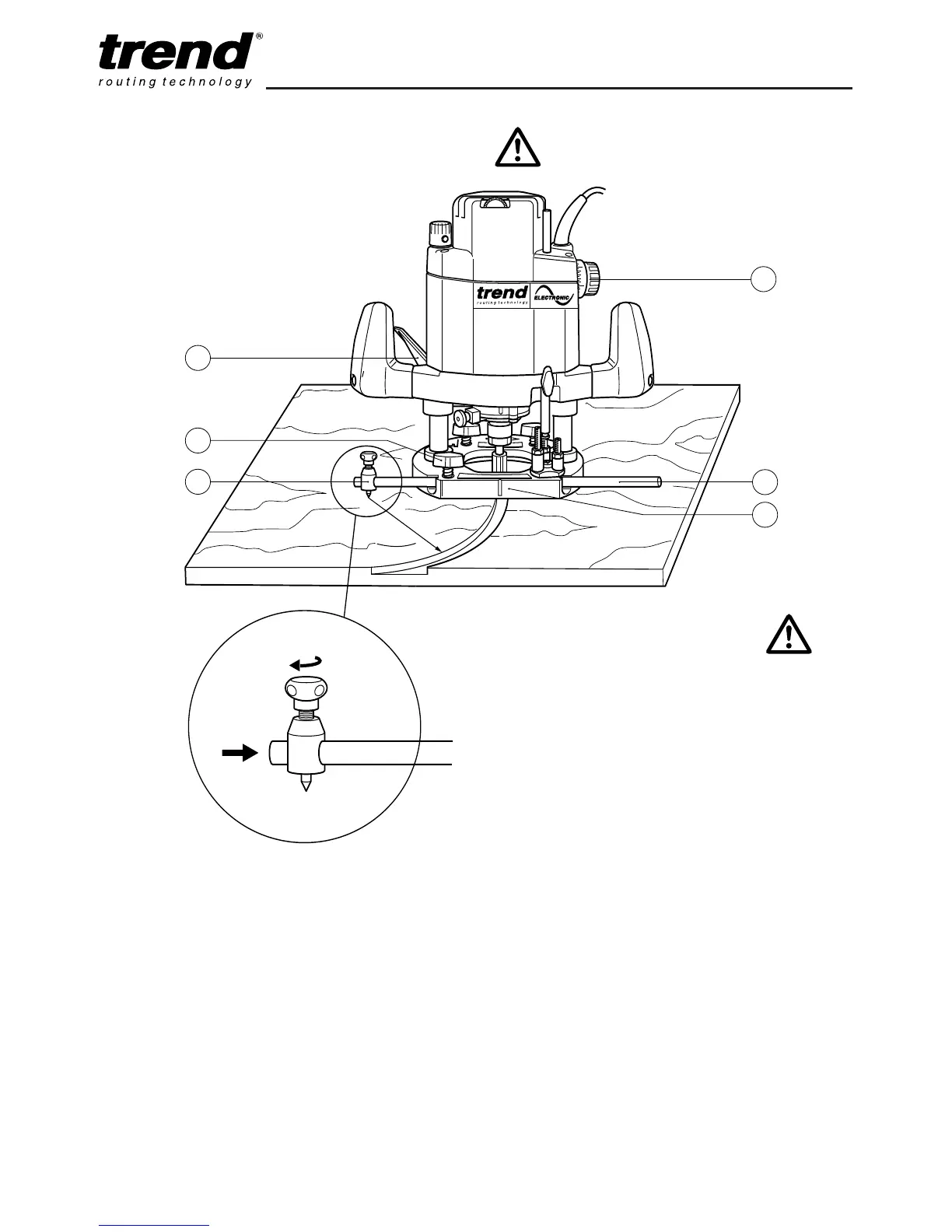
Beam Trammel Routing using Accessory
Ref. BEAM/009
Cutting Arcs with the Router
n Place the machine on the workpiece.
n Set the cutting depth using the depth stop
dial (2).
n Fasten the fence rod (1) in the routing base
(3) with the thumb knob (4).
n Fit on the beam trammel (5) as shown.
n Measure the radius and fix the point of the
beam trammel in position.
n Switch on the machine.
n After releasing the plunge locking lever (6),
lower the machine slowly as far as the depth
stop and lock it there.
n Cut grooves, rebates etc. at a steady rate of
feed, in an anti-clockwise direction. Ensure
the beam trammel point does not move.
n When finished, release plunge locking lever
(6) to raise the machine.
n Switch off the machine.
Fitting the Beam Trammel Attachment
n Fit the beam trammel attachment (A) on to
one rod and tighten the knob (B) securely.



 To Next Page