T9
-10-
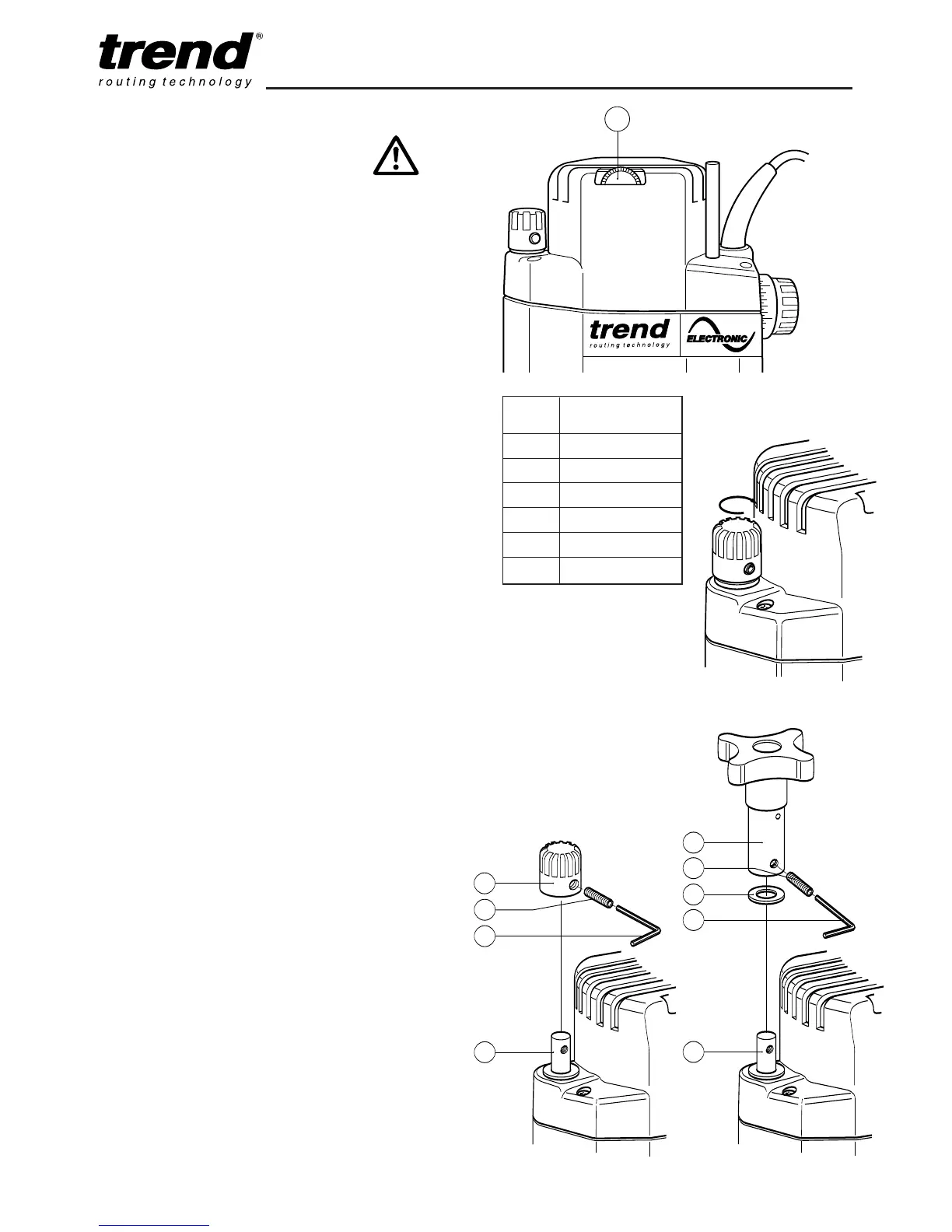
Setting the Electronic Speed
Control Dial
The speed is infinitely variable from 8,000 to
22,000 rpm using the electronic speed control
dial (1) for uniform cutting results in all types of
wood, plastics and in aluminium.
n Turn the electronic speed control dial to the
required level. The dial is numbered from 1 to
6 and corresponds to router speeds from
8,000 rpm to 22,000 rpm.
n Generally, use the lower settings for large
diameter cutters and the higher settings for
small diameter cutters. The correct setting will
also depend on the density of the material,
depth of cut and feed speed of the router, as
severe loss of rpm denotes motor overload.
Using the Fine Height Adjuster
The optional fine height adjuster
(ref. FHA/002) should be used when fine
adjustment is required. This is especially
recommended when using our dovetail jig or
router table.
Fitting the Fine Height Adjuster
n Lock depth of plunge with plunge locking
lever
n Using a Hex key (1) supplied with fine height
adjuster, remove grub screw (2) on the
plunge depth stop knob (3)
n Gently remove depth stop knob (3) from
height adjustment rod (4) by releasing the
plunge lever carefully. Once removed, plunge
router down and lock using plunge locking
lever.
n Fit washer (5) onto height adjustment rod (4)
and then fit height adjuster assembly (6) onto
height adjuster rod. Ensure that the hole in
both the assembly and rod are aligned.
n Using a Hex key (1) screw the grub screw (2)
into the threaded side of the fine height
adjuster body and into the thread within the
rod.
n Ensure grub screw (2) is not left proud.
Dial Router
No. Speed
1 8,000 rpm
2 10,000 rpm
3 12,000 rpm
4 15,500 rpm
5 18,000 rpm
6 22,000 rpm



 To Next Page