©Copyright2013TRENDnet.AllRightsReserved.
TRENDnetUser’sGuide
TEW‐733GR
31
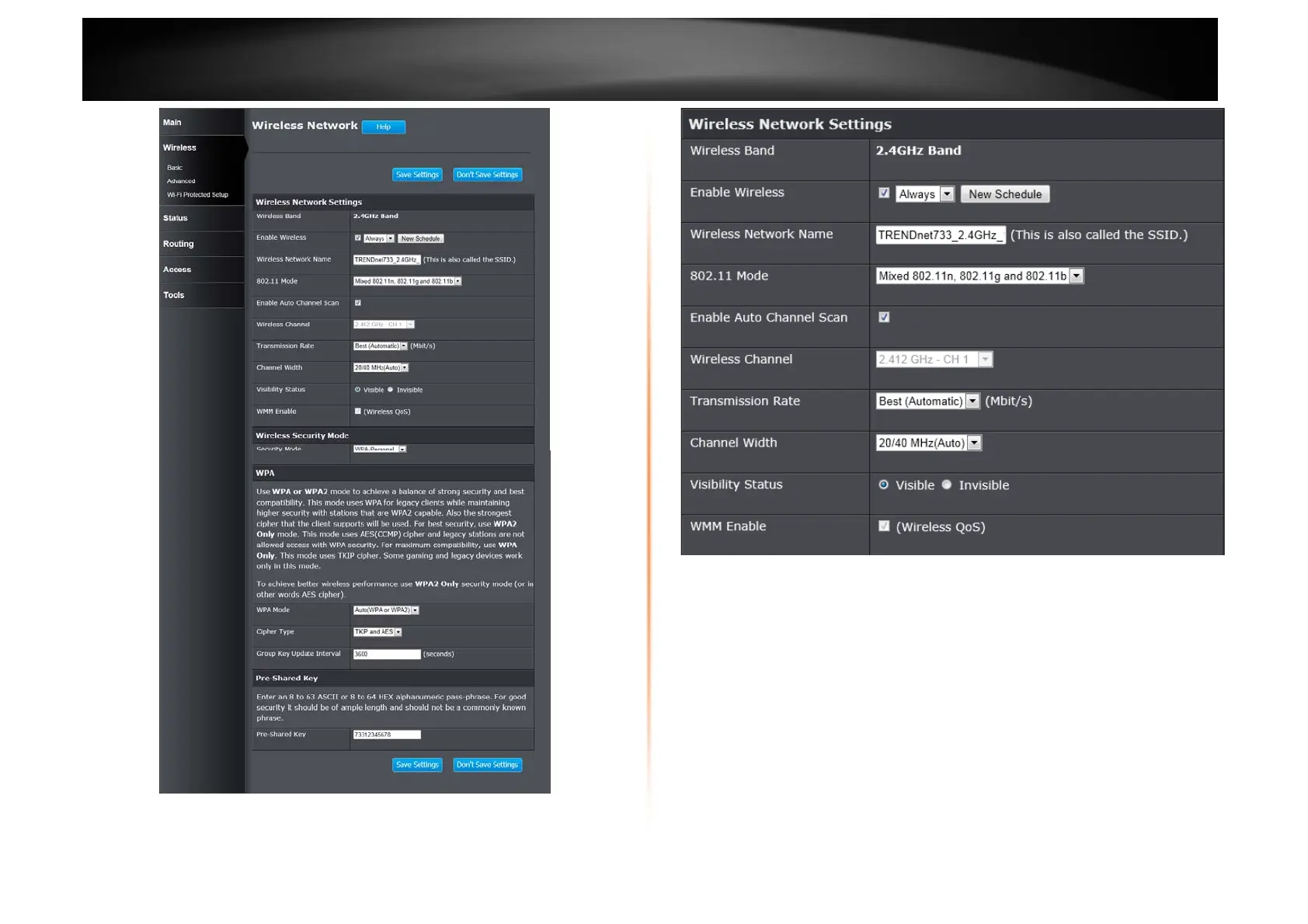
Wireless Network Settings
Wireless Band: This displays the wireless band that the Router is used.
Enable Wireless: Tick the check box to enable the wireless feature for the
2.4GHz band on this router. Use the drop-down menu to apply a time schedule to
this wireless network.
Wireless Network Name: Enter the wireless network name (SSID) (Wi-Fi
Name/SSID) that can be found on the label at the bottom of the Router. This
name will be available when wireless clients scan for available wireless networks.
However, when Visibility Status is set to Invisible, this name will not be visible
to wireless clients.
802.11 Mode: Select which 802.11 wireless modes to use from the drop-down
menu. Options to choose from are 802.11b only, 802.11g only, 802.11n only,
Mixed 802.11g and 802.11b, Mixed 802.11n and 802.11g, and Mixed 802.11n,
802.11g and 802.11b. If you are not sure, select Mixed 802.11n, 802.11g and
802.11b.















 To Next Page