©Copyright2013TRENDnet.AllRightsReserved.
TRENDnetUser’sGuide
TEW‐733GR
44
enable this feature and only deny the computers, by MAC address, access to the
network.
Checkbox: Tick the check box of each entry to enable the selected rule.
MAC Address: Enter the MAC address to be filtered.
DHCP Client List: Select the DHCP client from the drop-down menu to be
filtered.
Schedule: Select the time schedule for the rule. Click the New Schedule button
to create time schedules.
Click the Save Settings button to accept the changes made.
Click the Don’t Save Settings button to discard the changes made.
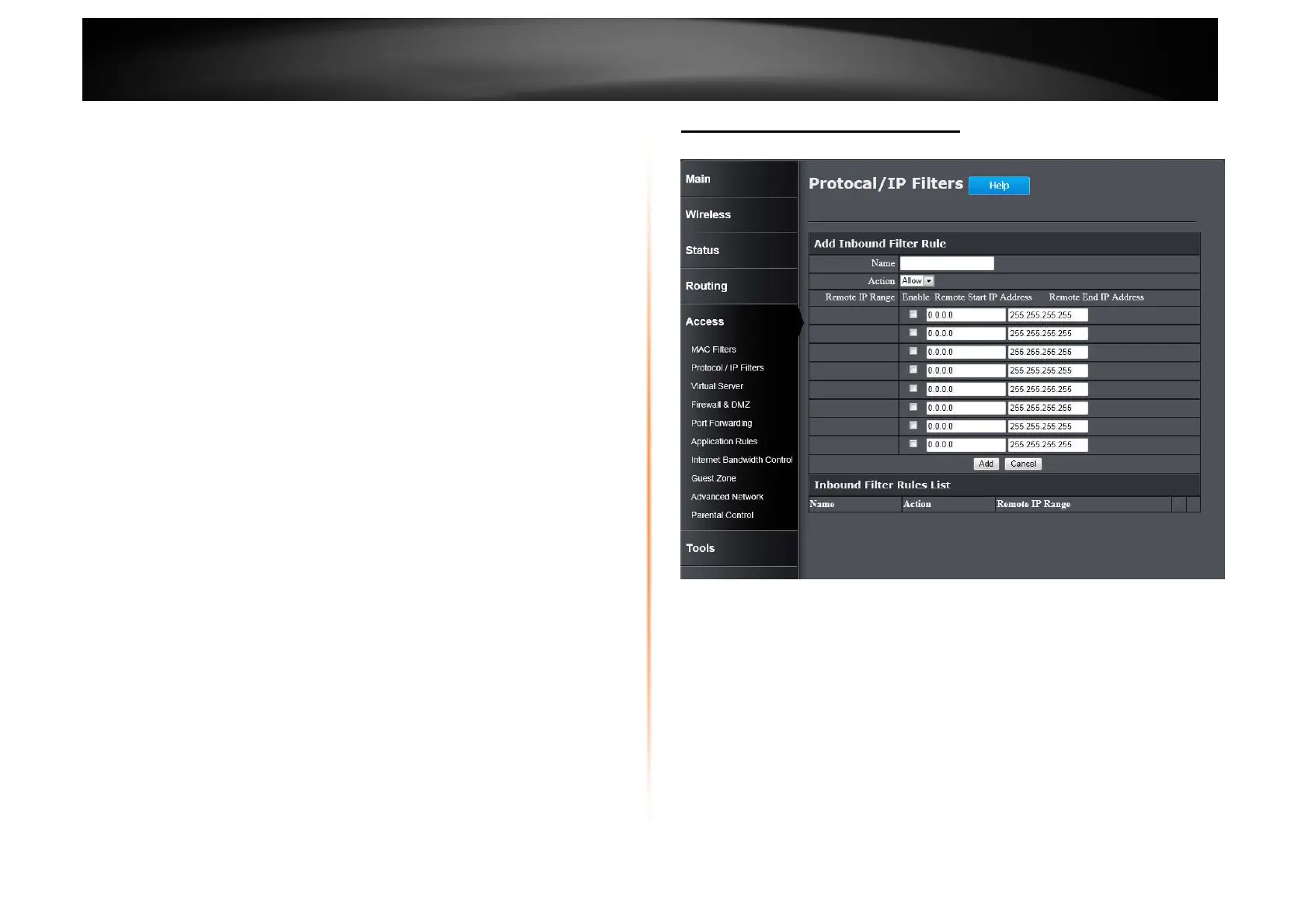
Access > Protocol / IP Filter
This window is used to configure the IP filter rules used by the Router.
Add Inbound Filter Rule
Name: Enter the name of the inbound filter rule.
Action: Select to Allow or Deny this rule.
Enable: Tick the check box of the corresponding entry to enable the rule.
Remote Start IP Address: Enter the starting remote IP address.
Remote End IP Address: Enter the ending remote IP address.
Click the Add button to add or modify the rule.
Click the Cancel button to discard the changes made.
Inbound Filter Rules List
This section displays a list of configured inbound filter rules.















 To Next Page