General information
46
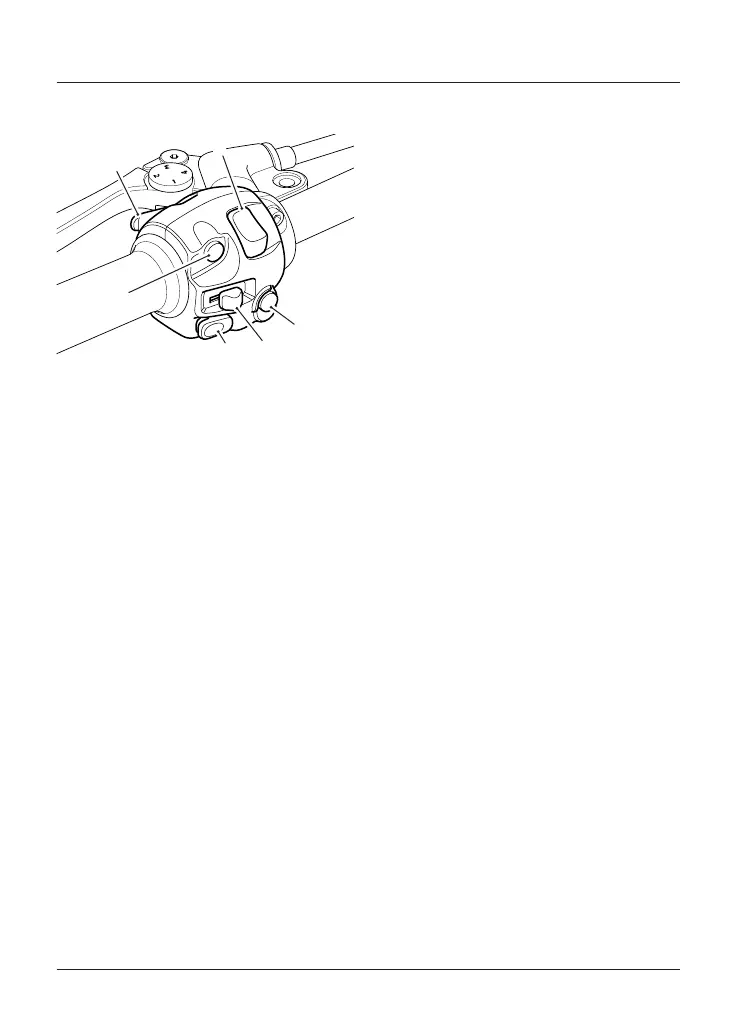
Left Handlebar Switches
1. SCROLL button
2. Horn button
3. Turn signal switch
4. MODE button (if equipped)
5. Daytime Running Lights (DRL) switch
(if equipped)
6. High beam button
SCROLL Button
The SCROLL button is used to operate
the following functions of the
instruments:
• Odometer functions (see
page33
)
• Trip reset (see
page33
)
• Clock reset (see
page34
)
• Traction control functions (see
page37
).
Horn Button
When the horn button is pushed, with
the ignition switch turned to the ON
position, the horn will sound.
Turn Signal Switch
When the turn signal switch is pushed
to the left or right, the corresponding
turn signals will flash on and off.
The indicators can be canceled
manually. To manually turn off the
indicators, press and release the
indicator switch in the central position.
MODE Button (if equipped)
The MODE button allows throttle
response adjustment. Press and release
the MODE button to select one of the
different rider modes available (see
page35
for more information).
Daytime Running Light (DRL) Switch
(if fitted)
Note:
• The daytime running light is
manually operated. It is not
automatic.
The daytime running light or dip beam
can be selected with the Daytime
Running Light (DRL) switch.
To select the daytime running light,
push the DRL switch forward.
To select dip beam, push the DRL switch
rearwards.
When the daytime running light is
turned on, the daytime running light
indicator light will illuminate in the
instrument panel.





 To Next Page