27
General Information
Once both hours and minutes are correctly
set, press button 'B' to confirm and t-SEt will
be visible in the display screen. Press and
release button 'A' until r
Eturn is visible then
press button 'B'. Trip 1 will be visible in the
display screen.
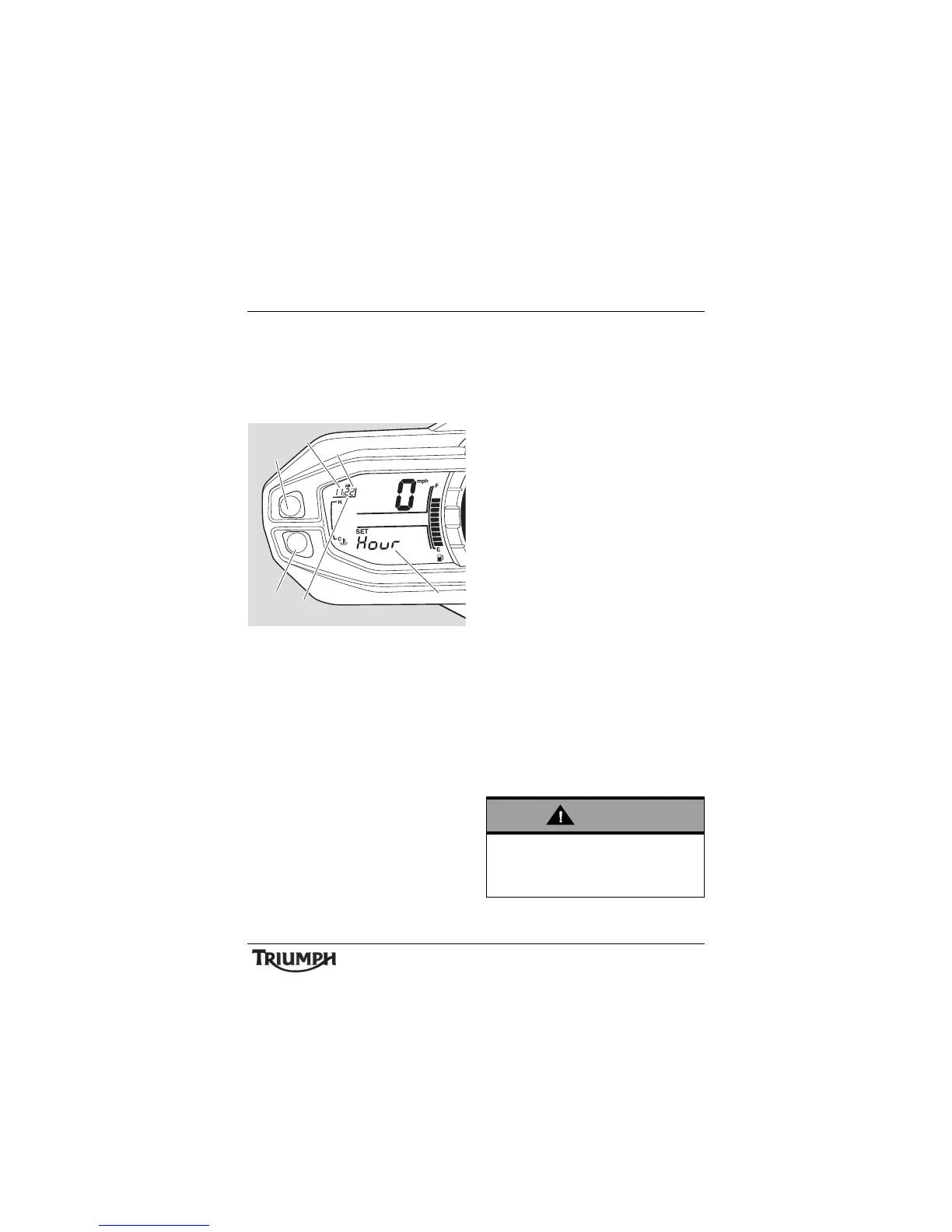
1. C l o c k d i s p l a y
2. Hours read-out
3. Minutes read-out
4. Display screen (Hour selected for
adjustment)
5. Button A
6. Button B
Changing Units (Imperial, US
or Metric)
Units has four selectable display modes as
described below:
• mpg - Imperial gallons
• mpg US - US gallons
• L/100 km - Metric
•km/L - Metric.
Each display provides the following
information:
mpg (Imperial gallons)
The speedometer and odometer will read in
miles. The fuel consumption will be
measured in imperial gallons.
mpg US (US gallons)
The speedometer and odometer will read in
miles. The fuel consumption will be
measured in US gallons.
L/100 km (Metric)
The speedometer and odometer will read in
kilometres. The fuel consumption will be
measured in litres of fuel per 100 km.
km/L (Metric)
The speedometer and odometer will read in
kilometres. The fuel consumption will be
measured in kilometers per litre of fuel.
Do not attempt to change the units display
with the motorcycle in motion as this may
lead to loss of motorcycle control and an
accident.




 To Next Page