20 21
OPERATION INSTRUCTIONS
RUNNING BELT TENSION ADJUSTMENT
This Trojan TR 1200 Treadmill is designed to keep the belt reasonably centred while in use. It is normal for
some belts to drift near one side while the belt is running with no one on it. After a few minutes of use,
the belt should have a tendency to centre itself. If during use, the belt continues to move toward one side,
adjustments are necessary.
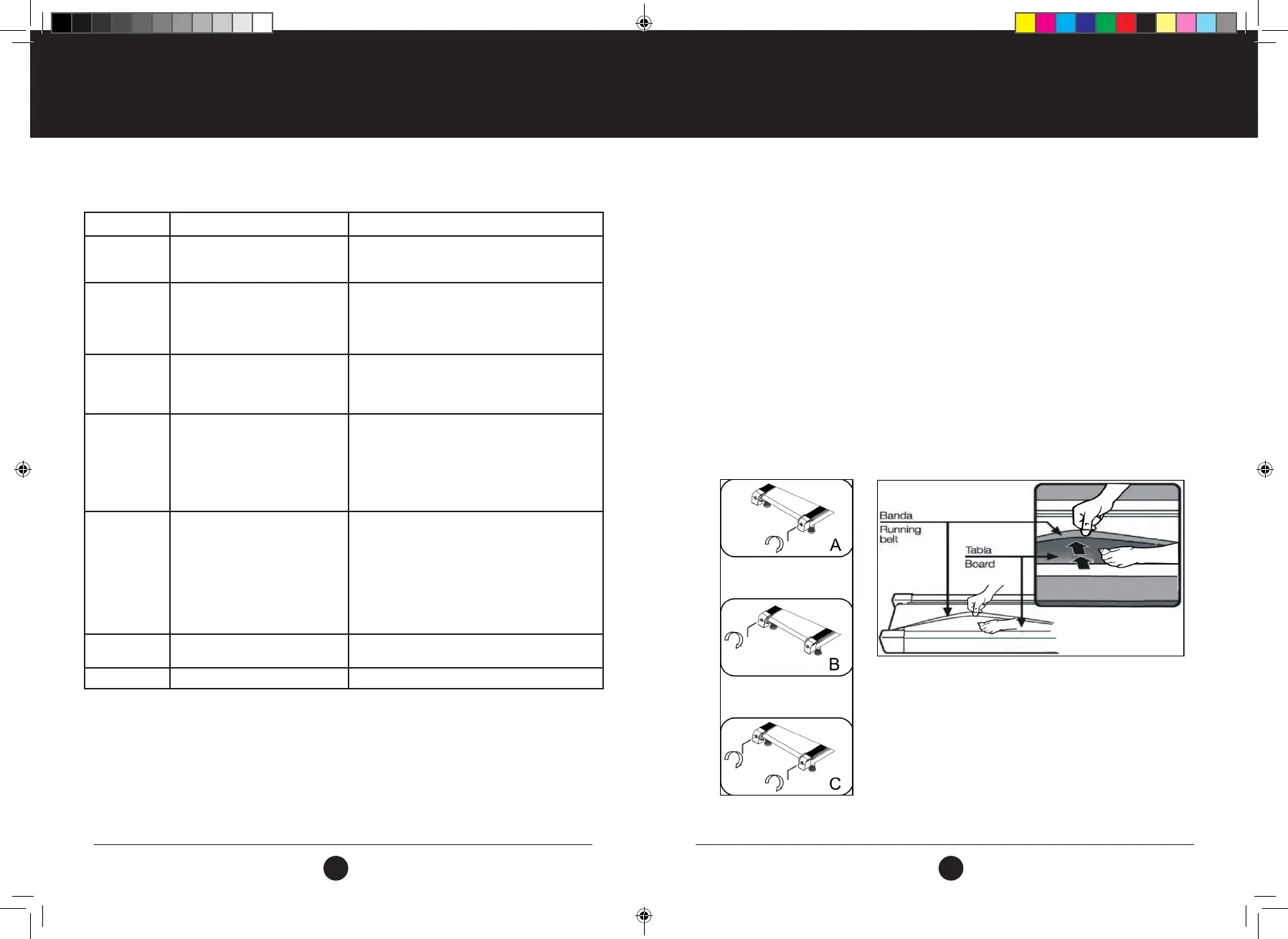
If the belt tends to move to the right, you should turn the belt adjustment screw on the right in clockwise
direction. We recommend you turn it 90 degrees each time and check how it works. If the belt remains slanting
to the right, then turn the belt adjustment screw on the left in counterclockwise direction by 90 degrees, as
shown in Picture A.
If the belt tends to move to the left, then turn the belt adjustment screw on the left, 90 degrees in a
clockwise direction. If the belt remains slanting to the left, then turn the belt adjustment screw on the right,
90 degrees in a counterclockwise direction, as shown in Picture B.
After having been used for a period, the belt might be slightly elongated, slipping and halting might appear
when a person is running on it. When this happens, you should tighten the screws on both sides by turning
them 90 degrees. If the belt is too tight, just loosen the screws 90 degrees on both side, as shown in Picture C.
CONSOLE FUNCTIONS
ERROR CODE MAIN REASON SOLUTION TO ERROR
E01 This error indicates a possible
message failure between Console
and bottom control board.
1. Check that the Console and bottom control board
wires are connected correctly.
2. Change the entire control board
E02 This error indicates a protection
against exploding.
1. If there is a bad connection with an open circuit in
the motor, please change to a new motor or check
the connection.
2. If the power cable has a puncture. Please change
to a new Power cable or control board.
E03 This error indicates a possible no
sensor signal.
1. Check that the speed sensor wire connection is
correct. If not, then reconnect the wire.
2. Check if the speed sensor is damaged. If it is, then
change to a new speed sensor.
E04 This error indicates a possible incline
motor study failure.
1. Check if the incline motor wires have been
connected correctly. If not, re-connect them.
2. Check if wire on the incline motor is damaged.
Change wire if required.
After checking all the above, press the study key on
the incline motor to reset.
E05 This error indicates a possible
current overload.
1. If current over load has been detected or the
motor is stuck, this will cause an excessive current
and the machine will start self-protecting its
system. Adjust the machine and restart.
2. Check if the motor has a noise coming from the it
or if the motor / bottom control board has burnt
out. If it has burnt out, then change to a new
motor and/or bottom control board. Use correct
voltage moving forward.
E06 Cannot pass self checking Turn the power on and off again.
Change the controller.
E07/08 Program and data error Change the controller.
ERROR CODES
#22M03T013.1 TR1200 Treadmill UM - Amendment.indd 20-21 2022/06/01 09:22



 To Next Page