14 15
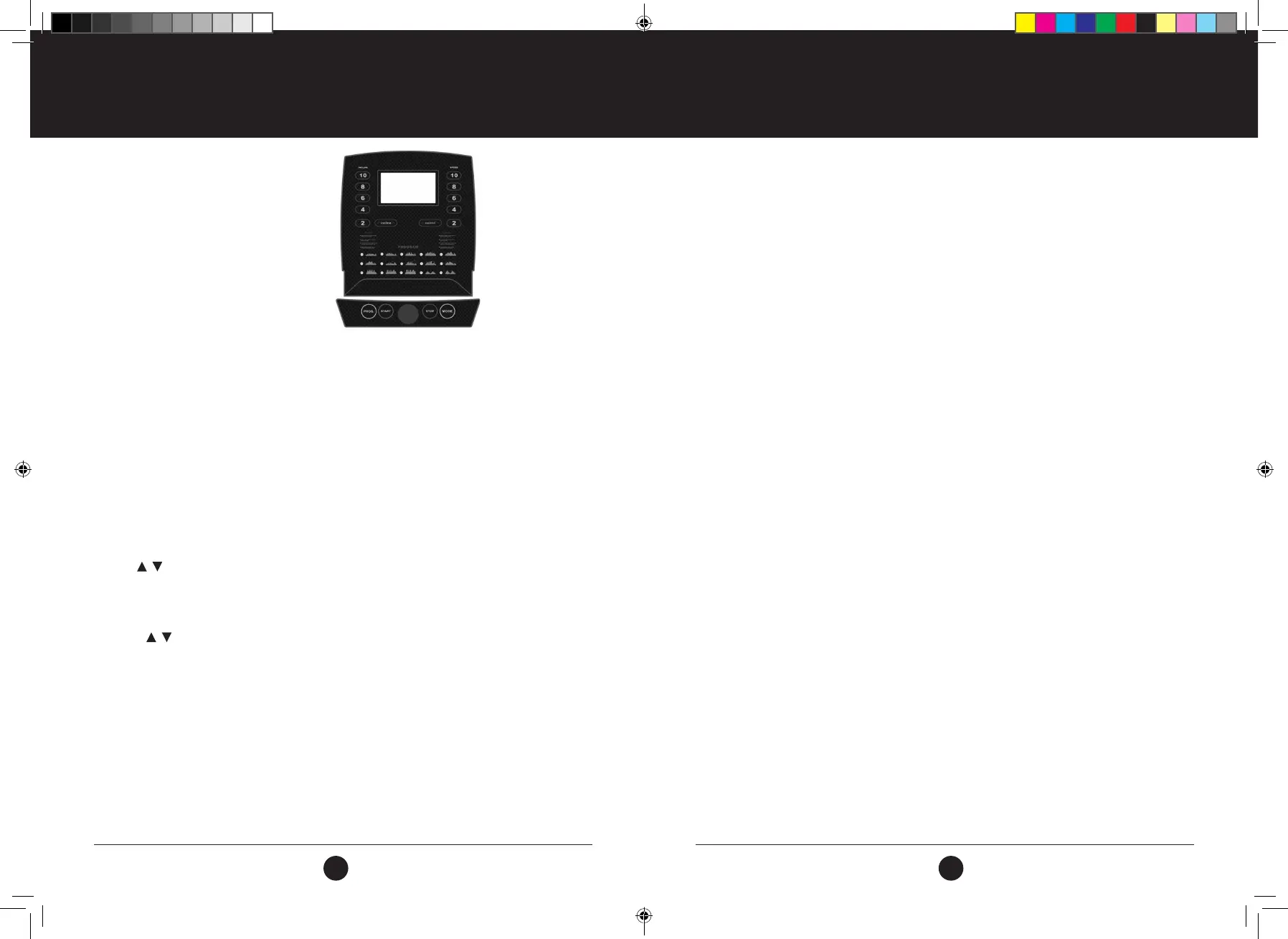
FUNCTION BUTTONS:
SPEED: Displays speed and program
TIME: Displays running time
DIST: Displays distance
CAL: Displays calories
PUL: Displays heart rate data
FUNCTIONS AND OPERATIONS:
PROG: Press button and select from manual mode to “P1 - P15,
U1 - U3 U1 — FAT”.
MODE: Select the manual mode, having the three running modes .“TIME” is
the time count down, “DIS” is distance count down and “CAL” calorie
count down.
START: Before pressing start ensure safety key is attached to your persons.
Once secure, press start to begin your work out.
STOP: Press this button to stop the machine and the machine will gradually
slow down until coming to a complete stop.
SPEED: These buttons are used to adjust the speed of the running belt.
QUICK SPEED KEYS: These buttons are used to get the running belt to the
required speed faster than increasing it one by one with the speed
button.
INCLINE: These buttons are used to adjust the incline of the running belt. Press
the button to adjust the incline when running and whilst the treadmill is
in ready state.
QUICK INCLINE KEYS: These buttons are used to get the incline to the required
level faster than increasing it one by one using the incline button.
BUTTON ON LEFT
HANDLE BAR: Incline increase or decrease.
BUTTON ON
RIGHT HANDLE BAR: Speed increase or decrease.
MAIN FUNCTION
Turn on the power switch and the screen will illuminate and the machine will enter standby mode.
CONSOLE FUNCTIONS
CONSOLE FUNCTIONS
START-UP QUICKLY (MANUAL):
Put the safety key in the console, press the Start button, within 3 seconds, the treadmill will start running
from the lowest speed, increase and decrease speed by pressing the corresponding SPEED button. You can
also press quick key or press button to adjust rails. To stop running, press the stop button or pull off the
safety key.
COUNTDOWN MODE:
Press the Mode button to view mode options: time, countdown, distance countdown, calories countdown
The default value corresponds to the ashing display. At this point press SPEED to adjust to the
desired speed using plus or minus key. Press the START button, in 3 seconds the treadmill will start running
from the lowest speed. Add and subtract the speed by using the SPEED button to adjust the speed and
slope. Once the STOP button has been pressed the treadmill will automatically decrease speed until coming
to a complete stop. Alternatively, pulling the safety key away from the console will ensure a faster
stopping speed.
INSTALLED PROGRAMS:
Press ‘PROG’ button to choose the desired program from P1 - P15. Upon selection of the desired program,
the time window will show default data. Press SPEED button to set the running time. Each program has been
divided into 20 sections. Each exercise time=the setting time/20. Press ‘START’, the machine will run at the
rst section speed. When the section is over, it will enter into next section automatic, the speed will change
as next section data. When the selected program is complete, the machine will stop smoothly. During use,
you can change the speed by the “SPEED+”, “SPEED-“.
HEART RATE TEST:
When holding the hand pulse by two hands, the pulse window will show your heart rate after 5 seconds. In
order to get an accurate heart rate reading, please use when the machine has stopped. Ensure you hold the
hand pulse for more than 30 seconds.
NOTE: The heart rate data is just for reference and should not be used as medical data.
BODY FAT TEST
While the treadmill is in standby mode, press the “MODE” button, until the ‘FAT’ mode displays on the
computer. The ‘FAT’ mode indicates the body fat test mode. Press ‘MODE’ to choose the parameters for “F1 -
SEX / F2 - AGE / F3 - HEIGHT / F4 - WEIGHT”.
The display will show “-1-”, “-2-”, “-3-”, “-4-”. When each parameter appears. Press the SPEED ▲/▼ buttons to
display the correct parameter. Once the desired parameter displays, press the ‘MODE’ button to select. The
display will then show“-5-” and“---” and the treadmill will then enter standby mode. Hold the handle pulse
with two hands and your BMI data will display within 5 seconds.
Note: This BMI must be used as an indication only. Should you require an accurate reading, please consult a
healthcare professional.
(2,4,6,8,10)
(2,4,6,8,10)
#22M03T011.1 TR500 Treadmill UM - Amendment.indd 14-15 2022/05/06 13:44



 To Next Page