36
Chapter 9: Electrical System 2503 Center Console • Owner’s Manual Supplement
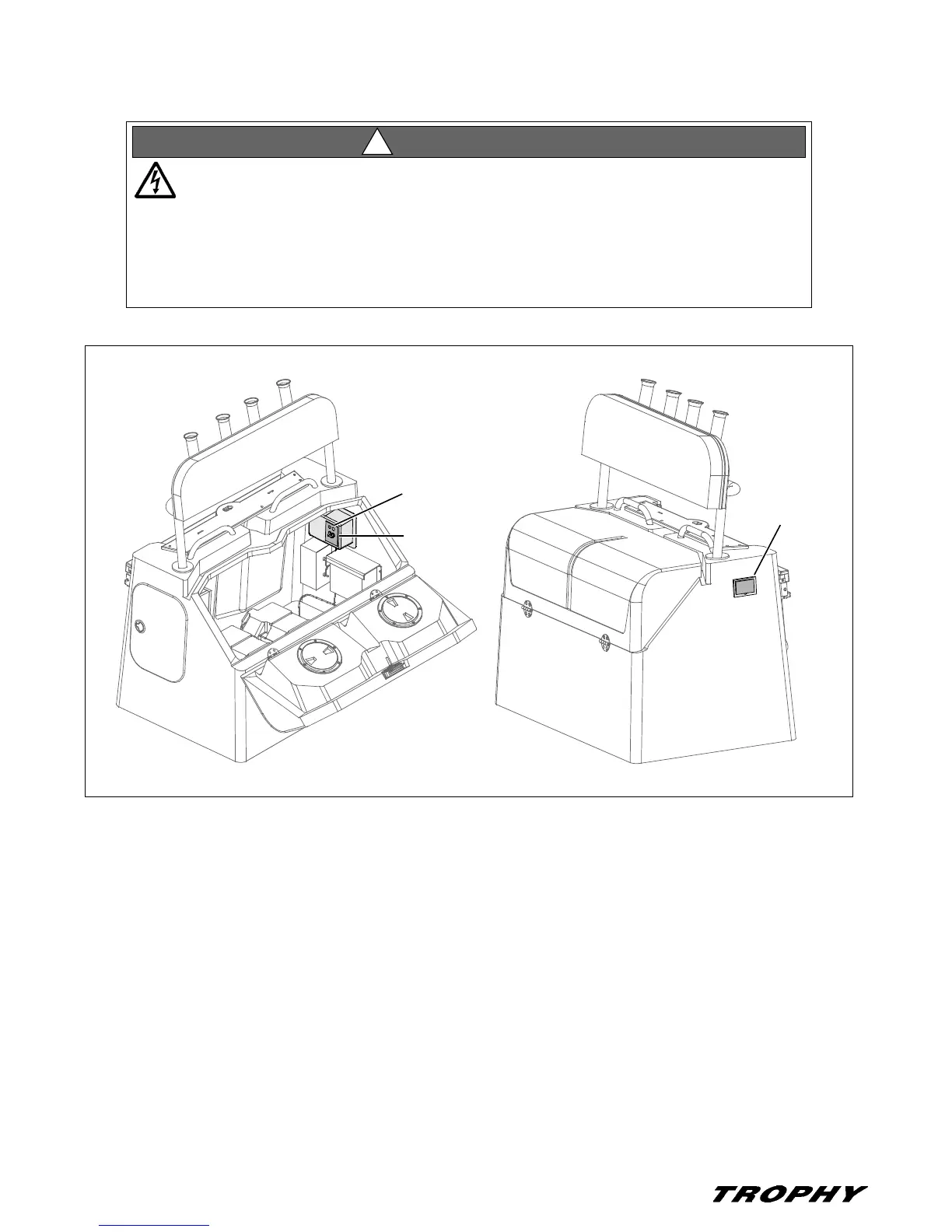
Connecting To Shore Power
1. Review all hazard information at the beginning of this section, Shore Power.
2. Attach the shore power cord to the boat inlet first, then to the dockside outlet.
3. If the Green polarity light is on, turn On the main breaker switch.
4. If the Red reversed polarity light is On, do not turn On the breaker switch. Instead, IMMEDIATELY unplug the
shore power cord (ALWAYS from the dockside outlet first) and alert marina management.
SHOCK & ELECTRICAL SYSTEM DAMAGE HAZARD!
• Monitor the polarity indicator lights EVERY TIME you connect to shore power.
• If the RED reversed polarity light turns On when you are connecting to shore power, DO
NOT turn On the main breaker switch.
• Instead, IMMEDIATELY unplug the shore power cord (ALWAYS from the dockside outlet
first) and alert marina management.
WARNING!
!
SHORE POWER
INLET
BREAKER
SWITCH
POLARITY
LIGHTS



 To Next Page