14
Connecting to Devices with a Composite (yellow RCA-type) Video
Output
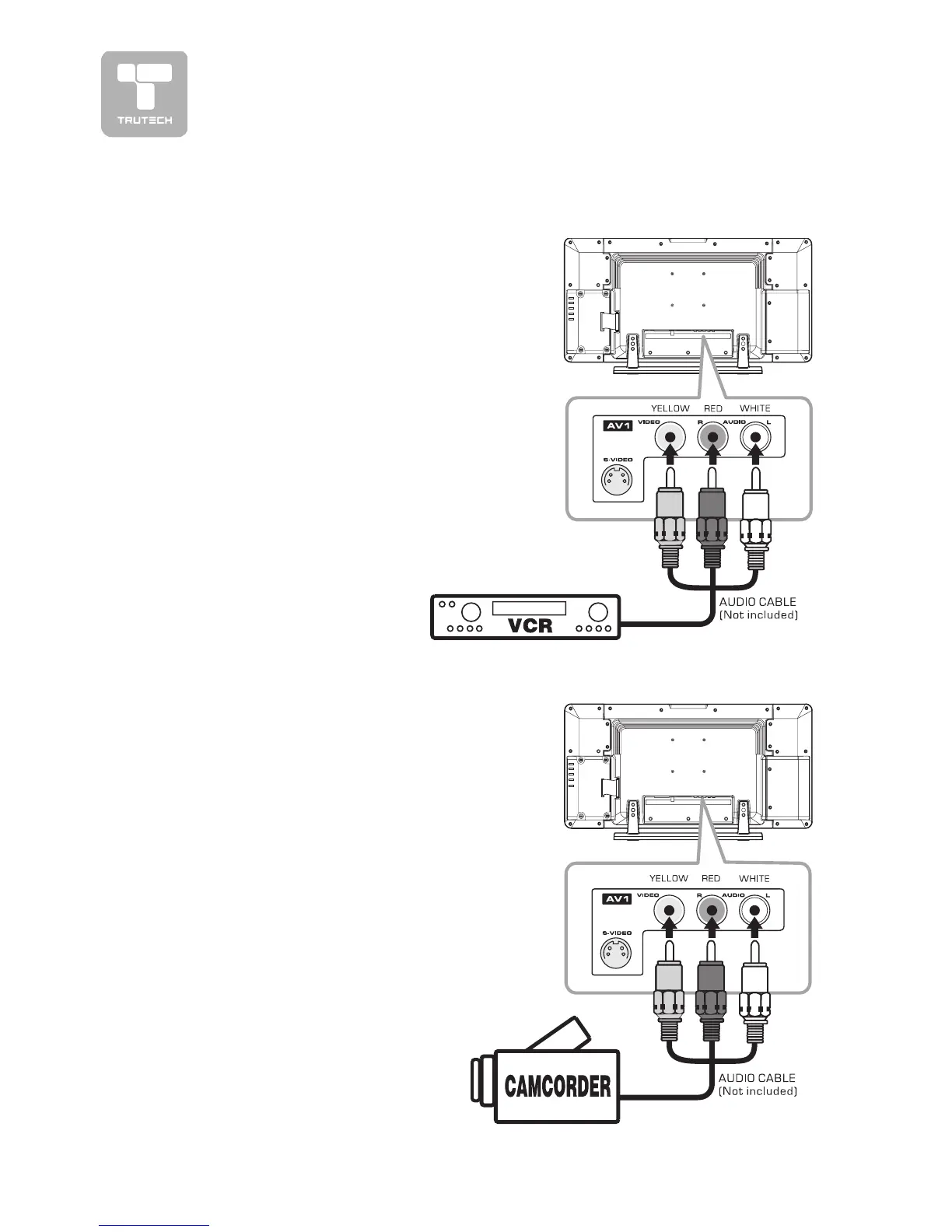
To connect to A/V devices such as a VCR
or camcorder:
- Connect to a VCR- Connect to a VCR
- Connect to a VCR- Connect to a VCR
- Connect to a VCR
Connect the right (red) and left (white)
audio output from the VCR to the right
(red) and left (white) input on this unit
(Audio cable not included).
Connect the video (yellow) output from the
VCR to the video input on this unit (Video
cable not included).
Make sure you connect both audio and
video from the same VCR to the same input
(AV1).
Note:Note:
Note:Note:
Note:
Please refer to the user manual for the
VCR for more information.
CONNECTIONSCONNECTIONS
CONNECTIONSCONNECTIONS
CONNECTIONS
- Connect to a camcorder- Connect to a camcorder
- Connect to a camcorder- Connect to a camcorder
- Connect to a camcorder
Connect the right (red) and left (white) audio
output from the camcorder to the right
(red) and left (white) input on this unit (Audio
cable not included).
Connect the video (yellow) output from the
camcorder to the video input on this unit
(Video cable not included).
Make sure you connect both audio and video
from the same camcorder to the same input
(AV1).
Note:Note:
Note:Note:
Note:
Please refer to the user manual for the
camcorder for more information.


 To Next Page