29
TV SETUP
1. E : Exempt.
2. G : GENERAL AUDIENCES,
Suitable for all ages.
3. 8+ : Not recommended for
young childred.
MPPA
Rating
1. OFF
2. G : GENERAL AUDIENCES,
Suitable for all ages.
3. PG : PARENTAL GUIDANCE
SUGGESTED - Some material
may not be suitable for
children.
4. PG-13 : PARENTS STRONGLY
CAUTIONED - Some material
may be inappropriate for children
under 13.
5. R : RESTRICTED, Under 17
requires accompanying parent or
adult guardian for viewing in movie
theaters.
6. NC-17 : No one 17 or under
admitted in movie theaters,
7. X : Adults Only.
PG
Rating
1. OFF
2. TV-Y : Recommended for all
children.
3. TV-Y7 : Recommended for all
children age 7 and above.
4. TV-G : General Audience.
5. TV-PG : Parental Guidance
Suggested.
6. TV-14 : Parental Strongly Cautioned.
7. TV-MA : Mature Audience Only.
PG
Contents
1. Violence : Contains violence.
2. Sex : Contains sexual
situations.
3. Language : Contains adult
language.
4. Dialogue : Contains dialogue.
5. Fantasy Violence : Contains fantasy
violence.
Can. Eng
1. E : Exempt.
2. C : Children.
3. C8 : Recommended for children
age 8.
4. G : GENERAL AUDIENCES,
Suitable for all ages.
5. PG : PARENTAL GUIDANCE
SUGGESTED - Some material may
not be suitable for children.
6. 14+ : Viewers 14 years and older.
7. 18+ : Adult Programming.
Can.
French
4. 13+ : Not suitable for children
under the age of 13.
5. 16+ : Not suitable for children
under the age of 16.
6. 18+ : Adult Programming.
PARENTPARENT
PARENTPARENT
PARENT
AL SETTINGAL SETTING
AL SETTINGAL SETTING
AL SETTING
CHILD LOCKCHILD LOCK
CHILD LOCKCHILD LOCK
CHILD LOCK
1.1.
1.1.
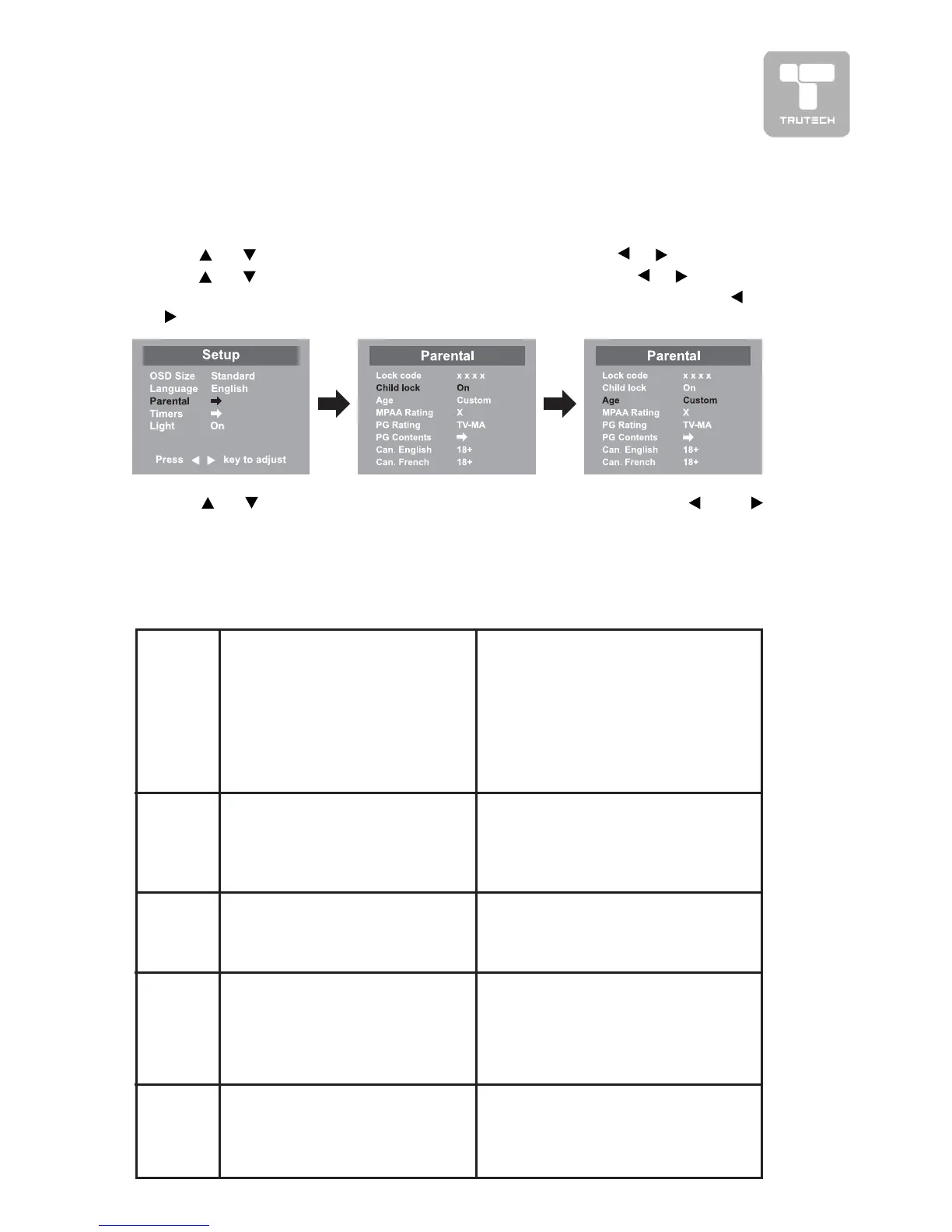
1. Press the
MENUMENU
MENUMENU
MENU button.
2.2.
2.2.
2. Use or button to select the
Setup menuSetup menu
Setup menuSetup menu
Setup menu, then press or button.
3.3.
3.3.
3. Use
or button to select the
Parental menuParental menu
Parental menuParental menu
Parental menu, then press or button.
4.4.
4.4.
4. Enter a 4-digit to select the
Lock codeLock code
Lock codeLock code
Lock code and turn on/off the
Child lockChild lock
Child lockChild lock
Child lock using
or
button.
5.5.
5.5.
5. Use
or button to select
various Parental settings various Parental settings
various Parental settings various Parental settings
various Parental settings and use the or or
button to adjust each setting.
6.6.
6.6.
6. Repeat steps 4-5 to adjust other options.
7.7.
7.7.
7. To exit the MAIN MENU and return to the normal screen, press the
EXITEXIT
EXITEXIT
EXIT
button on remote control.


 To Next Page