9
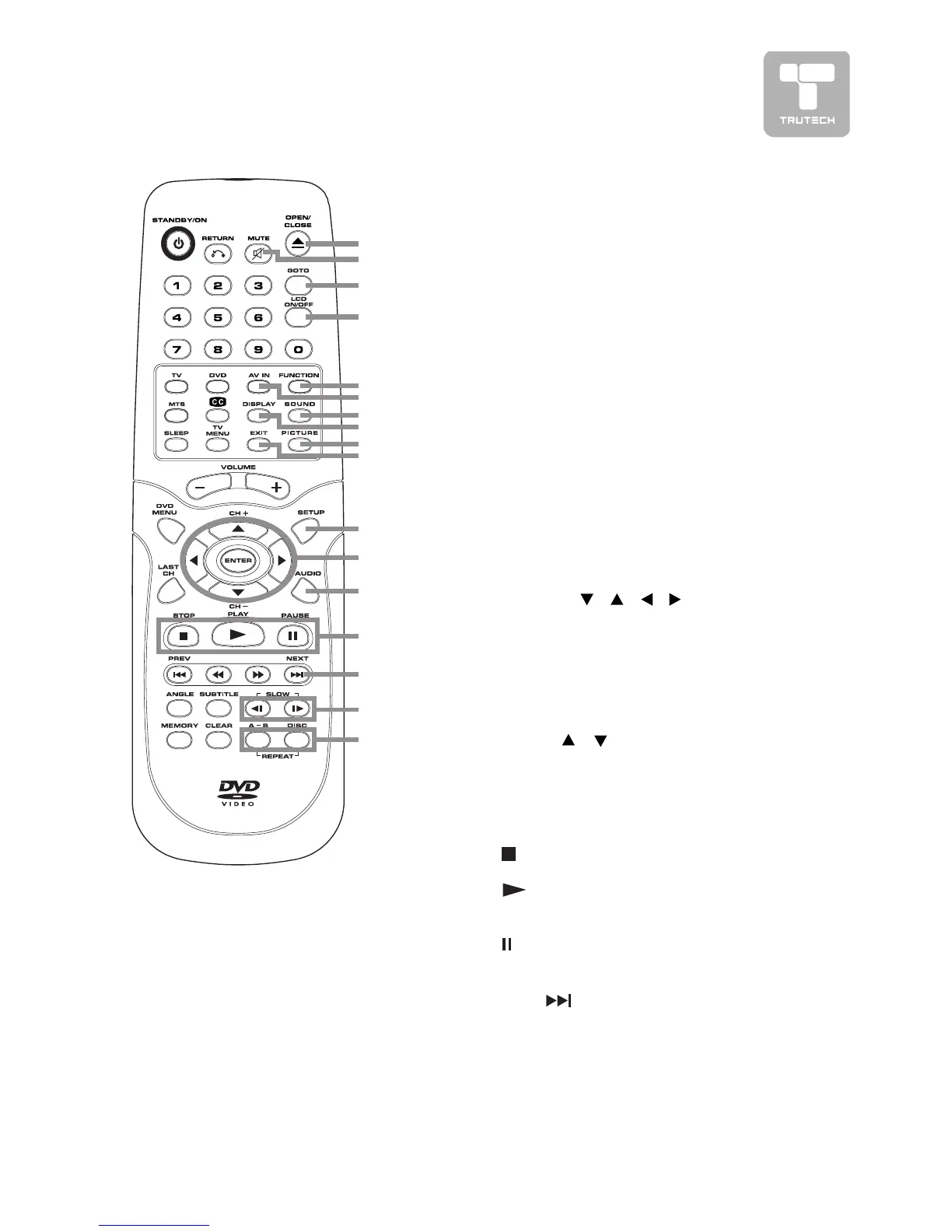
REMOTE CONTROL REFERENCE GUIDEREMOTE CONTROL REFERENCE GUIDE
REMOTE CONTROL REFERENCE GUIDEREMOTE CONTROL REFERENCE GUIDE
REMOTE CONTROL REFERENCE GUIDE
19)19)
19)19)
19)
OPEN / CLOSE buttonOPEN / CLOSE button
OPEN / CLOSE buttonOPEN / CLOSE button
OPEN / CLOSE button
To open or close the disc door.
20)20)
20)20)
20)
MUTE buttonMUTE button
MUTE buttonMUTE button
MUTE button
Press this button to mute the
sound.
Press again to cancel mute.
21)21)
21)21)
21)
GOTO buttonGOTO button
GOTO buttonGOTO button
GOTO button
Skip directly to a specific location
on a DVD/CD.
22)22)
22)22)
22)
LCD ON/OFF buttonLCD ON/OFF button
LCD ON/OFF buttonLCD ON/OFF button
LCD ON/OFF button
Turns on or off the LCD display.
23)23)
23)23)
23)
FUNCTION buttonFUNCTION button
FUNCTION buttonFUNCTION button
FUNCTION button
Switch between TV/DVD/AV-IN/
PC.
19
20
21
22
23
24
25
26
27
28
29
30
31
32
33
34
35
24) AV IN button24) AV IN button
24) AV IN button24) AV IN button
24) AV IN button
Select source connected to AV1/
AV2.
25)25)
25)25)
25)
SOUND buttonSOUND button
SOUND buttonSOUND button
SOUND button
Select from preset sound settings
(Personal, Voice, Music, Theater)
to match the type of show you are
watching.
26)26)
26)26)
26)
DISPLADISPLA
DISPLADISPLA
DISPLA
Y buttonY button
Y buttonY button
Y button
Change disc status information
displayed on the screen.
27)27)
27)27)
27)
PICTURE buttonPICTURE button
PICTURE buttonPICTURE button
PICTURE button
Select from preset screen display
settings to match the type of show
you are watching (Standard,
Personal, Movie, Dynamic & Soft)
28)28)
28)28)
28)
EXIT buttonEXIT button
EXIT buttonEXIT button
EXIT button
Press to exit the menu and return
directly to normal viewing.
29)29)
29)29)
29)
SETUP buttonSETUP button
SETUP buttonSETUP button
SETUP button
Enter and exit the SETUP menu of
the DVD player.
30)30)
30)30)
30)
CURSOR (CURSOR (
CURSOR (CURSOR (
CURSOR (
, ,
, ,
,
, ,
, ,
,
, ,
, ,
,
) buttons) buttons
) buttons) buttons
) buttons
Use to highlight selections on a
menu screen and adjust certain
settings.
ENTER buttonENTER button
ENTER buttonENTER button
ENTER button
Confirm selections on a menu
screen.
CH+/CH– buttonCH+/CH– button
CH+/CH– buttonCH+/CH– button
CH+/CH– button
Press
/ to move the TV
channels.
31)31)
31)31)
31)
AUDIO buttonAUDIO button
AUDIO buttonAUDIO button
AUDIO button
Select audio soundtracks of a DVD
or change the output mode of a
CD.
32)32)
32)32)
32)
STOP button STOP button
STOP button STOP button
STOP button
Stop playing a disc.
PLA PLA
PLA PLA
PLA
Y buttonY button
Y buttonY button
Y button
Press to start and resume
playback of a disc.
PAUSE button PAUSE button
PAUSE button PAUSE button
PAUSE button
Pause playback and single frame
advance.
33)33)
33)33)
33)
NEXTNEXT
NEXTNEXT
NEXT
button button
button button
button
Select next title, chapter or track
on a disc.
34)34)
34)34)
34)
SLOW buttonSLOW button
SLOW buttonSLOW button
SLOW button
Play a DVD in slow-motion.
35)35)
35)35)
35)
REP A-B buttonREP A-B button
REP A-B buttonREP A-B button
REP A-B button
Perform point-to-point repeat
playback on a DVD or CD.
REP DISC buttonREP DISC button
REP DISC buttonREP DISC button
REP DISC button
Repeat chapter of a DVD.
Repeat single track or whole CD.


 To Next Page