31
TV SETUP
RESTORE SETTINGRESTORE SETTING
RESTORE SETTINGRESTORE SETTING
RESTORE SETTING
If you reset the TV to the factory settings, all your present settings on picture &
sound will be erased and replaced by the factory’s default settings. However, picture
setting in PC mode and parental setting will not be erased.
MTS (MTS (
MTS (MTS (
MTS (
Multi-channel TMulti-channel T
Multi-channel TMulti-channel T
Multi-channel T
elevision Sound)elevision Sound)
elevision Sound)elevision Sound)
elevision Sound)
SETTING SETTING
SETTING SETTING
SETTING
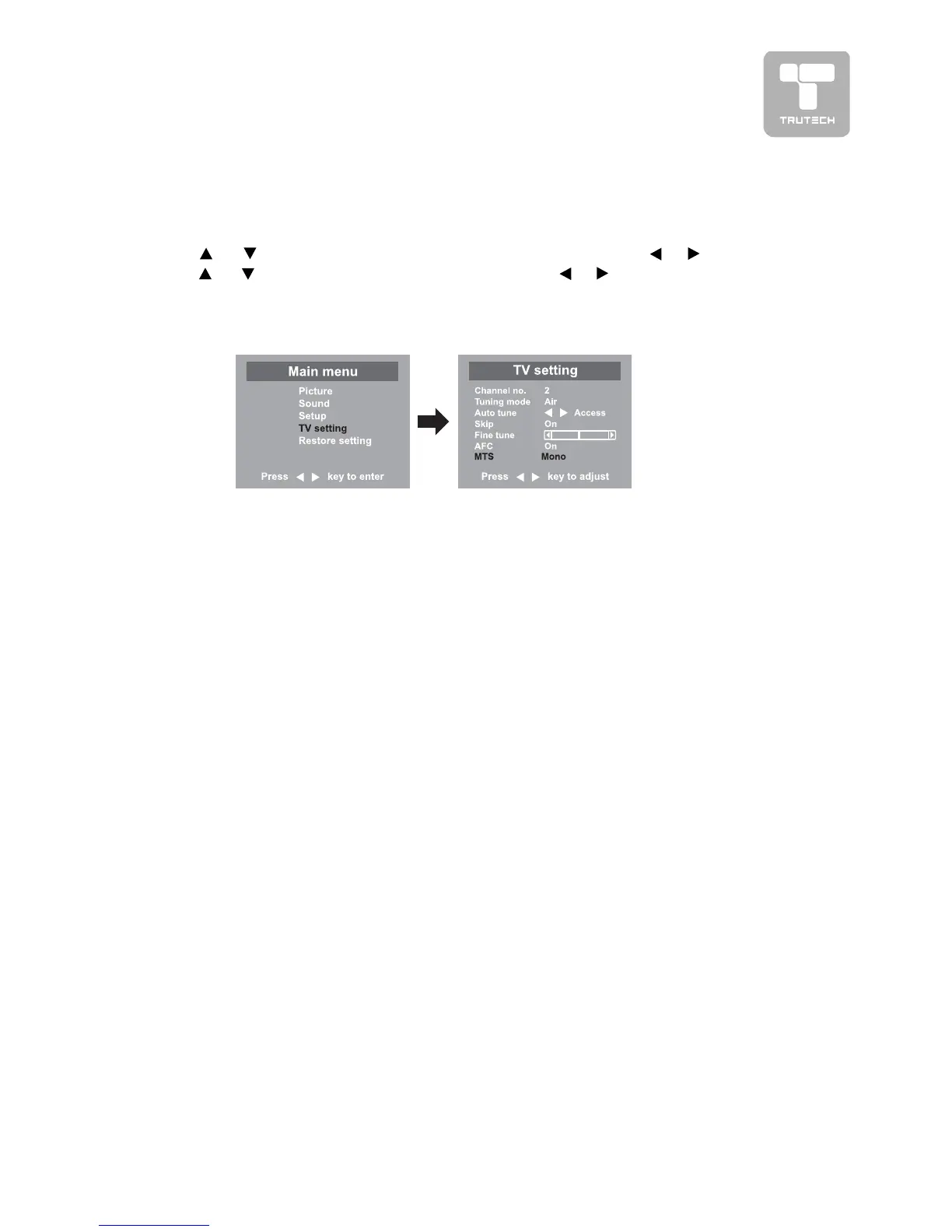
This feature allows reception of sound other than the main audio for the program.
1.1.
1.1.
1. Press the
MENUMENU
MENUMENU
MENU button.
2.2.
2.2.
2. Use
or button to select the
TV setting menuTV setting menu
TV setting menuTV setting menu
TV setting menu, then press or button.
3.3.
3.3.
3. Use
or button to select
MTS menuMTS menu
MTS menuMTS menu
MTS menu, and press or button to select the
options (Mono, Stereo, SAP)
4.4.
4.4.
4. To exit the MAIN MENU and return to the normal screen, press the
EXITEXIT
EXITEXIT
EXIT button
on remote control.
Note:Note:
Note:Note:
Note:
• MTS only operates while in TV mode.
• The SAP (Secondary Audio Programs) feature allows a TV station to broadcast
other information, which could be audio in another language.


 To Next Page