28
If you forIf you for
If you forIf you for
If you for
get the passworget the passwor
get the passworget the passwor
get the passwor
d,d,
d,d,
d,
enter “ 8 8 8 8 “ to unlock parenter “ 8 8 8 8 “ to unlock par
enter “ 8 8 8 8 “ to unlock parenter “ 8 8 8 8 “ to unlock par
enter “ 8 8 8 8 “ to unlock par
ental contrental contr
ental contrental contr
ental contr
ol.ol.
ol.ol.
ol.
TV SETUP
PARENTPARENT
PARENTPARENT
PARENT
AL SETTINGAL SETTING
AL SETTINGAL SETTING
AL SETTING
LOCK CODELOCK CODE
LOCK CODELOCK CODE
LOCK CODE
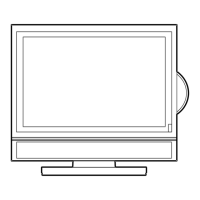
1. Press the MENU button.
2. Use
or button to select the Setup menu, then press or button to
confirm the setting.
3. Use
or button to select the Parental menu, then press or button to
confirm the setting and the menu locked screen will be displayed.
4. Enter a 4-digit lock code. Once entered, the screen will enter the Parental menu.
The factory preset lock code is “ 8888 “.
5. To exit the MAIN MENU and return to the normal screen, press the
EXITEXIT
EXITEXIT
EXIT button
on remote control.


 To Next Page