16
CONNECTIONSCONNECTIONS
CONNECTIONSCONNECTIONS
CONNECTIONS
CONNECTING A PCCONNECTING A PC
CONNECTING A PCCONNECTING A PC
CONNECTING A PC
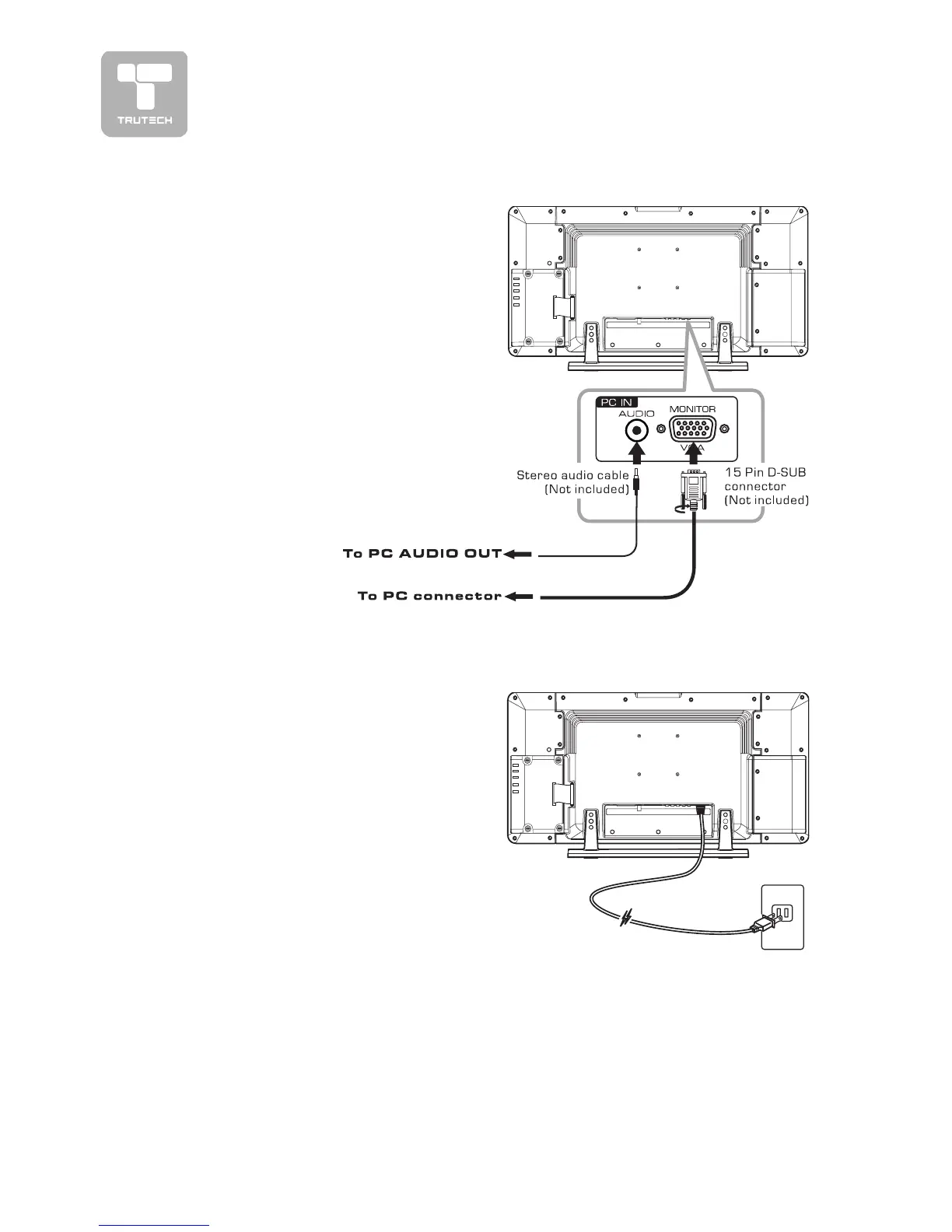
Connect the 15-pin D-SUB PC/VGA
connector from your computer to the
15-pin D-SUB PC/VGA input on this
unit using a monitor cable (not
included).
Connect a stereo audio cable (not
included) to the PC AUDIO IN jack on
the bottom of this unit, and the other
end to the AUDIO OUT jack on your
computer’s sound card.
CONNECT THE POWER CORDCONNECT THE POWER CORD
CONNECT THE POWER CORDCONNECT THE POWER CORD
CONNECT THE POWER CORD
• Connect the AC power cord into a
wall outlet.
• Press the
STANDBY/ONSTANDBY/ON
STANDBY/ONSTANDBY/ON
STANDBY/ON button on
the top of unit or remote control to
turn on the unit.
Note:
• Be sure the AC power cord is
disconnected and all functions are off
before making connections.
• Make sure that all the components
are connected correctly.
•
To prevent electrical shock, matchTo prevent electrical shock, match
To prevent electrical shock, matchTo prevent electrical shock, match
To prevent electrical shock, match
wide blade of plug to wide slot, andwide blade of plug to wide slot, and
wide blade of plug to wide slot, andwide blade of plug to wide slot, and
wide blade of plug to wide slot, and
fully insert.fully insert.
fully insert.fully insert.
fully insert.
• When you are not going to use the
unit for a long period of time,
disconnect the power cord.


 To Next Page