30
TV SETUP
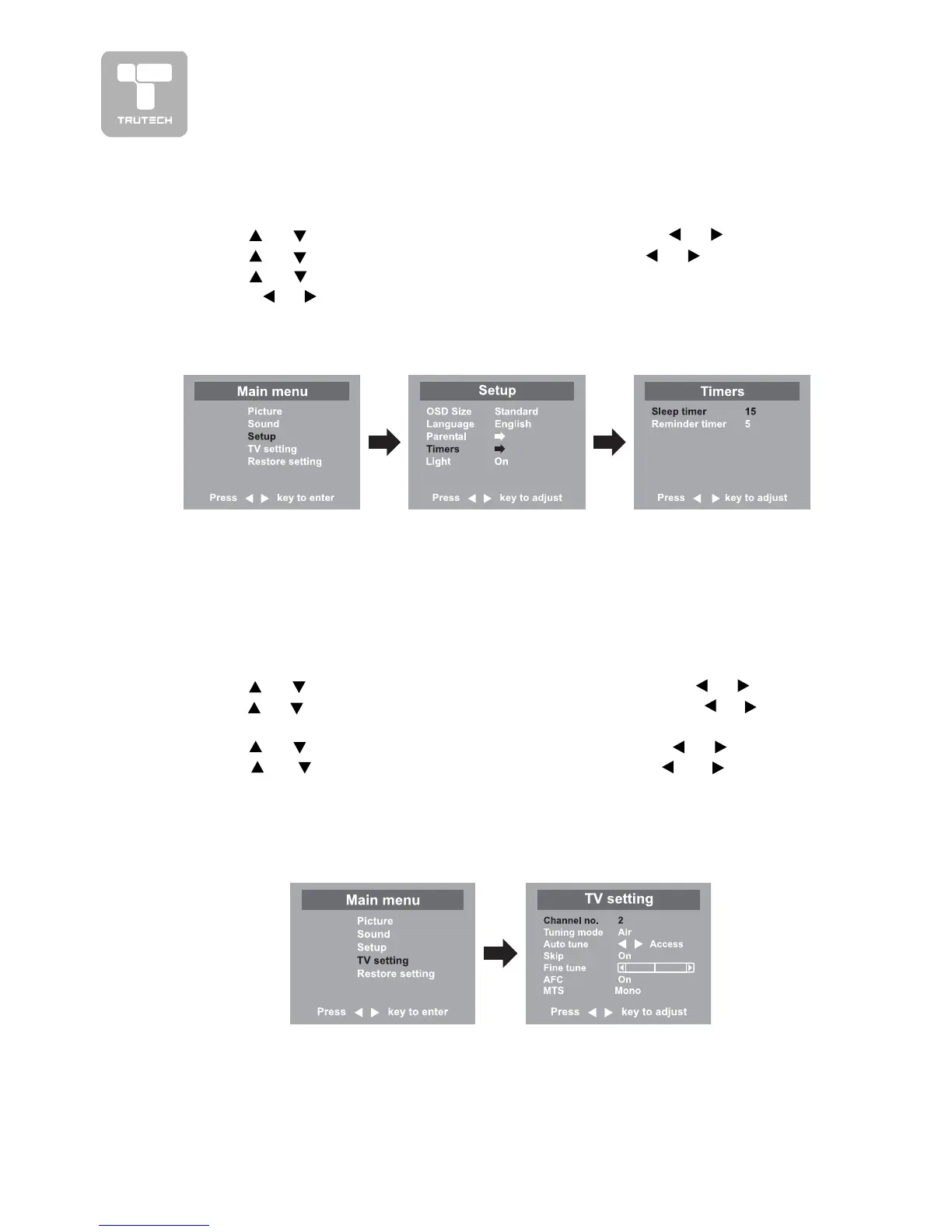
TIMERS SETTINGTIMERS SETTING
TIMERS SETTINGTIMERS SETTING
TIMERS SETTING
1.1.
1.1.
1. Press the
MENUMENU
MENUMENU
MENU button.
2.2.
2.2.
2. Use
or button to select the
Setup menuSetup menu
Setup menuSetup menu
Setup menu, then press or button.
3.3.
3.3.
3. Use
or button to select
Timers menuTimers menu
Timers menuTimers menu
Timers menu, then press or button.
4.4.
4.4.
4. Use or button to select the
Sleep timer or Reminder timerSleep timer or Reminder timer
Sleep timer or Reminder timerSleep timer or Reminder timer
Sleep timer or Reminder timer setting and
press
or button.
5.5.
5.5.
5. Repeat step 4 to adjust other options.
6.6.
6.6.
6. To exit the MAIN MENU and return to the normal screen, press the
EXITEXIT
EXITEXIT
EXIT
button on remote control.
Remarks:Remarks:
Remarks:Remarks:
Remarks:
1.
Sleep timer / Reminder timer Sleep timer / Reminder timer
Sleep timer / Reminder timer Sleep timer / Reminder timer
Sleep timer / Reminder timer : Off -> 5 - - - - -> 115 -> 120.
2. Sleep timer : Set the LCD TV to turn itself off within a certain time.
3. Reminder timer : Remind the show time setting of TV.
TV SETTINGTV SETTING
TV SETTINGTV SETTING
TV SETTING
1.1.
1.1.
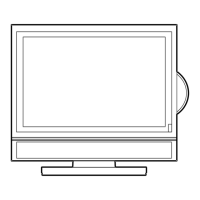
1. Press the
MENUMENU
MENUMENU
MENU button.
2.2.
2.2.
2. Use
or button to select the
TV setting menuTV setting menu
TV setting menuTV setting menu
TV setting menu, then press or button.
3.3.
3.3.
3. Use or button to select the
Channel no.Channel no.
Channel no.Channel no.
Channel no. setting and use the or button
to change from AIR (over-the-air broadcasts) to CABLE (cable/satellite broadcasts).
4.4.
4.4.
4. Use
or button to select the
TT
TT
T
uning modeuning mode
uning modeuning mode
uning mode and use the or button.
5.5.
5.5.
5. Use
or button to select the
Auto tuneAuto tune
Auto tuneAuto tune
Auto tune and press or button to
confirm the selection. The unit will immediately search through all possible TV
channels and store those channels with signals in memory. After this is complete,
the unit will switch to the first channel found.
6.6.
6.6.
6. To exit the MAIN MENU and return to the normal screen, press the
EXITEXIT
EXITEXIT
EXIT button.
Note :Note :
Note :Note :
Note : In DVD mode, this option is not available.
Remarks:Remarks:
Remarks:Remarks:
Remarks:
1.
Channel no.Channel no.
Channel no.Channel no.
Channel no. : 2-69 channel for Air mode, 1-125 channel for Cable mode.
2.
TT
TT
T
uning modeuning mode
uning modeuning mode
uning mode : Air or Cable mode are available.
3.
Auto tuneAuto tune
Auto tuneAuto tune
Auto tune : Searches for usable stations and stores them in memory.
4.
Skip : ONSkip : ON
Skip : ONSkip : ON
Skip : ON - Skip weak channels.
OFFOFF
OFFOFF
OFF - No channel skip.
5.
Fine tuneFine tune
Fine tuneFine tune
Fine tune : The frequency changes to allow fine tuning.
6.
AFCAFC
AFCAFC
AFC : Auto frequency control.
7.
MTS :MTS :
MTS :MTS :
MTS : Select the Mono sound/Stereo sound/Secondary Audio Program (SAP).


 To Next Page