17
INSTINST
INSTINST
INST
ALLAALLA
ALLAALLA
ALLA
TIONTION
TIONTION
TION
MOUNTING ON THE WMOUNTING ON THE W
MOUNTING ON THE WMOUNTING ON THE W
MOUNTING ON THE W
ALLALL
ALLALL
ALL
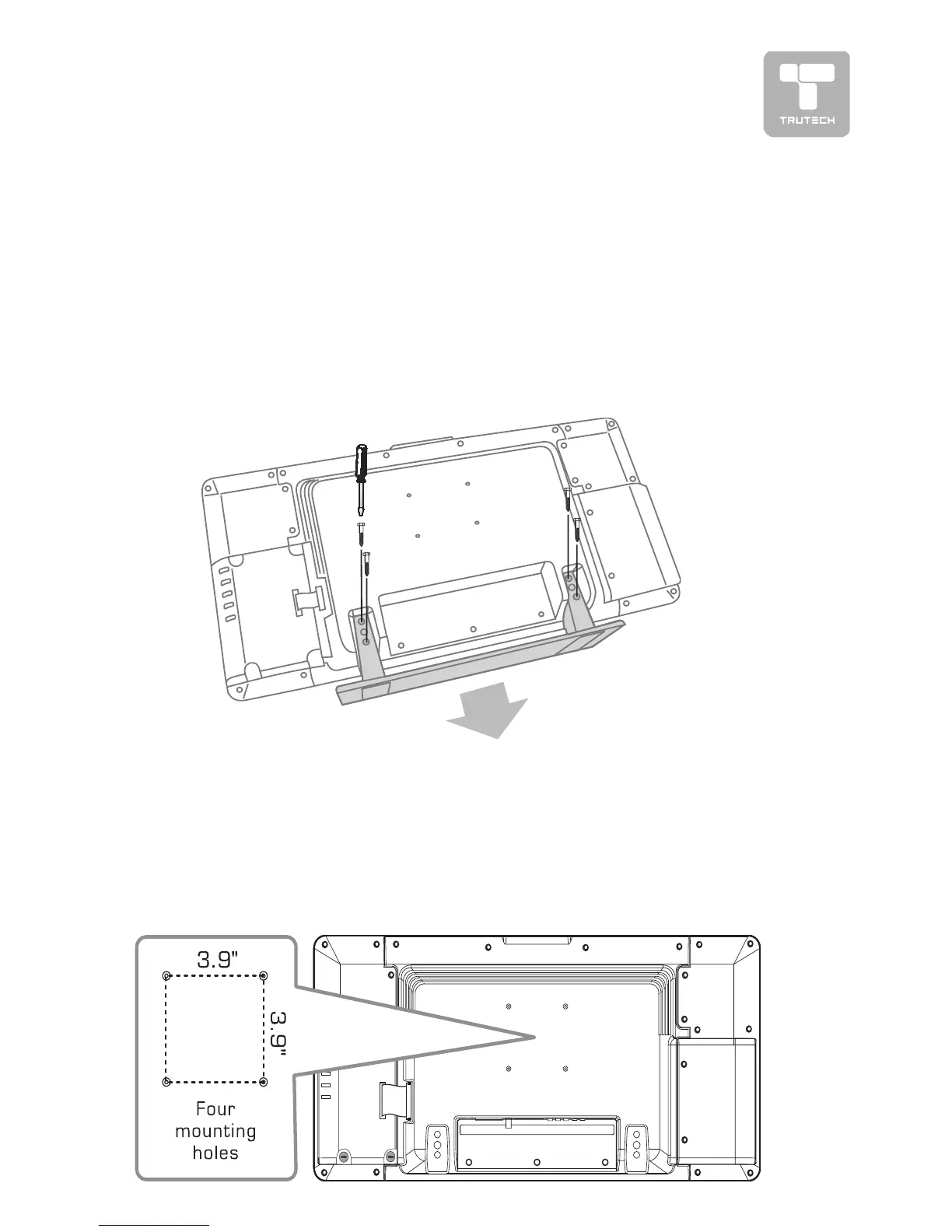
This unit is VESA-compliant, and is designed to be wall-mounted with a VESA-
compliant 3.9” x 3.9” (100mm x 100mm) mounting kit designed for flat-
panel TVs (sold separately). Mount this unit according to the directions
included with the mounting kit.
REMOVING THE BASE STREMOVING THE BASE ST
REMOVING THE BASE STREMOVING THE BASE ST
REMOVING THE BASE ST
ANDAND
ANDAND
AND
WARNING: The LCD Display is very fragile, and must be protected at all
times when removing the base stand. Be sure that no hard or sharp, or
anything that could scratch or damage the LCD display, come in contact
with it. Do NOT place pressure on the rear of the unit at any time because
the screen could crack.
1. Disconnect any cables or cords connected to the unit.
2. Lay the unit down on a flat surface, so the back side is facing up, making
sure to place a soft cushioned material (such as a pillow or thick piece
of foam) beneath the screen.
3. Remove the four screws and then remove the BASE STAND from the TV.


 To Next Page