EasyManua.ls Logo

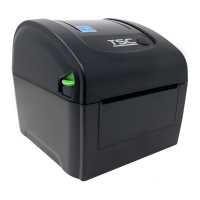
TSC DA210 Series - User Manual

TSC DA210 Series
48 pages
Print Icon
To Next Page IconTo Next Page
Loading...
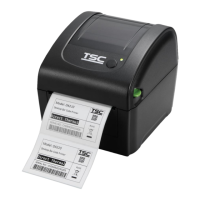
Desktop Barcode Printer
DA210 Series
Direct Thermal
User Manual
Series Models
DA210 / DA310
DA220 / DA320
DA220HC / DA320HC
www.tscprinters.com

Other manuals for TSC DA210 Series

Questions and Answers

  • K
    Kathy HansenSep 8, 2025
    Why is the printing position of small label incorrect on my TSC Barcode Reader?
    • C
      carol98Sep 8, 2025
      If the printing position of small labels is incorrect on your TSC Barcode Reader, recalibrate the media sensor sensitivity. Ensure the label size and gap size are set correctly. If using BarTender software, adjust the vertical offset in the driver settings.
  • D
    donald83Sep 12, 2025
    What to do if the cutter is not working on my TSC Barcode Reader?
    • D
      David LloydSep 12, 2025
      If your TSC Barcode Reader's cutter is not working, ensure the connector is correctly plugged in. Remove any label jams. If the issue persists, the cutter driver IC board might be damaged and need replacement.
  • T
    Timothy YoungSep 12, 2025
    Why is the RTC time incorrect when I reboot my TSC Barcode Reader?
    • B
      Brian QuinnSep 13, 2025
      If the RTC time is incorrect after rebooting your TSC Barcode Reader, check if there is a battery on the main board.
  • G
    Gregory ThomasSep 15, 2025
    Why is there missing printing on the left or right side of label on my TSC Barcode Reader?
    • T
      Thomas Perry Jr.Sep 15, 2025
      If your TSC Barcode Reader shows missing printing on the left or right side of the label, set the correct label size.
  • O
    okellySep 17, 2025
    Why is there a gray line on the blank label from my TSC Barcode Reader?
    • A
      Alexander KerrSep 17, 2025
      To address a gray line on the blank label printed by your TSC Barcode Reader, clean the print head and the platen roller.

Summary

1 Introduction

1.1 Key Features

Overview of the printer's key features and capabilities.

1.2 Product Specification

Detailed technical specifications for the DA210/DA220 series printers.

DA220 HC;DA320 HC Series Specifications

2 Operation Overview

2.1 Unpacking and Inspection

Instructions for unpacking and inspecting the printer upon receipt.

3 Getting to Know Your Printer

3.1 Front View

Identification of components on the front of the printer.

3.2 Interior View

Identification of internal components of the printer.

3.3 Rear View

Identification of the ports and controls on the rear of the printer.

4 Setup

4.1 Setting up the Printer

Step-by-step guide for initial printer setup and connection.

4.2 Loading the Media

Instructions on how to load standard media rolls into the printer.

4.3 Loading the External Media

Instructions for loading external media rolls using the printer's features.

4.4 Loading Media in Peel-off Mode

Guide for loading media specifically for peel-off operation.

4.5 Loading the Media in Cutter Mode

Instructions for loading media when using the cutter function.

4.6 Loading Media in Linerless Tear Mode

Steps to load linerless media for tear-off dispensing.

4.7 Loading Media in Linerless Cutter Mode

How to load linerless media for cutter dispensing.

4.8 Install the Adapter for 1.5 Paper Core

Guide to installing the optional adapter for 1.5-inch paper cores.

5 LED and Button Functions

5.1 LED Indicator

Explanation of LED colors and their meanings for printer status.

5.2 Regular Button Function

Description of the functions of the printer's main button.

5.3 Power-on Utilities

How to access and use power-on utilities for calibration and settings.

6 TSC Console

6.1 Starting TSC Console

Steps to launch and begin using the TSC Console management software.

6.2 Setup Ethernet Interface

Configuration steps for connecting the printer via Ethernet using TSC Console.

6.3 TPH Care

Using TPH Care to check and manage printhead condition and dot failures.

6.4 Printer Function

Overview of various printer functions available within the TSC Console.

6.5 Setting Post-Print Action

How to configure actions performed after printing, like cutting or peeling.

7 Troubleshooting

LED Status Troubleshooting

Common LED status indicators and their corresponding troubleshooting procedures.

Print Problem Diagnosis

Identifying and resolving common printing issues like no print or poor quality.

8 Maintenance

Cleaning and Disinfecting Procedures

Guidelines for cleaning and disinfecting the printer for optimal performance.

Important Maintenance Precautions

Essential safety and handling precautions during maintenance tasks.

8.1 Cleaning Supplies

List of recommended cleaning supplies for printer maintenance.

8.2 Cleaning Procedures

Detailed procedures for cleaning various printer components.

9 Agency Compliance and Approvals

CE, FCC, and IC Compliance

Information on compliance with various regulatory standards like CE, FCC, and IC.

TSC DA210 Series Specifications

General IconGeneral
Resolution203 dpi / 300 dpi
Print SpeedUp to 6 ips (inches per second)
Processor32-bit RISC
InterfaceUSB 2.0
Scanning TechnologyThermal transfer / Direct thermal
Scanning SpeedUp to 6 ips (inches per second)
Scanning Resolution203 dpi / 300 dpi
Scanning DistanceN/A (Not applicable for barcode printers)
Additional InterfaceBluetooth (optional)
Power SupplyAC 100-240V, 50/60Hz
Operating Temperature5 ~ 40°C (41 ~ 104°F)
Storage Temperature-40 ~ 60°C (-40 ~ 140°F)
Humidity20% to 85% (non-condensing)
Supported Barcode TypesCode 39, Code 128, UPC-A, UPC-E, EAN-8, EAN-13, PDF-417, DataMatrix, QR code

Related product manuals