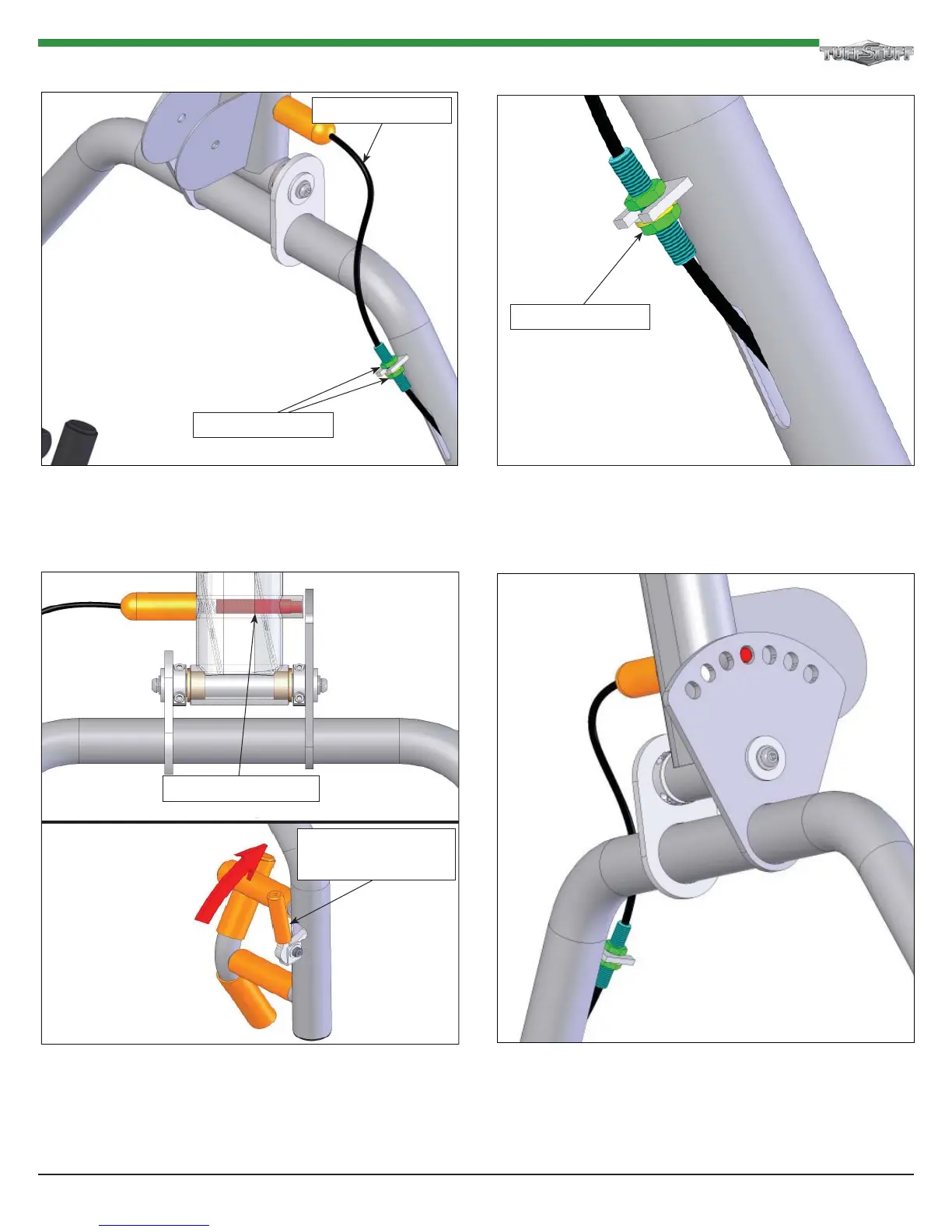
Step 17b Spring Loaded Pin Adjustment
FIG. 6 Once you have the handle working properly, tighten
the bottom Adjusting Nut.
FIG. 7 Before using the machine, be sure that the Plunger
fi ts easily into all seven (7) of the Adjustment Plate Holes
and that the end of the Plunger does not make contact with
the Adjustment Plate while changing from one position to
the other.
If handle is loose or needs adjusting, please refer to
FIG.5 & FIG. 6.
FIG. 8 This illustration depicts the ideal setting for the
plunger, as shown fl ushed with the outside surface of the
Adjustment Plate.
Cable Assembly
Handle Engages and
Disengages Plunger
Disengaged Plunger
Adjusting Nut
Adjusting Nut
25 AXT-2.5 AXT- Cable Motion Plus Home Gym
FIG. 5 To increase or decrease the tension and play of the
Adjusting Handle, perform the following steps:
Loosen the a. Adjusting Nuts with two 3/4 wrenches.
Tighten the top b. Adjusting Nut until the Handle completely
disengages the Plunger from the Selector Plate.












 To Next Page