Stealth 700 Gen 2 MAX for Xbox – Troubleshoong Guide
Quesons? Contact Support: hps://support.turtlebeach.com/s/contactsupport
MANUAL PAIRING PROCESS (TROUBLESHOOTING)
Your headset and transmier will already be paired out of the box, and so you should not need to pair the
headset and transmier before using them.
If, however, the headset/transmier LEDs are double-blinking green, the headset and transmier may
need to be re-paired.
To do so, please do the following:
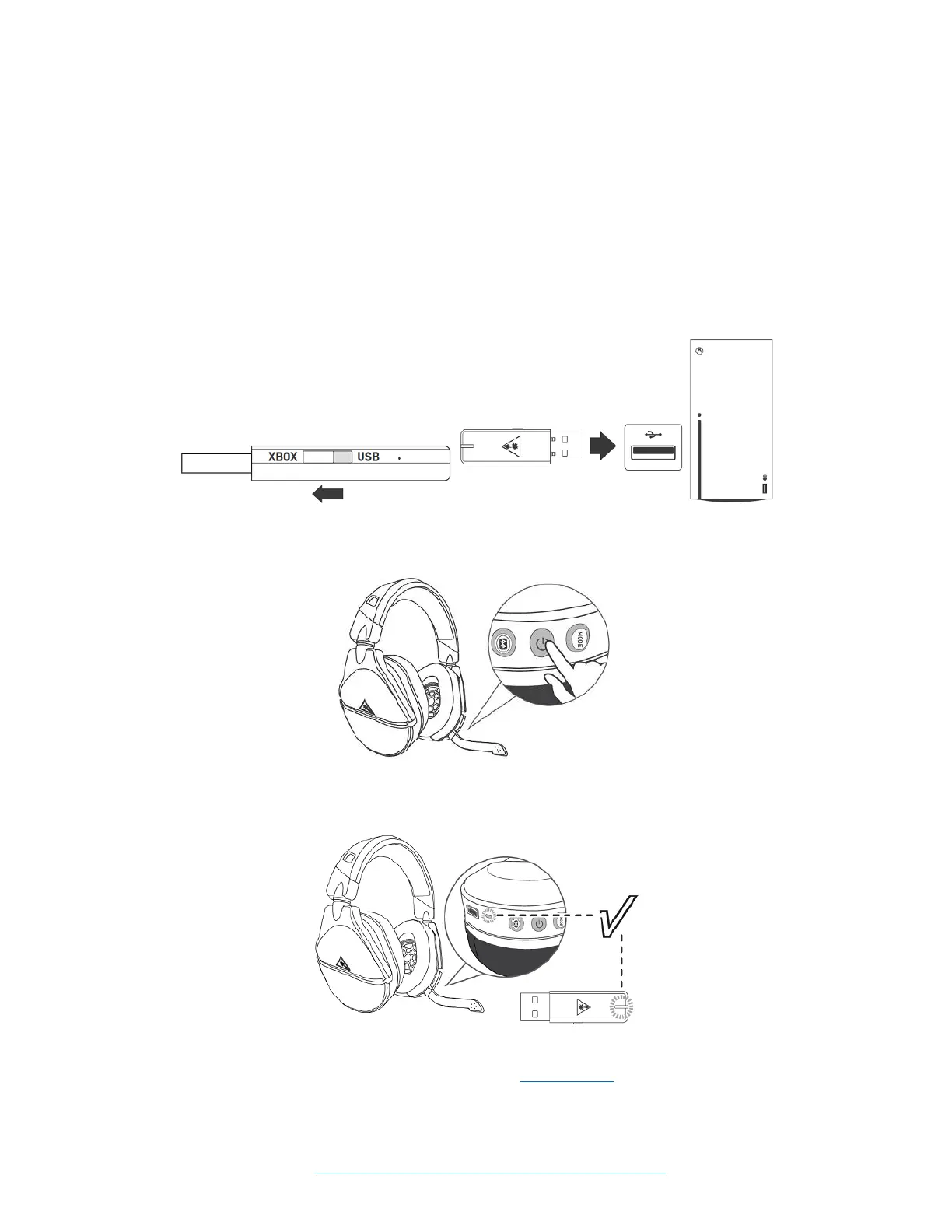
1. Connect your transmier to an available USB port on your console. Make sure the transmier is in
the Xbox mode. Your transmier will double-blink green as it searches to pair with your headset.
2. Power on your Stealth 700 Gen 2 MAX for Xbox headset; the LED indicaon on the headset will
double-blink green as it searches for your transmier.
3. Within 20 seconds, the LED indicaons on the headset and transmier should turn a solid green
to indicate a successful pairing.
If the LEDs sll double-blink green aer this process is performed, or if the headset and transmier
otherwise do not pair aer this process, please contact our support team for further assistance.














 To Next Page