Stealth 700 Gen 2 MAX for Xbox – Troubleshoong Guide
Quesons? Contact Support: hps://support.turtlebeach.com/s/contactsupport
FEATURES AND CONTROLS
The Stealth 700 Gen 2 MAX For Xbox oers some unique features and controls.
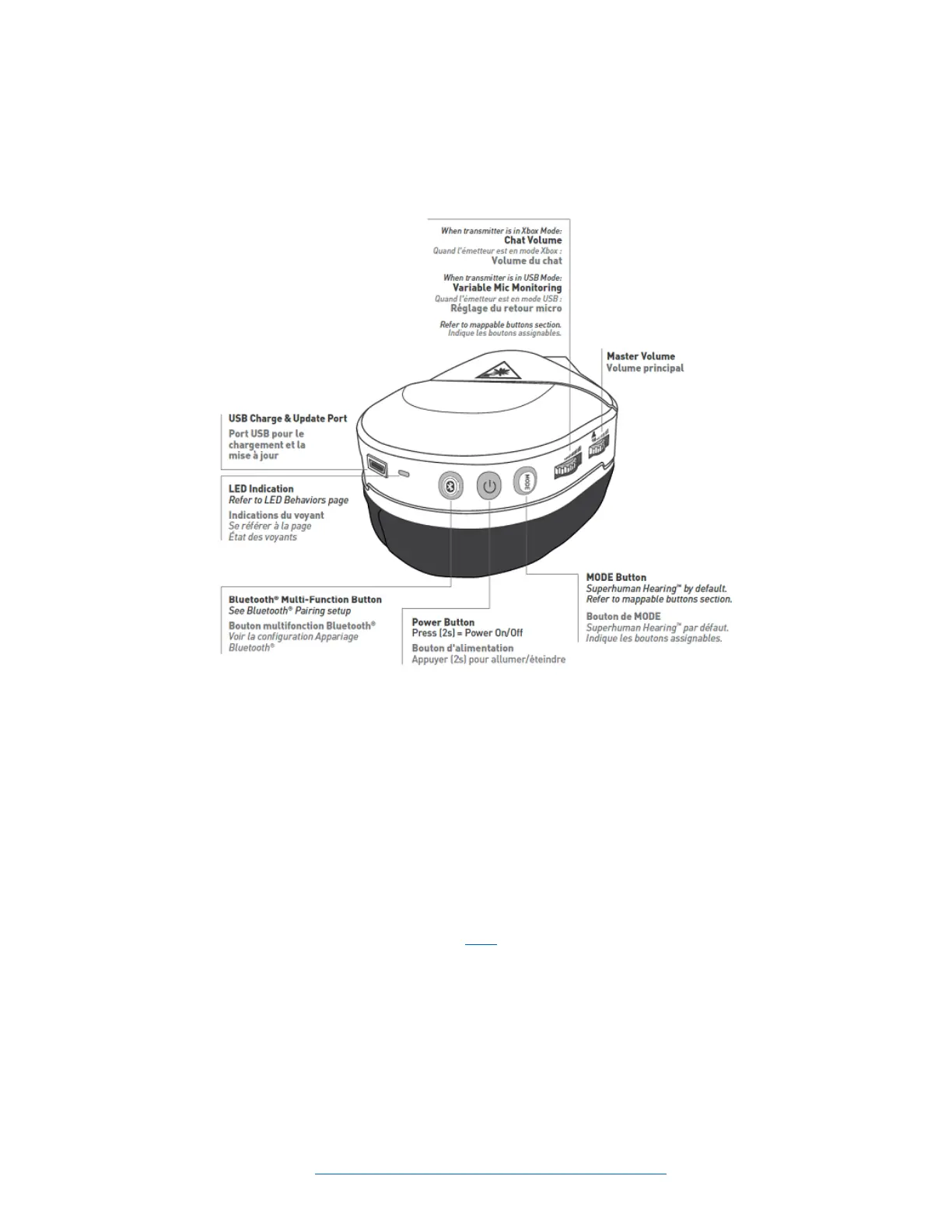
On the back of the le earcup there are two dials; both dials will control audio volume. Please Note: the
Lower Volume Dial will depend on which mode the transmier is in.
• The Upper Volume Dial will control the Master/Overall (Game + Chat) volume.
• In Xbox Mode, the Lower Volume Dial will control the Chat Volume.
• In USB Mode, the Lower Volume Dial will control the Variable Mic Monitoring.
o Mic Monitoring is a feature that allows you to hear yourself through the headset when
you speak into the mic. This helps you to avoid inadvertently yelling at other
people/players.
Below the Lower Volume Dial is the MODE Buon. By default, this will engage and disengage
the Superhuman Hearing feature. This buon can be re-mapped/re-assigned to control/adjust a
dierent feature (instrucons for this are available here).
• Superhuman Hearing is a feature that allows you to pinpoint quiet audio cues like enemy
footsteps and weapon reloads.
Below the Mode Buon is the Power Buon. Press and hold this buon for 2 seconds to power the
headset on and o.














 To Next Page