63
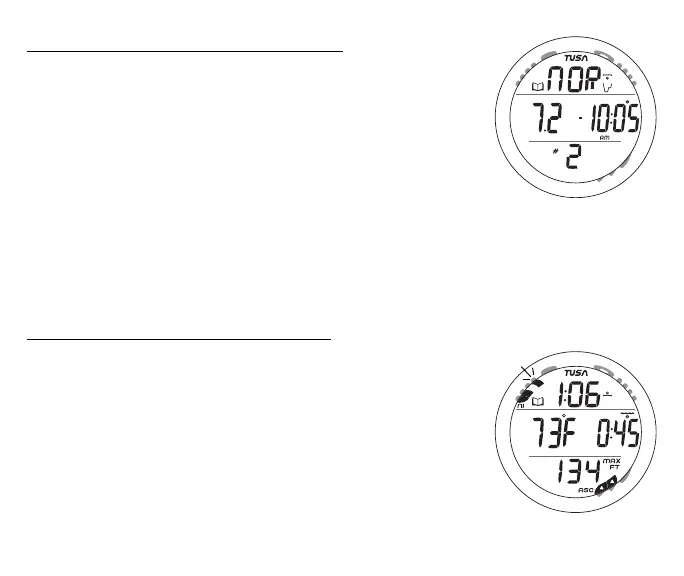
Log Preview information includes (Fig. 56):
> Log (book) icon.
> Graphic NOR (or GAU).
> Dive Mode (wave/clock/profile) icon, if NORM.
> Date (month.day or day.month) the dive was conducted.
> Time of Day the dive began (hr:min) with clock icon and
AM (or PM) icon if set for 12 Hour Format.
> # icon and dive number (1 to 24) for that series.
• Pressing and releasing the S button momentarily (< 2 sec)
will access that dive's Log Data 1 screen.
• Pressing and releasing the A button momentarily (< 2 sec)
while viewing the Preview screen of the most recent dive
will bypass Log Mode and access the History Mode.
Log Data 1 information includes (Fig. 57):
> NiBG with the max segment flashing, others fixed up to end
of dive accumulation. All flashing if Violation.
> Log (book) icon.
> Pre dive Surface Interval time (hr:min) with clock/wave
icon, 10 - through 23 - for times greater than 9 hours and
59 minutes, ( - : - - ) if no previous dive that period.
> Temperature (minimum recorded that dive) with degrees
icon and graphic F (or C).
> Elapsed Dive Time (hr:min) with wave/clock icon.
Fig. 56 - LOG PREVIEW
Fig. 57 - LOG DATA 1



 To Next Page